数据科学的力量不仅仅在于解决技术和业务问题。它的用途不仅限于数据分析以创造新技术、向消费者做广告以及业务利润和销售额的最大化。开放科学的概念导致组织使用数据来处理社会问题。它可以为隐藏的人类行为和文化模式提供统计和数据驱动的解决方案。
我们使用旧金山犯罪部门的数据来了解公民报告的犯罪案件与警方报告的犯罪案件之间的关系。为了存储大量数据并使其易于访问,我们使用 GridDB 作为我们的数据库平台。
使用 GridDB 导出和导入数据集
由于 GridDB 是一个高度可扩展的内存数据库,它可以通过并行处理实现高性能和高效率。通过使用GridDB的python客户端,可以很方便的连接GridDB和python,用它来实时导入导出数据。
图书馆
我使用一些 python 库进行数据预处理和可视化分析。
- Pandas:广泛使用的 Python 库,尤其是在处理数据帧时。
- Matplotlib:使用基本图直观表示数据的库
- Numpy:用于处理涉及数学计算的数据的 Python 库
预处理
犯罪数据有两个数据集。一个是包含有关警方报告的犯罪信息的数据集。另一个是有关向警察局提交的犯罪报告的信息。
    incidents = pd.read_csv("datasets/downsample_police-department-incidents.csv")
    calls = pd.read_csv("datasets/downsample_police-department-calls-for-service.csv")
数据集现在以数据框的形式保存在变量“事件”和“呼叫”中。
由于数据集包含一些对我们的分析不重要的列,我们决定将它们从数据框中删除,以最大限度地减少内存消耗并最大限度地提高分析的时间效率。
    incidents = incidents.drop(['IncidntNum', 'Time', 'X', 'Y', 'Location', 'PdId'], axis = 1)
    calls = calls.drop(['Crime Id', 'Report Date', 'Offense Date', 'Call Time', 'Call Date Time',
                        'Disposition', 'Address', 'City', 'State', 'Agency Id','Address Type',
                        'Common Location'], axis = 1)
我将介绍用于分析的数据框中剩余的列。
事件数据框:
- 类别:犯罪类型
- 描述:所发生犯罪的详细信息
- DayOfWeek:犯罪发生的那一天
- 日期:犯罪发生的日期
- PdDistrict:犯罪发生的旧金山区
- 解决方案:针对犯罪采取的行动
- 地址:犯罪发生的确切位置
调用数据框:
- 描述:记者描述的犯罪内容
- 日期:接到电话的日期。
我还需要在两个数据框中引入一个主键列,以便我可以单独跟踪每一行。重置索引并将其重命名为“ID”。
    incidents.reset_index(drop=True, inplace=True)
    incidents.index.name = 'ID'
    incidents.dropna(inplace = True)


    calls.reset_index(drop=True, inplace=True)
    calls.index.name = 'ID'
    calls.dropna(inplace = True)
清理后,将数据框作为 CSV 文件保存到本地驱动器并将其上传到 GridDB。
    #save it into csv
    incidents.to_csv("preprocessed_incidents.csv")
    calls.to_csv("preprocessed_calls.csv")
将数据集导出到 GridDB
接下来,将数据上传到 GridDB。为此,我使用 pandas 读取了预处理的 CSV 文件并将其存储在单独的数据框中。
    #read the cleaned data from csv
    incident_processed = pd.read_csv("preprocessed_incidents.csv")
    calls_processed = pd.read_csv("preprocessed_calls.csv")
在插入行信息之前,我们将创建两个不同的容器来将列信息传递给 GridDB,以便我们可以为两个数据库生成设计。
    #Create container
    incident_container = "incident_container"

    # Create containerInfo
    incident_containerInfo = griddb.ContainerInfo(incident_container,
                    [["ID", griddb.Type.INTEGER],
                    ["Category", griddb.Type.STRING],
                    ["Descript", griddb.Type.STRING],
                    ["DayOfWeek", griddb.Type.STRING],
                    ["Date", griddb.Type.TIMESTAMP],
                    ["PdDistrict", griddb.Type.STRING],
                    ["Resolution", griddb.Type.STRING]],
                    griddb.ContainerType.COLLECTION, True)

    incident_columns = gridstore.put_container(incident_containerInfo)
#Create container calls_container = "calls_container" # Create containerInfo calls_containerInfo = griddb.ContainerInfo(calls_container, [["ID", griddb.Type.INTEGER], ["Descript", griddb.Type.STRING], ["Date", griddb.Type.TIMESTAMP]], griddb.ContainerType.COLLECTION, True) calls_columns = gridstore.put_container(calls_containerInfo)最后,在创建的模式中插入一行。
    # Put rows
    incident_columns.put_rows(incident_processed)

    print("Data Inserted using the DataFrame")
# Put rows calls_columns.put_rows(calls_processed) print("Data Inserted using the DataFrame")从 GridDB 导入数据集
使用类似于 SQL 命令的 TQL 从 GridDB 数据库中检索数据。在获取数据之前,我最终创建了一个容器,用于在将数据保存到数据帧之前提取数据行。
    # Define the container names
    incident_container = "incident_container"

    # Get the containers
    obtained_data = gridstore.get_container(incident_container)

    # Fetch all rows - language_tag_container
    query = obtained_data.query("select *")

    rs = query.fetch(False)
    print(f"{incident_container} Data")
# Define the container names call_container = "call_container" # Get the containers obtained_data = gridstore.get_container(call_container) # Fetch all rows - language_tag_container query = obtained_data.query("select *") rs = query.fetch(False) print(f"{call_container} Data")数据提取的最后一步是按列信息的顺序查询行,并将它们存储在数据框中,以进行数据可视化和分析。
    # Iterate and create a list
    retrieved_data= []
    while rs.has_next():
        data = rs.next()
        retrieved_data.append(data)

    # Convert the list to a pandas data frame
    incidents = pd.DataFrame(retrieved_data,
                        columns=['ID', 'Category', 'Descript', 'DayOfWeek', 'Date',
                                 'PdDistrict', 'Resolution','Address'])
# Iterate and create a list retrieved_data= [] while rs.has_next(): data = rs.next() retrieved_data.append(data) # Convert the list to a pandas data frame calls = pd.DataFrame(retrieved_data, columns=['ID', 'Descript', 'Date'])保存为两个数据框,“事件”和“呼叫”,清理后的数据现在可用于数据分析。
数据分析和可视化
我们通过引入一个由空值或零值组成的列来帮助我们对分组数据进行计数来开始我们的分析。
incidents['NumOfIncidents'] = np.zeros(len(incidents))
calls['NumOfCalls'] = np.zeros(len(calls))
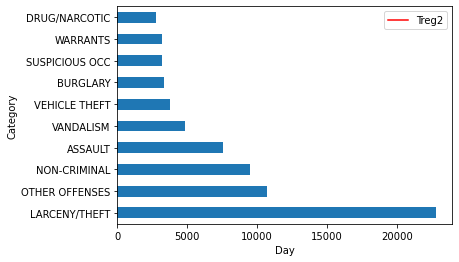
报案犯罪属于不同类别,由警方自行报案。考虑到这些数据,让我们来看看旧金山发生的主要犯罪活动。
incident_categories = incidents.groupby(["Category"]).count()
n_largest = incident_categories['NumOfIncidents'].nlargest(n=10)
incident_categories.reset_index(inplace = True)
incident_categories = incident_categories[["Category","NumOfIncidents"]]
n_largest.plot(kind = 'barh')
plt.show()
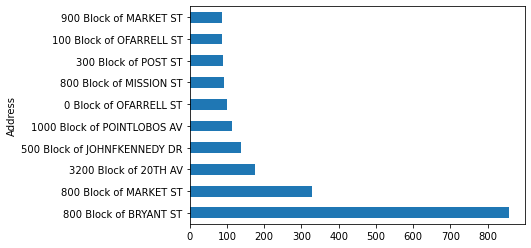
旧金山的大多数犯罪都与“盗窃”有关。您可以进一步开展这项研究,看看这种犯罪普遍存在的领域。
Theft_address = incidents[incidents['Category']=="LARCENY/THEFT"]
Theft_address = Theft_address.groupby(["Address"]).count()
n_largest = Theft_address['NumOfIncidents'].nlargest(n=10)
Theft_address.reset_index(inplace = True)
Theft_address = Theft_address[["Address","NumOfIncidents"]]
n_largest.plot(kind = 'barh')
plt.show()
现在,要了解每日事件和每日通话的值如何随时间变化,让我们分别检查警方报告的每日通话和每日事件。通过从键中删除 Date 列,结果是一个细长的数据框,在这两种情况下每个日期观察都有多行。
daily_incidents = incidents.groupby(["Date"]).count()
daily_incidents.reset_index(inplace = True)
daily_incidents = daily_incidents[["Date","NumOfIncidents"]]


daily_calls = calls.groupby(["Date"]).count()
daily_calls.reset_index(inplace = True)
daily_calls = daily_calls[["Date","NumOfCalls"]]
然后在日期列上加入两个数据框,以获取一个数据框中特定日期的通话和事件值。
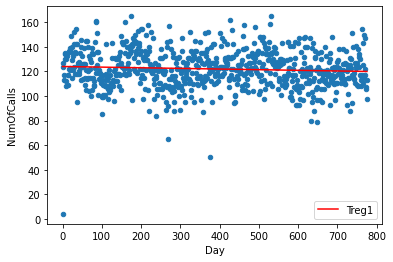
shared_dates = pd.merge(daily_incidents, daily_calls, on='Date', how = 'inner')在散点图上绘制两列并应用线性回归模型以获得数据显示的模式的直线。为此,我将首先将数据拟合到回归模型中,使用数据点绘制散点图,然后使用模型获得的数据点绘制一条线,并将其保存为“Treg1”。
d1 = np.polyfit(shared_dates.index,shared_dates['NumOfCalls'],1)
f1 = np.poly1d(d1)
shared_dates.insert(3,'Treg1',f1(shared_dates.index))
ax = shared_dates.plot.scatter(x = 'Day', y='NumOfCalls')
shared_dates.plot(y='Treg1',color='Red',ax=ax)
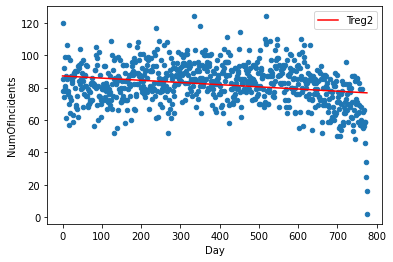
同样,为第二列创建另一个线性模型,并将模型数据点存储在“Treg2”列中。
d2 = np.polyfit(shared_dates.index,shared_dates['NumOfIncidents'],1)
f2 = np.poly1d(d2)
shared_dates.insert(4,'Treg2',f2(shared_dates.index))
ax = shared_dates.plot.scatter(x='Day' ,y='NumOfIncidents')
shared_dates.plot(y='Treg2',color='Red',ax=ax)
为了进一步探索和量化两个变量之间的关系,我们使用相关系数技术。它使用统计学中最简单和最常用的皮尔逊相关系数。它从 -1 到 +1 变化,-1 表示强负相关,+1 表示强正相关。用作 Python 的“corr”函数的默认变量。
correlation = shared_dates['NumOfIncidents'].corr(shared_dates['NumOfCalls'])相关系数为0.1469688,表明两个变量之间存在非常弱的正相关。
结论
从统计上可以得出结论,向警方报告的事件数量并不取决于警方接到的电话数量。此外,我们提取了旧金山最不安全的区域,发现警察的特殊安全措施是必要的。所有分析均使用后端的 GridDB 数据库完成,从而实现无缝且高效的集成。
原创声明:本文系作者授权爱码网发表,未经许可,不得转载;
原文地址:https://www.likecs.com/show-308623013.html