Python标准库系列之MySQLdb模块
MySQLdb模块的主要功能就是提供Python操作MySQL数据库的一个API,通过MySQLdb模块我们可以对数据库进行增,删,改,查, 等操作.
MySQLdb工作流程如下:
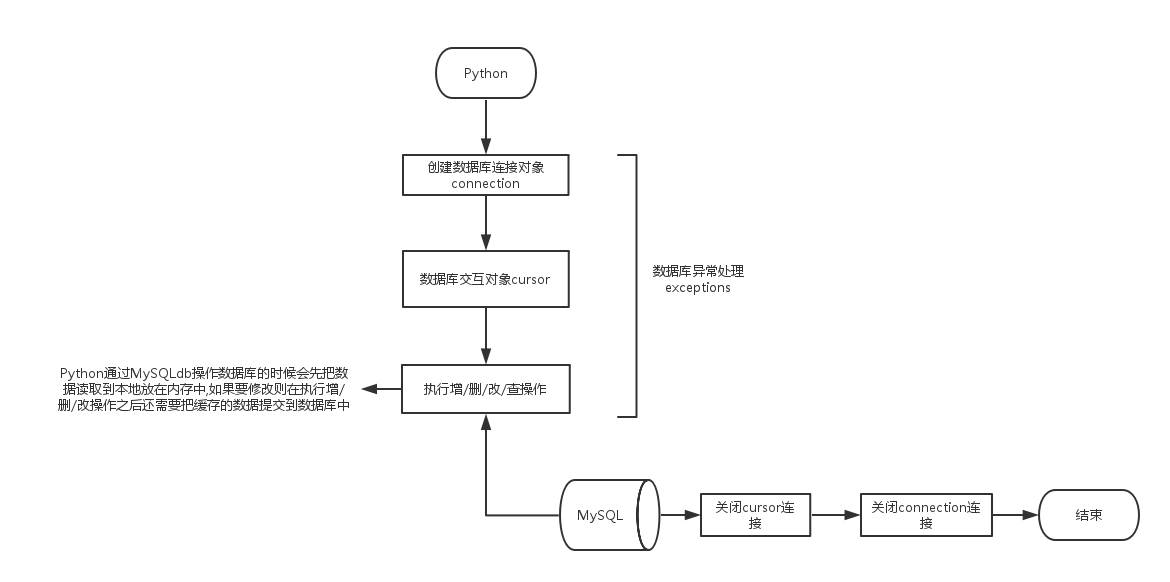
connection
connection方法用于创建客户端与数据库的网络连接.
语法:
|
1
|
MySQLdb.Connect(参数) |
参数
| 参数 | 类型 | 说明 |
|---|---|---|
| host | 字符串 | MySQL服务器地址 |
| port | 整型 | MySQL服务器端口号 |
| user | 字符串 | MySQL数据库用户名 |
| passwd | 字符串 | MySQL数据库密码 |
| db | 字符串 | MySQL数据库库名 |
| charset | 字符串 | 连接所使用的字符集 |
例如:
|
1
2
3
4
5
6
7
8
9
10
11
12
13
|
# 导入MySQLdb模块>>> import MySQLdb
# 创建一个Connect连接>>> conn = MySQLdb.Connect(host='127.0.0.1', user='root', passwd='as', db='USER', port=3306, charset="utf8")
>>> cursor = conn.cursor()
>>> print(cursor)
<MySQLdb.cursors.Cursor object at 0x7f4af5e15550>
>>> print(conn)
<_mysql.connection open to '127.0.0.1' at 15b1518>
# 关闭连接>>> conn.close()>>> print(conn)
<_mysql.connection closed at 15b1518>
|
connection对象支持的方法
| 方法名 | 说明 |
|---|---|
| cursor() | 使用该连接创建并返回游标 |
| commit() | 提交当前事务 |
| rollback() | 回滚当前事务 |
| close() | 关闭连接 |
cursor
cursor用户执行查询和获取结果,执行流程如下:
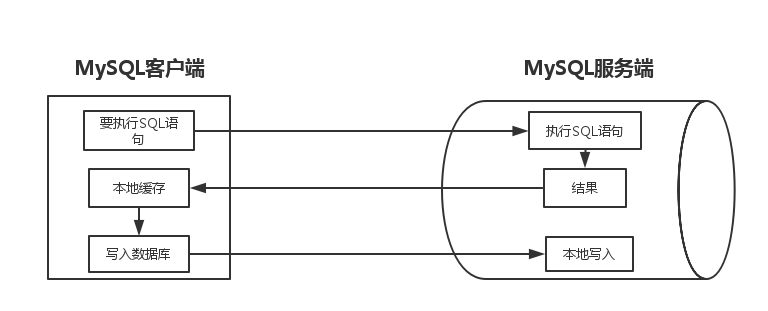
cursor对象所支持的方法
| 参数名 | 说明 |
|---|---|
| execute(“SQL”) | 执行的SQL语句 |
| fefchone() | 获取结果的下一行 |
| fefchmany(size) | 获取结果的下几行 |
| fefchall() | 获取结果剩下的所有行 |
| rowcount | 最近一次execute返回数据的行数或影响的行数 |
| close() | 关闭游标对象 |
事务
访问额更新数据库的一个程序执行单元,执行单元指的就是很多操作的集合,里面的每个操作都是用来访问个更新数据库.
-
原子性: 事务中包括的诸多操作要么都做要么都不做
比如银行转账,A用户向B用户转账100,A-100和B+100这两个操作,要么都做,要么都不操作
-
一致性: 事务必须使数据库从一致性状态变到另一个一致性状态
-
隔离性: 一个事务的执行不能被其他事务干扰
-
持久性: 事务一旦提交,他对数据库的改变是永久性的
开发中怎样使用事务?
-
关闭自动commit: 设置conn.autocommit(False),
MySQLdb默认已经为False -
正常结束事务: conn.commit()
-
异常结束事务: conn.rollback()
实例
-
SELECT查询数据
先创建一个user表:
|
1
2
3
4
5
6
7
|
CREATE DATABASE USER;USE USER;CREATE TABLE `user` (`userid` INT(11) NOT NULL AUTO_INCREMENT,
`username` VARCHAR(100) DEFAULT NULL,
PRIMARY KEY (`userid`)) ENGINE=INNODB AUTO_INCREMENT=9 DEFAULT CHARSET=utf8;
|
插入以下内容
|
1
2
3
4
5
|
INSERT INTO user(userid, username) VALUES(1, 'name1');
INSERT INTO user(userid, username) VALUES(2, 'name2');
INSERT INTO user(userid, username) VALUES(3, 'name3');
INSERT INTO user(userid, username) VALUES(4, 'name4');
INSERT INTO user(userid, username) VALUES(5, 'name5');
|
查看数据
|
1
2
3
4
5
6
7
8
9
10
11
|
mysql> SELECT * FROM user;
+--------+----------+
| userid | username |+--------+----------+
| 1 | name1 |
| 2 | name2 |
| 3 | name3 |
| 4 | name4 |
| 5 | name5 |
+--------+----------+
5 rows in set (0.00 sec)
|
|
1
2
3
4
5
6
7
8
9
10
11
12
13
14
15
16
17
18
19
|
>>> import MySQLdb
>>> conn = MySQLdb.Connect(host='127.0.0.1', user='root', passwd='as', db='USER', port=3306, charset="utf8")
>>> cursor = conn.cursor()
>>> SQL = "SELECT * FROM user"
# 返回获取到的多少行>>> cursor.execute(SQL)5# 输出获取到的行数>>> print(cursor.rowcount)
5# 返回第一条数据>>> cursor.fetchone()(1, 'name1')
# 返回两条数据>>> cursor.fetchmany(2)
((2, 'name2'), (3, 'name3'))
# 返回剩下的所有数据>>> cursor.fetchall()((4, 'name4'), (5, 'name5'))
|
-
insert/update/delete
流程图:
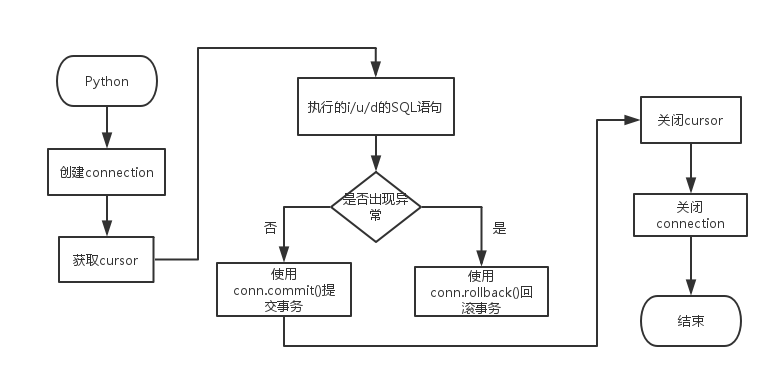
|
1
2
3
4
5
6
7
8
9
10
11
12
|
>>> import MySQLdb
>>> conn = MySQLdb.Connect(host='127.0.0.1', user='root', passwd='as', db='USER', port=3306, charset="utf8")
>>> cursor = conn.cursor()
>>> cursor.execute("INSERT INTO user(userid, username) VALUES(50, 'name50')")
1>>> cursor.execute("UPDATE user SET username='as' WHERE userid=1")
1>>> cursor.execute("DELETE FROM user WHERE userid=2")
1>>> conn.commit()>>> cursor.close()>>> conn.close() |
查看数据库表内容
|
1
2
3
4
5
6
7
8
9
10
11
|
mysql> SELECT * FROM user;
+--------+----------+
| userid | username |+--------+----------+
| 1 | as |
| 3 | name3 |
| 4 | name4 |
| 5 | name5 |
| 50 | name50 |
+--------+----------+
5 rows in set (0.00 sec)
|
本文转自 Edenwy 51CTO博客,原文链接:http://blog.51cto.com/edeny/1925803,如需转载请自行联系原作者