Python标准库系列之requests模块
Requests is the only Non-GMO HTTP library for Python, safe for human consumption.
官方文档:http://docs.python-requests.org/en/master/
安装Requests模块
Requests模块官方提供了两种方式安装:
pip方式安装
|
1
|
pip install requests |
源码方式安装
|
1
2
3
|
git clone git://github.com/kennethreitz/requests.git
cd requestspython setup.py install |
验证是否安装成功
进入python解释的,导入模块试试,如果导入成功则安装成功,否则就需要检查那里执行错误了呢。
|
1
2
3
4
|
C:\Users\anshengme> pythonPython 3.5.1 (v3.5.1:37a07cee5969, Dec 6 2016, 01:54:25) [MSC v.1900 64 bit (AMD64)] on win32
Type "help", "copyright", "credits" or "license" for more information.
>>> import requests
|
环境准备
安装gunicorn和httpbin
|
1
|
sudo pip3 install gunicorn httpbin |
启动一个gunicornServer
|
1
2
3
4
5
|
sudo gunicorn httpbin:app
[2016-10-27 11:45:08 +0800] [12175] [INFO] Starting gunicorn 19.6.0
[2016-10-27 11:45:08 +0800] [12175] [INFO] Listening at: https://blog.ansheng.me:8000 (12175)
[2016-10-27 11:45:08 +0800] [12175] [INFO] Using worker: sync
[2016-10-27 11:45:08 +0800] [12178] [INFO] Booting worker with pid: 12178
|
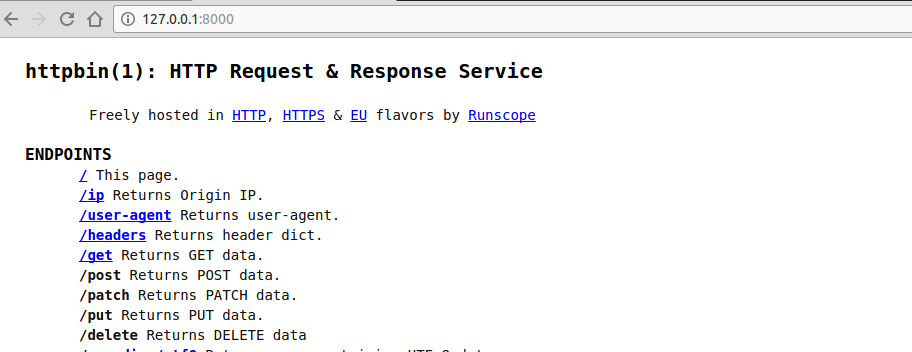
打开浏览器输入``将会得到以下页面,相当于在本地启动一个http server便于学习requests模块
简单的一个requests小程序
下面的一个小程序会通过requests请求'https://blog.ansheng.me:8000/ip'这个URI链接,获取到对应的数据。
|
1
2
3
4
5
6
7
8
9
10
11
12
13
14
15
16
17
18
|
#!/use/bin/env python3# _*_ coding:utf-8 _*_import requests
URL_IP = '
def use_params_requests():
# 参数
params = {'params1': 'Hello', 'params2': 'World'}
# 发送请求
response = requests.get(URL_IP, params=params)
print("响应的状态码:", response.status_code, response.reason)
print("返回的头部:", response.headers)
print("把返回的数据转换为json:", response.json())
print("响应的文本:", response.text)
if __name__ == '__main__':
use_params_requests()
|
发送请求
通过GITHUB提供的API获取用户信息
|
1
2
3
4
5
6
7
8
9
10
11
12
13
14
15
16
17
18
19
20
21
22
23
24
25
26
|
#!/use/bin/env python3# _*_ coding:utf-8 _*_import requests
import json
URL = '
def build_uri(endpoint):
return '/'.join([URL, endpoint])
def better_print(json_str):
return json.dumps(json.loads(json_str), indent=4)
def request_method():
# 获取用户的所有信息
response = requests.get(build_uri('users/anshengme'))
print(better_print((response.text)))
print("\n")
# 获取用户的邮箱
print(better_print((response.text)))
if __name__ == '__main__':
request_method()
|
带参数的请求
|
1
2
3
4
5
6
7
8
9
10
11
|
# 使用params传参def params_request():
response = requests.get(build_uri('users'), params={'since': 11})
print(better_print(response.text))
print(response.request.headers)
print(response.url)
# 使用json传参方式def json_request():
response = requests.get(build_uri('user'), auth=("username", "email"), json={"name": "asdas"})
print(better_print(response.text))
|
异常处理
|
1
2
3
4
5
6
7
8
9
|
def timeout_request():
try:
response = requests.get(build_uri('user/emails'), timeout=10)
response.raise_for_status()
except Exception as e:
print(e)
else:
print(response.text)
print(response.status_code)
|
自定义request
|
1
2
3
4
5
6
7
8
9
10
11
12
13
14
|
from requests import Request, Session
def hard_request():
s = Session()
# 创建请求
headers = {'User-Agent': 'fake1.3.4'}
req = Request('GET', build_uri('user/emails'), auth=('[email protected]', 'xxxxxx'), headers=headers)
prepped = req.prepare()
print("请求头》》", prepped.headers)
# 发送请求
resp = s.send(prepped)
print(resp.status_code)
print(resp.request.headers)
print(resp.text)
|
实例
下载图片/文件
|
1
2
3
4
5
6
7
8
9
10
11
12
13
14
15
16
17
18
19
20
21
22
23
24
25
26
27
28
|
#!/use/bin/env python3# _*_ coding:utf-8 _*_import requests
from contextlib import closing
# 流传输的模式def download_img():
url = "http://www.sinaimg.cn/IT/cr/2016/0331/725124517.jpg"
# headers = {
# 'User-Agent': 'Mozilla/5.0 (X11; Linux x86_64) AppleWebKit/537.36 (KHTML, like Gecko) Chrome/54.0.2840.71 Safari/537.36'}
# response = requests.get(url, headers=headers, stream=True)
response = requests.get(url, stream=True)
print(response.status_code, response.reason)
with open('github.jpg', 'wb') as fd:
for chunk in response.iter_content(128):
fd.write(chunk)
def download_img_improved():
url = "http://www.sinaimg.cn/IT/cr/2016/0331/725124517.jpg"
with closing(requests.get(url, stream=True)) as response:
# 打开并写入文件
with open('github1.jpg', 'wb') as fd:
for chunk in response.iter_content(128):
fd.write(chunk)
download_img()download_img_improved() |
处理响应的事件钩子
|
1
2
3
4
5
6
7
8
9
10
11
12
|
#!/use/bin/env python3# _*_ coding:utf-8 _*_import requests
def get_key_info(response, *args, **kwargs):
print(response.headers["Content-Type"])
def main():
requests.get("https://www.baidu.com", hooks=dict(response=get_key_info))
if __name__ == "__main__":
main()
|
本文转自 Edenwy 51CTO博客,原文链接:http://blog.51cto.com/edeny/1925733,如需转载请自行联系原作者