最近碰到一个国际性大客户,一定要发送经过加密的文件,因为是合约相关的文件,对方公司有这方面要求。但是Zimbra默认是禁止接收加密的文件 - \'Block encrypted archives\',这样当客户发送邮件过来的时候,就会把邮件自动过滤/阻止掉,然后会收到管理员的邮件:
VIRUS ALERT Our content checker found virus: Heuristics.Encrypted.Zip in an email to you from probably faked sender:
如何解决Zimbra此类问题?
reference:Emails are blocked with the notification VIRUS (Heuristics.Encrypted.PDF)
第一步:登陆管理员后台,找到配置菜单
找到Configure > Global Settings > AS/AV > Antivirus Settings and un-check \'Block encrypted archives.\' 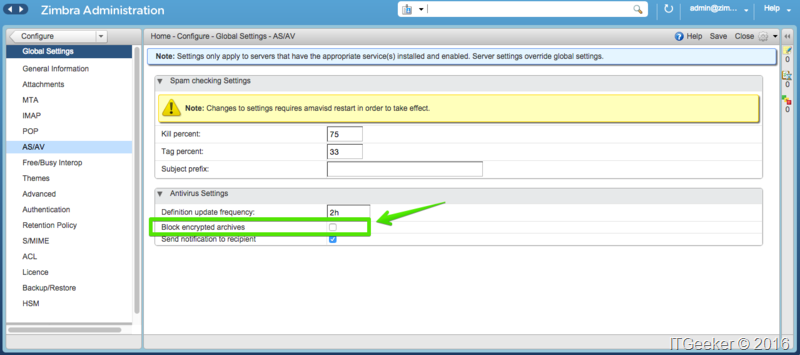
su – zimbra  #记得切换到zimbra用户先

zmclamdctl restart
搞定,再发送带有加密附件的邮件看看,是否已经收到了?