kvm虚拟机的克隆分为两种情况,本文也就通过以下两种情况进行克隆,克隆虚拟机为OEL5.8X64。
(1) KVM主机本机虚拟机直接克隆。
(2) 通过复制配置文件与磁盘文件的虚拟机复制克隆(适用于异机的静态迁移)。
1. 本机虚拟机直接克隆
(1) 查看虚拟机配置文件
[root@node1 ~]# cat /etc/libvirt/qemu/oeltest01.xml

<!--
WARNING: THIS IS AN AUTO-GENERATED FILE. CHANGES TO IT ARE LIKELY TO BE
OVERWRITTEN AND LOST. Changes to this xml configuration should be made using:
virsh edit oeltest01
or other application using the libvirt API.
-->
<domain type=\'kvm\'>
<name>oeltest01</name>
<uuid>8f2bb4a7-c7ed-32aa-3676-9fb05923269d</uuid>
<memory unit=\'KiB\'>524288</memory>
<currentMemory unit=\'KiB\'>524288</currentMemory>
<vcpu placement=\'static\'>1</vcpu>
<os>
<type arch=\'x86_64\' machine=\'rhel6.4.0\'>hvm</type>
<boot dev=\'hd\'/>
</os>
<features>
<acpi/>
<apic/>
<pae/>
</features>
<clock offset=\'utc\'/>
<on_poweroff>destroy</on_poweroff>
<on_reboot>restart</on_reboot>
<on_crash>restart</on_crash>
<devices>
<emulator>/usr/libexec/qemu-kvm</emulator>
<disk type=\'file\' device=\'disk\'>
<driver name=\'qemu\' type=\'raw\' cache=\'none\'/>
<source file=\'/data/test01.img\'/>
<target dev=\'hda\' bus=\'ide\'/>
<address type=\'drive\' controller=\'0\' bus=\'0\' target=\'0\' unit=\'0\'/>
</disk>
<disk type=\'block\' device=\'cdrom\'>
<driver name=\'qemu\' type=\'raw\'/>
<target dev=\'hdc\' bus=\'ide\'/>
<readonly/>
<address type=\'drive\' controller=\'0\' bus=\'1\' target=\'0\' unit=\'0\'/>
</disk>
<controller type=\'usb\' index=\'0\'>
<address type=\'pci\' domain=\'0x0000\' bus=\'0x00\' slot=\'0x01\' function=\'0x2\'/>
</controller>
<controller type=\'ide\' index=\'0\'>
<address type=\'pci\' domain=\'0x0000\' bus=\'0x00\' slot=\'0x01\' function=\'0x1\'/>
</controller>
<interface type=\'bridge\'>
<mac address=\'52:54:00:82:39:01\'/>
<source bridge=\'br0\'/>
<model type=\'virtio\'/>
<address type=\'pci\' domain=\'0x0000\' bus=\'0x00\' slot=\'0x03\' function=\'0x0\'/>
</interface>
<serial type=\'pty\'>
<target port=\'0\'/>
</serial>
<console type=\'pty\'>
<target type=\'serial\' port=\'0\'/>
</console>
<input type=\'tablet\' bus=\'usb\'/>
<input type=\'mouse\' bus=\'ps2\'/>
<graphics type=\'vnc\' port=\'5910\' autoport=\'no\' listen=\'0.0.0.0\'>
<listen type=\'address\' address=\'0.0.0.0\'/>
</graphics>
<video>
<model type=\'cirrus\' vram=\'9216\' heads=\'1\'/>
<address type=\'pci\' domain=\'0x0000\' bus=\'0x00\' slot=\'0x02\' function=\'0x0\'/>
</video>
<memballoon model=\'virtio\'>
<address type=\'pci\' domain=\'0x0000\' bus=\'0x00\' slot=\'0x04\' function=\'0x0\'/>
</memballoon>
</devices>
</domain>
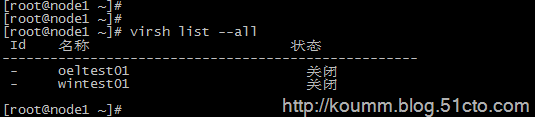
虚拟机磁盘文件: /data/test01.img
虚拟机名称:oeltest01
(2) 开始克隆
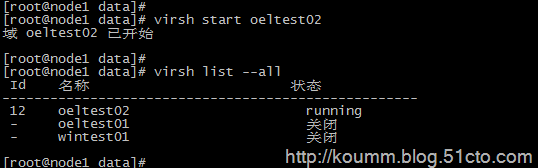
# virt-clone -o oeltest01 -n oeltest02 -f /data/test02.img
说明:以oeltest01做为源,克隆oeltest01虚拟机,并创建名称为oeltest02虚拟机,使用磁盘文件/data/test02.img

(3) 启动虚拟机并配置主机名,IP地址等
[root@node1 data]# virsh console oeltest02
连接到域 oeltest02

Escape character is ^]
Found volume group "vg" using metadata type lvm2
2 logical volume(s) in volume group "vg" now active
Welcome to Oracle Linux Oracle Linux Server release 5.8
Press \'I\' to enter interactive startup.
Starting udev: [  OK  ]
Loading default keymap (us): [  OK  ]
Setting hostname test01:  [  OK  ]
Setting up Logical Volume Management:   2 logical volume(s) in volume group "vg" now active
[  OK  ]
Checking filesystems
Checking all file systems.
[/sbin/fsck.ext3 (1) -- /] fsck.ext3 -a /dev/vg/root
/dev/vg/root: clean, 135384/1540096 files, 851398/1540096 blocks
[/sbin/fsck.ext3 (1) -- /boot] fsck.ext3 -a /dev/hda1
/boot: clean, 39/26104 files, 26897/104388 blocks
[  OK  ]
Remounting root filesystem in read-write mode:  [  OK  ]
Mounting local filesystems:  [  OK  ]
Enabling local filesystem quotas:  [  OK  ]
Enabling /etc/fstab swaps:  [  OK  ]
INIT: Entering runlevel: 5
Entering non-interactive startup
Applying Intel CPU microcode update: [  OK  ]
Starting background readahead: [  OK  ]
Checking for hardware changes [  OK  ]
[  OK  ] iSCSI daemon: [  OK  ]
[  OK  ]
Bringing up loopback interface:  [  OK  ]
Bringing up interface eth0:
Determining IP information for eth0... done.
[  OK  ]
Starting auditd: [  OK  ]
Starting system logger: [  OK  ]
Starting kernel logger: [  OK  ]
Starting irqbalance: [  OK  ]
iscsid (pid  1555) is running...
Setting up iSCSI targets: iscsiadm: No records found
[  OK  ]
Starting portmap: [  OK  ]
Starting NFS statd: [  OK  ]
Starting RPC idmapd: [  OK  ]
Starting system message bus: [  OK  ]
Starting o2cb:  [  OK  ]
[  OK  ] Bluetooth services:[  OK  ]
Mounting other filesystems:  [  OK  ]
Starting PC/SC smart card daemon (pcscd): [  OK  ]
Starting acpi daemon: [  OK  ]
Starting HAL daemon: [  OK  ]
Starting hidd: [  OK  ]
Starting monitoring for VG vg:   2 logical volume(s) in volume group "vg" monitored
[  OK  ]
Starting autofs:  Loading autofs4: [  OK  ]
Starting automount: [  OK  ]
[  OK  ]
Starting hpiod: [  OK  ]
Starting hpssd: [  OK  ]
Starting sshd: [  OK  ]
Starting cups: [  OK  ]
Starting xinetd: [  OK  ]
Starting console mouse services: [  OK  ]
Starting crond: [  OK  ]
Starting xfs: [  OK  ]
Starting anacron: [  OK  ]
[  OK  ] atd: [  OK  ]
Starting background readahead: [  OK  ]
Starting yum-updatesd: [  OK  ]
Starting Avahi daemon... [  OK  ]
Starting smartd: hdc: drive_cmd: status=0x41 { DriveReady Error }
hdc: drive_cmd: error=0x04 { AbortedCommand }
ide: failed opcode was: 0xec
[  OK  ]
Oracle Linux Server release 5.8
Kernel 2.6.18-308.el5 on an x86_64
test01 login: mtrr: type mismatch for f0000000,100000 old: uncachable new: write-combining
mtrr: type mismatch for f0000000,400000 old: uncachable new: write-combining
Oracle Linux Server release 5.8
Kernel 2.6.18-308.el5 on an x86_64
test01 login:
Oracle Linux Server release 5.8
Kernel 2.6.18-308.el5 on an x86_64
test01 login: root
Password:
Last login: Sat Sep  7 05:21:11 on ttyS0
[root@test01 ~]#
[root@test01 ~]#
[root@test01 ~]#


(4) 修改主机名,IP地址等

# vi /etc/hosts

# Do not remove the following line, or various programs
# that require network functionality will fail.
127.0.0.1       test02 localhost.localdomain localhost
::1             localhost6.localdomain6 localhost6

# vi /etc/sysconfig/network

NETWORKING=yes
NETWORKING_IPV6=no
HOSTNAME=test02
GATEWAY=192.168.233.2

修改IP地址

# vi /etc/sysconfig/network-script/ifcfg-eth0

# Virtio Network Device
DEVICE=eth0
BOOTPROTO=static
ONBOOT=yes
HWADDR=52:54:00:56:bd:2b
IPADDR=192.168.233.142
NETMASK=255.255.255.0

[root@test01 ~]# service network restart
Shutting down interface eth0:  [  OK  ]
Shutting down loopback interface:  [  OK  ]
Bringing up loopback interface:  [  OK  ]
Bringing up interface eth0:  [  OK  ]
[root@test01 ~]#
2. 复制配置文件与磁盘文件克隆
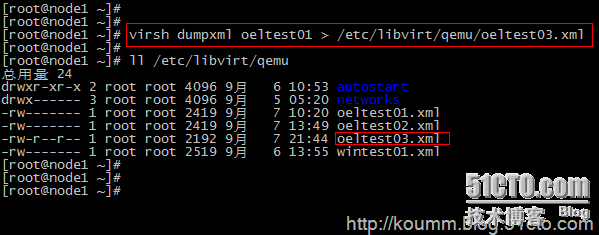
(1) 导入kvm虚拟机配置文件
这里采用oeltest01做为模板,进行克隆。
# virsh shutdown oeltest01

# virsh dumpxml oeltest01 > /etc/libvirt/qemu/oeltest03.xml
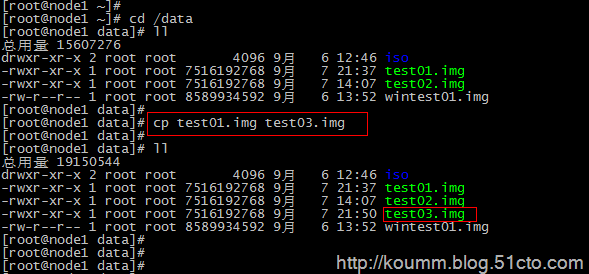
(2) 复制kvm虚拟机磁盘文件
本系列文章都是采用虚拟磁盘文件进行测试,没有使用lvm卷。
通过查看配置文件:虚拟磁盘位置<source file=\'/data/test01.img\'/>
(3) 直接编辑修改配置文件
修改name,uuid,disk位置,vnc端口
此时还是将该配置文件注册进来,无法通过virsh edit进行编辑。
[root@node1 data]# vi /etc/libvirt/qemu/oeltest03.xml
<domain type=\'kvm\'>
  <name>oeltest03</name>
  <uuid>8f2bb4a7-c7ed-32aa-3676-9fb05923260d</uuid>
  <memory unit=\'KiB\'>524288</memory>
  <currentMemory unit=\'KiB\'>524288</currentMemory>
  <vcpu placement=\'static\'>1</vcpu>
  <os>
    <type arch=\'x86_64\' machine=\'rhel6.4.0\'>hvm</type>
    <boot dev=\'hd\'/>
  </os>
  <features>
    <acpi/>
    <apic/>
    <pae/>
  </features>
  <clock offset=\'utc\'/>
  <on_poweroff>destroy</on_poweroff>
  <on_reboot>restart</on_reboot>
  <on_crash>restart</on_crash>
  <devices>
    <emulator>/usr/libexec/qemu-kvm</emulator>
    <disk type=\'file\' device=\'disk\'>
      <driver name=\'qemu\' type=\'raw\' cache=\'none\'/>
      <source file=\'/data/test03.img\'/>
      <target dev=\'hda\' bus=\'ide\'/>
      <address type=\'drive\' controller=\'0\' bus=\'0\' target=\'0\' unit=\'0\'/>
    </disk>
    <disk type=\'block\' device=\'cdrom\'>
      <driver name=\'qemu\' type=\'raw\'/>
      <target dev=\'hdc\' bus=\'ide\'/>
      <readonly/>
      <address type=\'drive\' controller=\'0\' bus=\'1\' target=\'0\' unit=\'0\'/>
    </disk>
    <controller type=\'usb\' index=\'0\'>
      <address type=\'pci\' domain=\'0x0000\' bus=\'0x00\' slot=\'0x01\' function=\'0x2\'/>
    </controller>
    <controller type=\'ide\' index=\'0\'>
      <address type=\'pci\' domain=\'0x0000\' bus=\'0x00\' slot=\'0x01\' function=\'0x1\'/>
    </controller>
    <interface type=\'bridge\'>
      <mac address=\'52:54:00:82:39:01\'/>
      <source bridge=\'br0\'/>
      <model type=\'virtio\'/>
      <address type=\'pci\' domain=\'0x0000\' bus=\'0x00\' slot=\'0x03\' function=\'0x0\'/>
    </interface>
    <serial type=\'pty\'>
      <target port=\'0\'/>
    </serial>
    <console type=\'pty\'>
      <target type=\'serial\' port=\'0\'/>
    </console>
    <input type=\'tablet\' bus=\'usb\'/>
    <input type=\'mouse\' bus=\'ps2\'/>
    <graphics type=\'vnc\' port=\'5911\' autoport=\'no\' listen=\'0.0.0.0\'>
      <listen type=\'address\' address=\'0.0.0.0\'/>
    </graphics>
    <video>
      <model type=\'cirrus\' vram=\'9216\' heads=\'1\'/>
      <address type=\'pci\' domain=\'0x0000\' bus=\'0x00\' slot=\'0x02\' function=\'0x0\'/>
    </video>
    <memballoon model=\'virtio\'>
      <address type=\'pci\' domain=\'0x0000\' bus=\'0x00\' slot=\'0x04\' function=\'0x0\'/>
    </memballoon>
  </devices>
</domain>
(4) 定义新虚拟机配置文件
[root@node1 data]# virsh define /etc/libvirt/qemu/oeltest03.xml
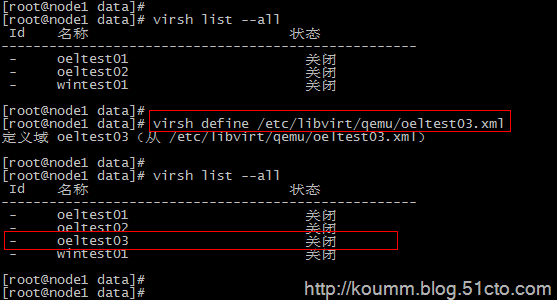
启动虚拟机
[root@node1 data]# virsh start oeltest03
域 oeltest03 已开始
(5) 登录虚拟机进行主机名,IP等修改
[root@node1 data]# virsh console oeltest03
连接到域 oeltest03
Escape character is ^]

Oracle Linux Server release 5.8
Kernel 2.6.18-308.el5 on an x86_64

test01 login: mtrr: type mismatch for f0000000,100000 old: uncachable new: write-combining
mtrr: type mismatch for f0000000,400000 old: uncachable new: write-combining

Oracle Linux Server release 5.8
Kernel 2.6.18-308.el5 on an x86_64

test01 login: root
Password:
Last login: Sat Sep  7 05:21:11 on ttyS0

[root@test01 ~]#
[root@test01 ~]#

修改主机名

# vi /etc/hosts

# Do not remove the following line, or various programs
# that require network functionality will fail.
127.0.0.1 test03 localhost.localdomain localhost
::1 localhost6.localdomain6 localhost6

# vi /etc/sysconfig/network

NETWORKING=yes
NETWORKING_IPV6=no
HOSTNAME=test03
GATEWAY=192.168.233.2

修改IP地址

# vi /etc/sysconfig/network-script/ifcfg-eth0

# Virtio Network Device
DEVICE=eth0
BOOTPROTO=static
ONBOOT=yes
HWADDR=52:54:00:56:bd:3b
IPADDR=192.168.233.143
NETMASK=255.255.255.0

service network restart
Shutting down interface eth0: [ OK ]
Shutting down loopback interface: [ OK ]
Bringing up loopback interface: [ OK ]
Bringing up interface eth0: [ OK ]
本文到此通过两种方式进行kvm虚拟机克隆,其实各有用处。
再次说明:本文克隆的虚拟机是oel5.8,如果克隆的虚拟机是RHEL/CentOS/OEL6.x操作系统,还需要修改/etc/udev/rules.d/70-persistent-net.rules文件。