Android是基于Linux 2.6 内核的系统,所以理论上Linux OS可以运行的脚本语言,给予相应的运行库,在Android也可以运行。
在Android手机上编写并运行Lua脚本
利用开源项目SL4A ( Scripting Layer for Android 项目地址:http://code.google.com/p/android-scripting/ ) ,可以快速在Android手机上搭建各种脚本运行环境。目前SL4A支持 Python, Perl, JRuby, Lua, BeanShell, JavaScript, Tcl, shell 等脚本语言 。
1、下载并安装SL4A运行环境
最新 sl4a_r6.apk 下载地址:http://android-scripting.googlecode.com/files/sl4a_r6.apk
这个应用提供了各种脚本的运行环境,通过拆APK可以看到应用内嵌了两个.so动态链接库。其中一个是ConnectBot的库,另一个是7.9K大小的脚本执行库,但显然不是脚本语言解析库。具体关于SL4A的原理,可以参考博文:《SL4A 之实现原理解析》
2、下载 Lua for android 支持
lua_for_android_r1.apk 下载地址:http://android-scripting.googlecode.com/files/lua_for_android_r1.apk
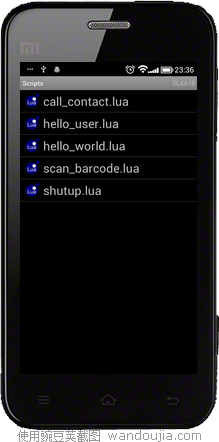
3、运行Lua for android ,它将从网络下载一些Lua脚本Demo。这些例子在SL4A中运行。


使用SL4A可以在Android手机上直接运行Lua等脚本。
其它脚本语言,可以到 http://code.google.com/p/android-scripting/downloads/list 下载相应的APK。
在Android项目中使用Lua脚本
SL4A 交互式的脚本运行方式不适合在Android项目中使用。如果你的项目要使用Lua脚本,就需要将Lua嵌入到Android项目中。
在Android项目中使用Lua,需要两个步骤:
1、加载Lua脚本解析引擎。
2、以Native API方式调用引擎接口
直接以JNI方式调用Lua解析引擎的接口十分麻烦,开源项目LuaJava对这些JNI接口进行了很好的封装。
AndroLua是一个包含了LuaJava的Android平台的Lua解析器,它提供一系列映射到Lua C实现函数的Java接口。
1、用Git将项目克隆到Eclipse的工作目录中
git clone https://github.com/mkottman/AndroLua.git
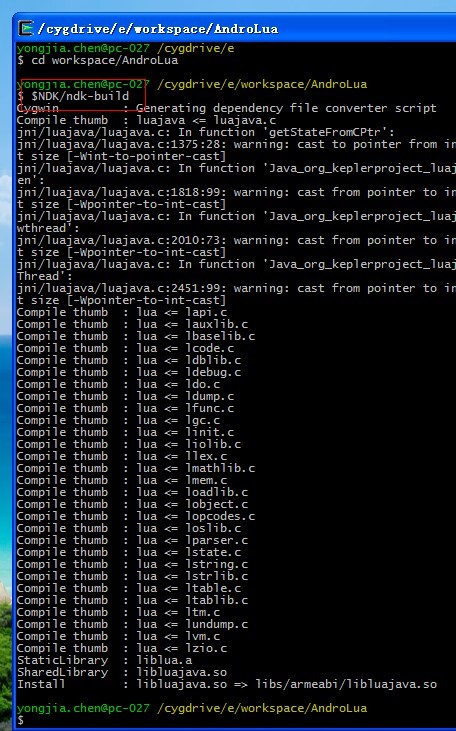
2、AndroLua项目包含了LuaJava的C源码在JNI目录中。用Android NDK编译。编译结束,在libs\armeabi目录下生成LuaJava的动态链接库文件。
编译结束。
3、创建几个演示例程。这里演示三种使用Lua脚本的方式。
将上面从GitHub中克隆回来的项目导入到Eclipse中。创建一个Activity。
01 |
public class MainActivity extends Activity {
|
03 |
private LuaState mLuaState;
|
05 |
private TextView mDisplay;
|
07 |
private LinearLayout mLayout;
|
10 |
protected void onCreate(Bundle savedInstanceState) {
|
12 |
super.onCreate(savedInstanceState);
|
13 |
setContentView(R.layout.activity_main);
|
15 |
mLayout = (LinearLayout) findViewById(R.id.layout);
|
16 |
mDisplay = (TextView) mLayout.findViewById(R.id.display);
|
18 |
mLuaState = LuaStateFactory.newLuaState();
|
22 |
public void runStatement(View v) {
|
25 |
.LdoString(" varSay = \'This is string in lua script statement.\'");
|
27 |
mLuaState.getGlobal("varSay");
|
29 |
mDisplay.setText(mLuaState.toString(-1));
|
32 |
public void runFile(View v) {
|
33 |
mLuaState.LdoString(readStream(getResources().openRawResource( R.raw.test)));
|
35 |
mLuaState.getField(LuaState.LUA_GLOBALSINDEX, "functionInLuaFile");
|
37 |
mLuaState.pushString("从Java中传递的参数");
|
42 |
mLuaState.call(paramCount, resultCount);
|
44 |
mLuaState.setField(LuaState.LUA_GLOBALSINDEX, "resultKey");
|
46 |
mLuaState.getGlobal("resultKey");
|
48 |
mDisplay.setText(mLuaState.toString(-1));
|
51 |
public void callAndroidAPI(View v) {
|
52 |
mLuaState.LdoString(readStream(getResources().openRawResource( R.raw.test)));
|
54 |
mLuaState.getField(LuaState.LUA_GLOBALSINDEX, "callAndroidApi");
|
56 |
mLuaState.pushJavaObject(getApplicationContext());
|
57 |
mLuaState.pushJavaObject(mLayout);
|
58 |
mLuaState.pushString("设置到TextView的数据");
|
62 |
private String readStream(InputStream is) {
|
64 |
ByteArrayOutputStream bo = new ByteArrayOutputStream();
|
71 |
} catch (IOException e) {
|
72 |
Log.e("ReadStream", "读取文件流失败");
|
Lua文件:
01 |
//此函数由Java代码调用。接受一个参数,并返回一个字符串 |
02 |
function functionInLuaFile(key)
|
03 |
return \' Function in Lua file . Return : \'..key..\'!\'
|
06 |
//此函数由Java代码调用。接受三个参数。并调用这些Android组件的方法。 |
07 |
function callAndroidApi(context,layout,tip)
|
08 |
//创建一个Android TextView
|
09 |
tv = luajava.newInstance("android.widget.TextView",context)
|
XML布局文件:
01 |
<?xml version="1.0" encoding="utf-8"?>
|
02 |
<LinearLayout xmlns:android="http://schemas.android.com/apk/res/android"
|
03 |
android:id="@+id/layout"
|
04 |
android:layout_width="match_parent"
|
05 |
android:layout_height="match_parent"
|
06 |
android:orientation="vertical" >
|
09 |
android:id="@+id/display"
|
10 |
android:layout_width="wrap_content"
|
11 |
android:layout_height="wrap_content" />
|
14 |
android:id="@+id/statemanet"
|
15 |
android:layout_width="match_parent"
|
16 |
android:layout_height="wrap_content"
|
17 |
android:onClick="runStatement"
|
18 |
android:text="运行Lua脚本语句" />
|
21 |
android:id="@+id/file"
|
22 |
android:layout_width="match_parent"
|
23 |
android:layout_height="wrap_content"
|
24 |
android:onClick="runFile"
|
25 |
android:text="运行Lua脚本文件" />
|
28 |
android:id="@+id/callAndroid"
|
29 |
android:layout_width="match_parent"
|
30 |
android:layout_height="wrap_content"
|
31 |
android:onClick="callAndroidAPI"
|
32 |
android:text="调用 Android API" />
|
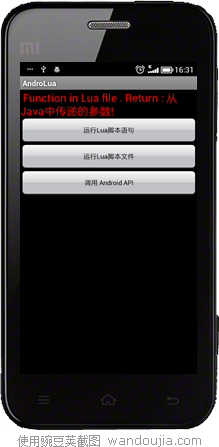
效果截图: