jmap+MAT
详情参考jmap 官方文档
Exception in thread "http-nio-8080-exec-2" Exception in thread "http-nio-8080-exec-1" java.lang.OutOfMemoryError: Java heap space
java.lang.OutOfMemoryError: Java heap space
–XX:MetaspaceSize=32M –XX:MaxMetaspaceSize=32M(同时在 pom.xml 中加入 asm 的依赖)
访问 http://localhost:8080/nonheap
Exception in thread "main" java.lang.OutOfMemoryError: Metaspace
Exception in thread "ContainerBackgroundProcessor[StandardEngine[Tomcat]]" java.lang.OutOfMemoryError: Metaspace
内存溢出自动导出
java.lang.OutOfMemoryError: GC overhead limit exceeded
Dumping heap to ./java_pid660.hprof ...
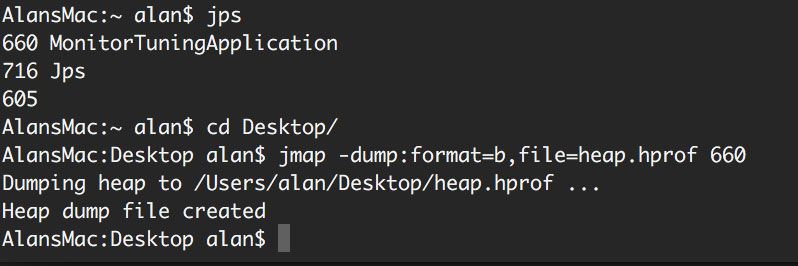
MAT下载地址:http://www.eclipse.org/mat/
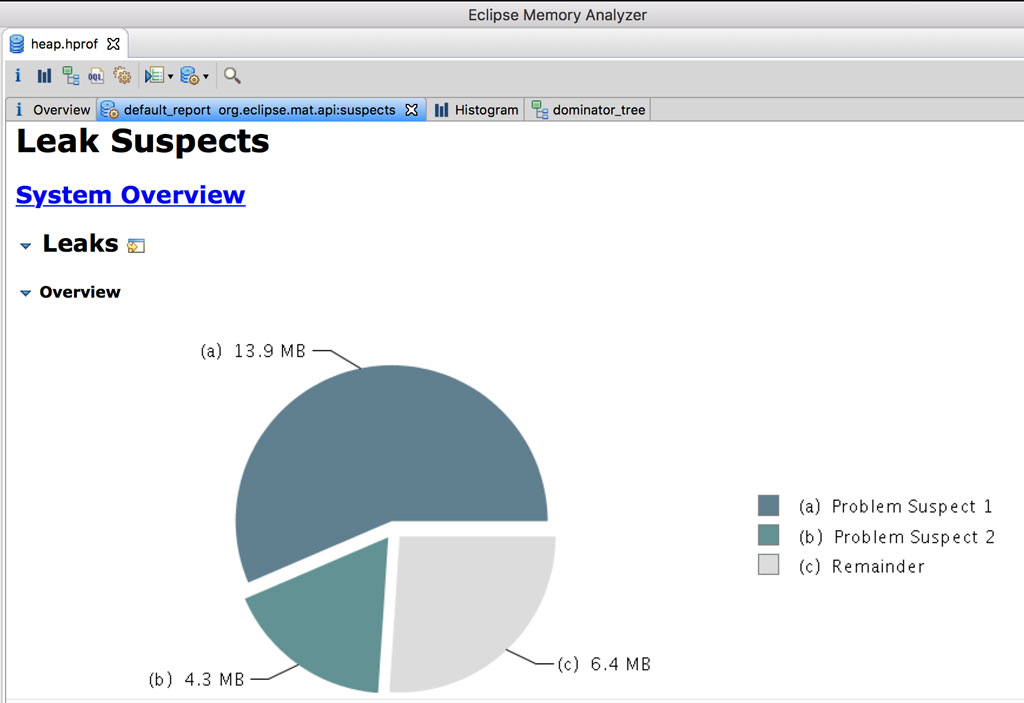
找开上述导出的内存溢出文件即可进行分析,如下图的溢出源头分析:
jstack
详情参考 jstack 官方文档
jstack <pid>
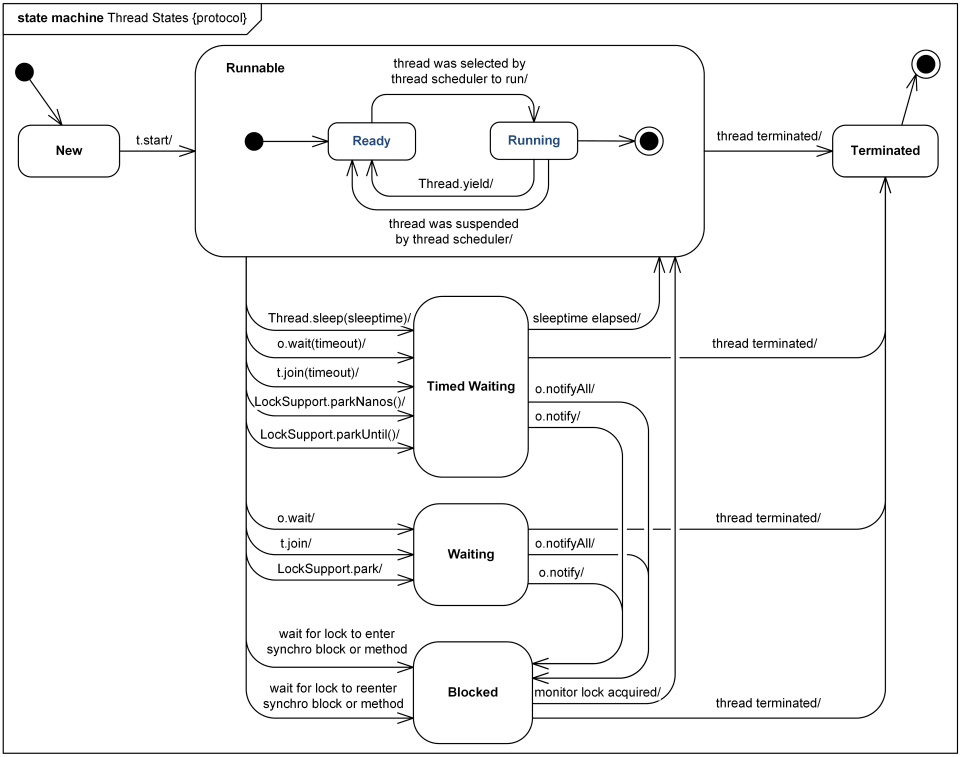
可查看其中包含java.lang.Thread.State: WAITING (parking),JAVA 线程包含的状态有:
NEW:线程尚未启动
RUNNABLE:线程正在 JVM 中执行
BLOCKED:线程在等待监控锁(monitor lock)
WAITING:线程在等待另一个线程进行特定操作(时间不确定)
TIMED_WAITING:线程等待另一个线程进行限时操作
TERMINATED:线程已退出
monitor_tuning中新增CpuController.java
mvn clean package -Dmaven.test.skip
mvn 打包提速参考 CSDN
此时会生成一个monitor_tuning-0.0.1-SNAPSHOT.jar的 jar包,为避免本地的 CPU 消耗过多导致死机,建议上传上传到虚拟机进行测试
nohup java -jar monitor_tuning-0.0.1-SNAPSHOT.jar &
访问 http://xx.xx.xx.xx:12345/loop(端口12345在application.properties文件中定义)
top -p <pid> -H可以查看线程及 CPU 消耗情况
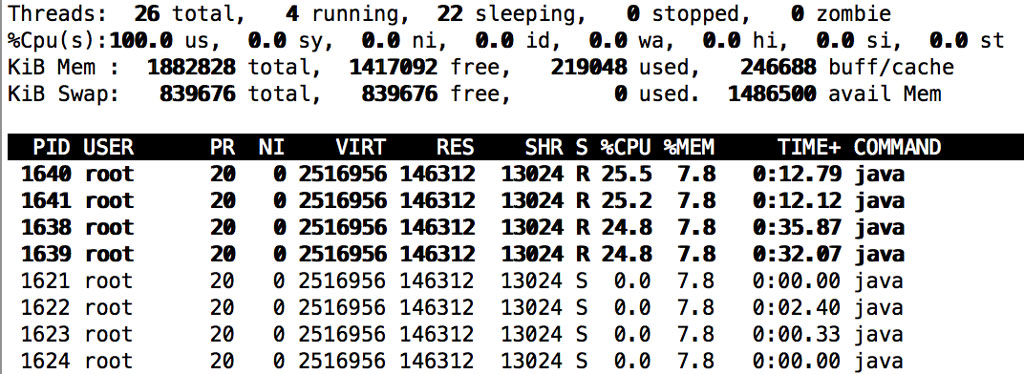
使用 jstack <pid>可以导出追踪文件,文件中 PID 在 jstack 中显示的对应 nid 为十六进制(命令行可执行 printf ‘%x’ <pid>可以进行转化,如1640对应的十六进制为668)
"http-nio-12345-exec-3" #18 daemon prio=5 os_prio=0 tid=0x00007f10003fb000 nid=0x668 runnable [0x00007f0fcf8f9000]
   java.lang.Thread.State: RUNNABLE
at org.alanhou.monitor_tuning.chapter2.CpuController.getPartneridsFromJson(CpuController.java:77)
访问http://xx.xx.xx.xx:12345/deadlock(如上jstack <pid>导出追踪记录会发现如下这样的记录)
Java stack information for the threads listed above:
===================================================
"Thread-5":
at org.alanhou.monitor_tuning.chapter2.CpuController.lambda$deadlock$1(CpuController.java:41)
- waiting to lock <0x00000000edcf3470> (a java.lang.Object)
- locked <0x00000000edcf3480> (a java.lang.Object)
at org.alanhou.monitor_tuning.chapter2.CpuController$$Lambda$337/547045985.run(Unknown Source)
at java.lang.Thread.run(Thread.java:748)
"Thread-4":
at org.alanhou.monitor_tuning.chapter2.CpuController.lambda$deadlock$0(CpuController.java:33)
- waiting to lock <0x00000000edcf3480> (a java.lang.Object)
- locked <0x00000000edcf3470> (a java.lang.Object)
at org.alanhou.monitor_tuning.chapter2.CpuController$$Lambda$336/1704575158.run(Unknown Source)
at java.lang.Thread.run(Thread.java:748)

Found 1 deadlock.