https://maytalkhao.com/archives/826
以下步骤都是按照上面这篇文章来的,具体细节如下
一、使用Softether VPN Server Manager软件添加本地网桥
本地网桥设置--选择要桥接的虚拟hub--要创建的类型--新tap设备名称--创建本地桥
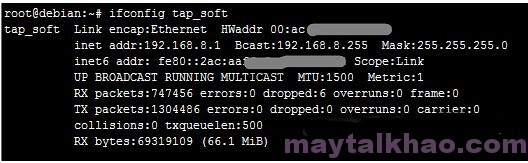
二、输入命令:ifconfig tap_soft,如果可以看到tap_soft网卡信息,那么可以进行下一步,否则看看上面步骤是不是哪里出错了
三、安装dnsmasq服务
1、yum list |grep dnsmasq 先查询下包名,我这里得出以下2个软件包
2、知道包名后就可以安装了,yum -y install dnsmasq.x86_64 dnsmasq-utils.x86_64
3、安装完成后配置/etc/dnsmasq.conf,在其中加入以下内容,内容自己看着写
******切记dhcp-range=tap_soft,192.168.8.2,192.168.8.254,12h 这里的IP范围给大一些,亲自踩过坑
interface=tap_soft
dhcp-range=tap_soft,192.168.8.2,192.168.8.254,12h
dhcp-option=tap_soft,3,192.168.8.1
dhcp-option=option:dns-server,192.168.8.1
resolv-file=/etc/resolv.dnsmasq.conf
strict-order
listen-address=0.0.0.0,::
4、编辑/etc/resolv.dnsmasq.conf(如果没有则创建),其中加入(nameserver自己看着写就OK):
vi /etc/resolv.dnsmasq.conf
nameserver 8.8.8.8
nameserver 8.8.4.4
nameserver 223.5.5.5
nameserver 223.6.6.6
nameserver 114.114.114.114
四、配置softether服务
编辑/etc/init.d/vpnserver文件,如果没有则创建
#!/bin/sh
-A POSTROUTING -s 192.168.8.0/24 -j SNAT --to-source 123.209.51.80
123.209.51.80就是你服务器的公网IP
-A POSTROUTING -s 192.168.8.0/24 -o eth1 -j MASQUERADE