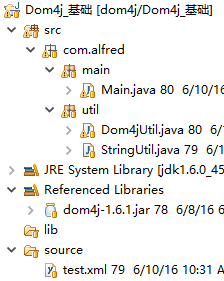
Dom4j是一个非常非常优秀的Java XML API,用来读写XML文件,具有性能优异、功能强大和易于使用的特点,同时它也是一个开放源代码的软件,可以在SourceForge上找到它。对主流的Java XML API进行的性能、功能和易用性的评测,Dom4j无论在那个方面都是非常出色的。如今你可以看到越来越多的Java软件都在使用dom4j来读写XML,例如hibernate,包括sun公司自己的JAXM也用了Dom4j。
![]()
package com.alfred.main;
import java.io.File;
import java.io.FileOutputStream;
import java.io.FileWriter;
import java.io.IOException;
import java.io.OutputStreamWriter;
import java.util.Iterator;
import java.util.List;
import org.dom4j.Attribute;
import org.dom4j.Document;
import org.dom4j.DocumentException;
import org.dom4j.DocumentHelper;
import org.dom4j.Element;
import org.dom4j.io.OutputFormat;
import org.dom4j.io.SAXReader;
import org.dom4j.io.XMLWriter;
import com.alfred.util.Dom4jUtil;
public class Main {
public static void main(String[] args)
throws Exception {
// 获取document对象,三种方法
Document doc = Dom4jUtil.getDocument();
// 打印文档结构
// Dom4jUtil.printDocument(doc);
// 打印文档的结构 使用dom4j输出重定向
Dom4jUtil.printDocumentByDom4j(doc);
// 对节点的操作
// elementOper(doc);
// 对节点属性的操作
// elementAttributeOper(doc);
// 将document写入文件
// writeDocumentToXml(doc);
// document的其他操作
// documentOtherOper();
}
/**
* 对节点的操作
*
* @param doc
*/
private static void elementOper(Document doc) {
// 获取文档的根节点
Element root = doc.getRootElement();
// ===========================查询 begin
// 获取某个节点的子节点
Element position = root.element("
position");
// 获取节点的文字内容 position.getTextTrim();去掉前后空格
String positionText = position.getText();
System.out.println("
positionText:" + positionText);
Element employees = root.element("
employees");
// 获取某节点下所有名为“employee”的子节点,并进行遍历
List employeeList = employees.elements("
employee");
for (Iterator it = employeeList.iterator(); it.hasNext();) {
Element elm = (Element) it.next();
}
// 获取某节点下所有子节点
List elementList = employees.elements();
// 对某节点下的所有子节点进行遍历
for (Iterator it = employees.elementIterator(); it.hasNext();) {
Element element = (Element) it.next();
}
// ===========================查询 end
// ===========================新增 begin
// 在某节点下添加子节点
Element compbirthday = root.addElement("
compbirthday");
// 设置节点内容
compbirthday.setText("
1970-10-10");
// 添加CDATA内容
compbirthday.addCDATA("
cdata区域");
// ===========================新增 end
// ===========================删除 begin
Element name = root.element("
name");
// 删除节点
boolean issuccess = root.remove(name);
// ===========================删除 end
}
/**
* 对节点属性的操作
*
* @param doc
*/
private static void elementAttributeOper(Document doc) {
// 获取文档的根节点
Element root = doc.getRootElement();
// ===========================查询 begin
// 获取节点
Element name = root.element("
name");
// 获取某节点下的某属性
Attribute scale = name.attribute("
scale");
// 获取属性的内容
String scaleText = scale.getText();
// 遍历某节点的所有属性
for (Iterator it = root.attributeIterator(); it.hasNext();) {
Attribute attribute = (Attribute) it.next();
}
// 获取某节点下所有属性
List attributeList = name.attributes();
// 获取某节点下某个属性的值,如果不存在该属性则返回null
String abbrValue = name.attributeValue("
abbr");
// 获取某节点下某个属性的值,如果不存在该属性则返回设置的默认值
String abbrnewValue = name.attributeValue("
abbrnew", "
IBMNEW");
// ===========================查询 end
// ===========================新增 begin
// 设置某节点的属性和内容 如果不存在则新增属性
name.addAttribute("
scale", "
1100");
name.addAttribute("
scalewish", "
1300");
// 设置属性的内容
name.setText("
1200");
// ===========================新增 end
// ===========================删除 begin
// 删除节点属性
boolean issuccess = name.remove(scale);
// ===========================删除 end
}
/**
* 将document写入文件
*
* @param doc
* @throws IOException
*/
private static void writeDocumentToXml(Document doc)
throws IOException {
// 不设置编码,直接写入的形式
// XMLWriter writer = new XMLWriter(new
// FileWriter("source/newtest.xml"));
// writer.write(doc);
// writer.flush();
// writer.close();
// 设置编码格式写入的形式(当文档中存在中文的时候)
// 创建文件输出的时候,紧凑的格式
// OutputFormat format = OutputFormat.createCompactFormat();
// 创建文件输出的时候,自动缩进的格式
OutputFormat format = OutputFormat.createPrettyPrint();
// 设置编码
format.setEncoding("
UTF-8");
// 创建XMLWriter对象,指定写出文件及编码格式
// XMLWriter writerEncoding = new XMLWriter(new
// FileWriter("source/newtest_encoding.xml"), format);
XMLWriter writerEncoding =
new XMLWriter(
new OutputStreamWriter(
new FileOutputStream(
new File("
source/newtest_encoding.xml")),
"
UTF-8"), format);
// 写入
writerEncoding.write(doc);
// 立即写入
writerEncoding.flush();
// 关闭操作
writerEncoding.close();
}
/**
* document的其他操作
*
* @param doc
* @throws DocumentException
*/
private static void documentOtherOper()
throws DocumentException {
// ===========================字符串与XML的转换 begin
// 将字符串转化为XML
String xml = "
<develop><java>java 语言</java></develop>";
Document document = DocumentHelper.parseText(xml);
// 将文档或节点的XML转化为字符串
SAXReader reader =
new SAXReader();
Element root = document.getRootElement();
String docXmlText = document.asXML();
String rootXmlText = root.asXML();
Element memberElm = root.element("
java");
String memberXmlText = memberElm.asXML();
// ===========================字符串与XML的转换 end
}
}