千金纵买相如赋,脉脉此情谁诉。

概述
有时候我们希望使用某一张图片作为视频素材的封面 ,而不是素材中的某帧。今天使用ffmpeg批量替换视频素材封面。
环境装备
从官网下载安装 ffmpeg
准备素材
准备好视频素材和封面图片
编写程序
package cn.merryyou.file;

import java.io.*;

/**
 * 修改视频封面
 * Created by i@merryyou.cn on 2020/3/24
 *
 * @VERSION 1.0
 */
public class ChangeVedioCover {

    public static final String FFMPEG_PATH = "D:/ffmpeg/bin/ffmpeg.exe"; // ffmpeg 程序迷路
    public static final String FILE_PATH = "E:/BaiduNetdiskDownload/测试"; //需要替换封面的视频目录
    public static final String IMAGE_PATH = "E:/BaiduNetdiskDownload/测试/1.png"; // 需要替换的封面照片
    public static final String COMMAND = "%s -i %s -i %s -map 1 -map 0 -c copy -disposition:0 attached_pic -y %s"; // ffmpeg 替换封面的命令

    public static void main(String[] args) throws Exception {
        printPath(new File(FILE_PATH));
    }

    public static void printPath(File file) throws IOException {
        File[] files = file.listFiles();
        for (File a : files) {
            System.out.println(a.getAbsolutePath());
            if (a.getAbsolutePath().endsWith(".mp4")) {
                String newPath = a.getParent() + "/" + a.getName().substring(0, a.getName().lastIndexOf(".")) + "_.mp4"; // 新生成的文件名后面添加_ 下划线
                String cmd = String.format(COMMAND, FFMPEG_PATH, a.getAbsolutePath(), IMAGE_PATH, newPath);
                execCmd(cmd);
                a.delete();// 删除源文件
            }
            if (a.isDirectory()) {
                printPath(a);
            }
        }
    }

    public static void execCmd(String cmd) {
        ProcessBuilder builder = new ProcessBuilder("cmd.exe", "/C", cmd);
        Process process = null;
        try {
            process = builder.redirectErrorStream(true).start();
        } catch (IOException e) {
            e.printStackTrace();
        }
        InputStream in = process.getInputStream();
        outStream(in);
    }

    private static void outStream(InputStream in) {
        // 用一个读输出流类去读
        BufferedReader br = new BufferedReader(new InputStreamReader(in));
        String line;
        // 逐行读取输出到控制台
        try {
            while ((line = br.readLine()) != null) {
//                System.out.println(line);
            }
        } catch (IOException e) {
            e.printStackTrace();
        }
    }
}
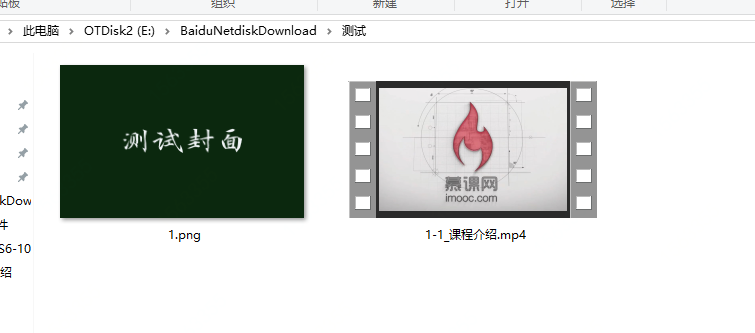
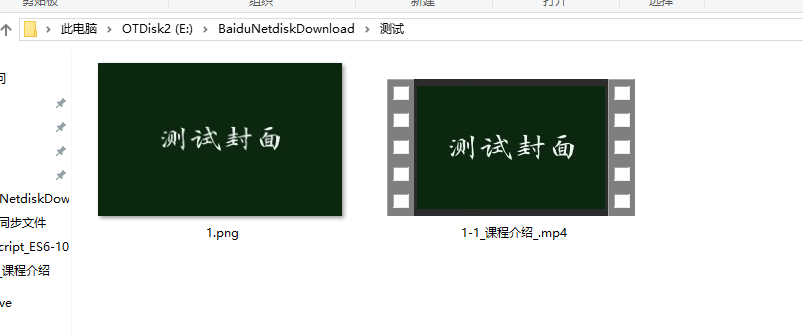
效果如下
修改封面前
修改封面后
总结
更多ffmpeg 命令参考链接