因为开发者对命令的不熟悉。或者粗心大意、疏于管理。运行了此命令。数据在一瞬间就被清空了。Linux不具备类似回收站的功能,这就意味着数据丢失。尽管Linux自身提供了恢复数据的机制,可是这个功能基本没用,要恢复数据,通过常规手段是无法完毕的,此时,仅仅有找专业的数据恢复公司来恢复数据,这样无疑要付出非常大的成本和费用,造成无法估量的的损失。
|
1
2
3
4
|
[root@localhost ~]# rpm -qa |grep e2fsprogs
e2fsprogs-1.41.12-21.el6.x86_64
e2fsprogs-libs-1.41.12-21.el6.x86_64
e2fsprogs-devel-1.41.12-21.el6.x86_64
|
|
1
2
3
4
5
6
|
[root@localhost /opt]# tar zxvf ext3grep-0.10.1.tar.gz
[root@localhost ext3grep-0.10.1]# ./configure
[root@localhost ext3grep-0.10.1]# make
[root@localhost ext3grep-0.10.1]# make install
[root@localhost ext3grep-0.10.1]# ext3grep -v
Running ext3grep version 0.10.1
|
|
1
2
3
4
5
6
7
8
9
10
11
12
13
14
15
16
17
18
19
20
21
22
23
24
25
26
27
28
29
30
31
32
33
34
35
36
37
38
39
40
41
|
[root@localhost /]# mkdir /disk #建立一个挂载点
[root@localhost /]# cd /mydata
[root@localhost mydata]# dd if=/dev/zero of=/mydata/disk1 count=102400 #模拟磁盘分
#区,创建一个空设备
102400+0 records in
102400+0 records out
52428800 bytes (52 MB) copied, 1.20597 seconds, 43.5 MB/s
[root@localhost mydata]# mkfs.ext3 /mydata/disk1 #将空设备格式化为ext3格式
[root@localhost mydata]# mount -o loop /mydata/disk1 /disk #挂载设备到/disk文件夹下
[root@localhost mydata]# cd /disk/
[root@localhost disk]# cp /etc/profile /disk #拷贝文件到模拟磁盘分区
[root@localhost disk]# cp /boot/initrd-2.6.18-164.11.1.el5xen.img /disk
[root@localhost disk]# echo "ext3grep test">ext3grep.txt
[root@localhost disk]# mkdir /disk/ext3grep
[root@localhost disk]# cp /etc/hosts /disk/ext3grep
[root@localhost disk]# pwd
/disk
[root@localhost disk]# ls -al
总计 2512
drwxr-xr-x 4 root root 4096 04-07 16:46 .
drwxr-xr-x 31 root root 4096 04-07 16:45 ..
drwxr-xr-x 2 root root 4096 04-07 16:46 ext3grep
-rw-r--r-- 1 root root 14 04-07 16:31 ext3grep.txt
-rw------- 1 root root 2535991 04-07 16:30 initrd-2.6.18-164.11.1.el5xen.img
drwx------ 2 root root 4096 04-07 16:33 lost+found
-rw-r--r-- 1 root root 1029 04-07 16:30 profile
[root@localhost disk]# md5sum profile #获取文件校验码
a6e82d979bb95919082d9aceddf56c39 profile
[root@localhost disk]# md5sum initrd-2.6.18-164.11.1.el5xen.img
031226080e00d7f312b1f95454e5a1ff initrd-2.6.18-164.11.1.el5xen.img
[root@localhost disk]# md5sum ext3grep.txt
5afe55495cdb666daad667e1cd797dcb ext3grep.txt
[root@localhost disk]# rm -rf /disk/* #模拟误删除数据操作
[root@localhost disk]# ls
(2).卸载磁盘分区
运行下面命令卸载磁盘分区:
[root@localhost disk]# cd /opt #切换到/opt文件夹下
[root@localhost /opt]# umount /disk #卸载模拟磁盘分区
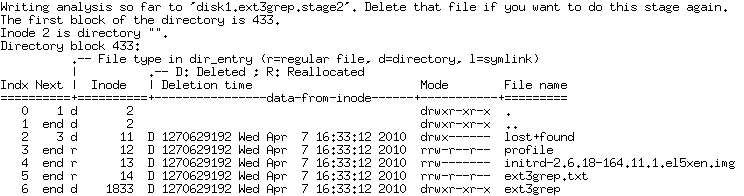
(3).查询恢复数据信息
运行例如以下命令。查询须要恢复的数据信息:
[root@localhost /opt]# ext3grep /mydata/disk1 --ls --inode 2
|
|
1
2
3
4
5
6
7
8
9
10
11
12
13
14
|
[root@localhost /opt]# ext3grep /mydata/disk1 --dump-names
Running ext3grep version 0.10.1
Number of groups: 7
Minimum / maximum journal block: 447 / 4561
Loading journal descriptors... sorting... done
The oldest inode block that is still in the journal, appears to be from 1270629014 = Wed Apr 7 16:30:14 2010
Number of descriptors in journal: 63; min / max sequence numbers: 2 / 10
Loading disk1.ext3grep.stage2... done
ext3grep
ext3grep.txt
ext3grep/hosts
initrd-2.6.18-164.11.1.el5xen.img
lost+found
profile
|
|
1
2
3
4
5
6
7
8
9
10
|
[root@localhost /opt]# ext3grep /mydata/disk1 --restore-file ext3grep.txt
Running ext3grep version 0.10.1
Number of groups: 7
Minimum / maximum journal block: 447 / 4561
Loading journal descriptors... sorting... done
The oldest inode block that is still in the journal, appears to be from 1270629014 = Wed Apr 7 16:30:14 2010
Number of descriptors in journal: 63; min / max sequence numbers: 2 / 10
Writing output to directory RESTORED_FILES/
Loading disk1.ext3grep.stage2... done
Restoring ext3grep.txt
|
|
1
2
3
4
5
6
7
8
9
|
[root@localhost /opt]# ext3grep /mydata/disk1 --restore-file ext3grep/hosts
Running ext3grep version 0.10.1
Number of groups: 7
Minimum / maximum journal block: 447 / 4561
Loading journal descriptors... sorting... done
The oldest inode block that is still in the journal, appears to be from 1270629014 = Wed Apr 7 16:30:14 2010
Number of descriptors in journal: 63; min / max sequence numbers: 2 / 10
Loading disk1.ext3grep.stage2... done
Restoring ext3grep/hosts
|
|
1
2
3
4
5
6
7
8
9
|
[root@localhost RESTORED_FILES]# ext3grep /mydata/disk1 --restore-inode 12
Running ext3grep version 0.10.1
Number of groups: 7
Minimum / maximum journal block: 447 / 4561
Loading journal descriptors... sorting... done
The oldest inode block that is still in the journal, appears to be from 1270629014 = Wed Apr 7 16:30:14 2010
Number of descriptors in journal: 63; min / max sequence numbers: 2 / 10
Writing output to directory RESTORED_FILES/
Restoring inode.12
|
|
1
2
3
4
5
6
7
|
[root@localhost /opt]# cd RESTORED_FILES
[root@localhost RESTORED_FILES]# ls
ext3grep ext3grep.txt inode.12
[root@localhost RESTORED_FILES]# md5sum ext3grep.txt
5afe55495cdb666daad667e1cd797dcb ext3grep.txt
[root@localhost RESTORED_FILES]# md5sum inode.12
a6e82d979bb95919082d9aceddf56c39 inode.12
|
|
1
2
3
4
5
6
7
8
9
10
11
12
13
14
15
16
17
18
19
20
21
22
|
[root@localhost /opt]# ext3grep /mydata/disk1 --restore-all
Running ext3grep version 0.10.1
Number of groups: 7
Minimum / maximum journal block: 447 / 4561
Loading journal descriptors... sorting... done
The oldest inode block that is still in the journal, appears to be from 1270629014 = Wed Apr 7 16:30:14 2010
Number of descriptors in journal: 63; min / max sequence numbers: 2 / 10
Loading disk1.ext3grep.stage2... done
Restoring ext3grep.txt
Restoring ext3grep/hosts
Restoring initrd-2.6.18-164.11.1.el5xen.img
Restoring profile
[root@localhost /opt]# cd RESTORED_FILES/
[root@localhost RESTORED_FILES]# ls -al
总计 2512
drwxr-xr-x 4 root root 4096 04-07 16:46 .
drwxr-xr-x 31 root root 4096 04-07 16:45 ..
drwxr-xr-x 2 root root 4096 04-07 16:46 ext3grep
-rw-r--r-- 1 root root 14 04-07 16:31 ext3grep.txt
-rw------- 1 root root 2535991 04-07 16:30 initrd-2.6.18-164.11.1.el5xen.img
drwx------ 2 root root 4096 04-07 16:33 lost+found
-rw-r--r-- 1 root root 1029 04-07 16:30 profile
|
“--restore-all”參数对恢复大量数据文件是很实用的。