环境
System : CentOS 7.x
jrxxfwb-zrgldb://> uname -a
Linux jrxxfwb-zrgldb 3.10.0-693.17.1.el7.x86_64 #1 SMP Thu Jan 25 20:13:58 UTC 2018 x86_64 x86_64 x86_64 GNU/Linux
SELINUX: 关闭
FIREWALL:关闭
systemctl stop firewalld.service --关闭防火墙
systemctl disable firewalld.service -- 禁止防火墙开机启动
systemctl status firewalld.service  -- 查看防火墙状态
操作步骤
A、环境准备
B、用户组创建
C、修改系统内核参数
D、修改用户配置
E、数据库应用安装
F、数据库初始化
A、环境准备
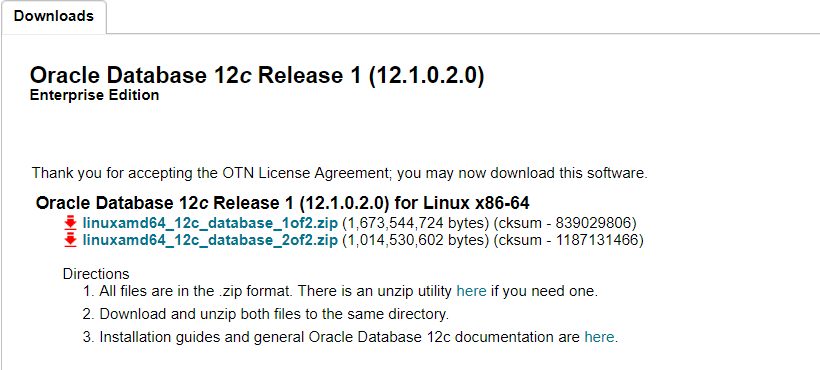
1、选择Oracle安装包,直接去官网选择自己需要的版本(需要注册oracle账号),如果下载不了的话也可以联系我度盘共享。
地址:https://www.oracle.com/technetwork/cn/database/enterprise-edition/downloads/index.html
2、使用root用户登录,进行系统基础环境准备。
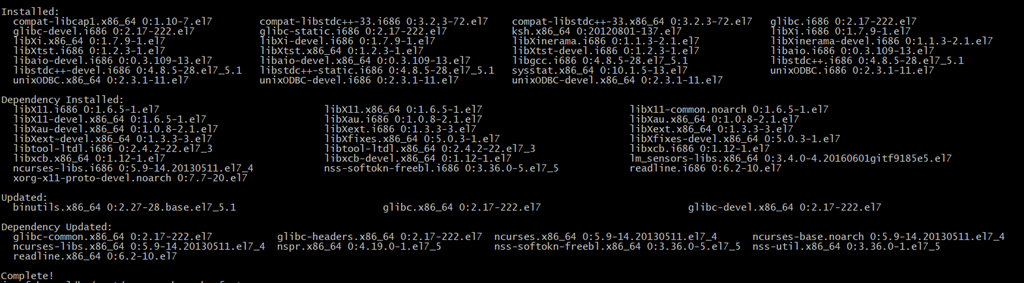
执行以下命令:
yum -y install binutils compat-libcap1 compat-libstdc++-33 compat-libstdc++-33*i686 compat-libstdc++-33*.devel compat-libstdc++-33 compat-libstdc++-33*.devel gcc gcc-c++ glibc glibc*.i686 glibc-devel glibc-devel*.i686 ksh libaio libaio*.i686 libaio-devel libaio-devel*.devel libgcc libgcc*.i686 libstdc++ libstdc++*.i686 libstdc++-devel libstdc++-devel*.devel libXi libXi*.i686 libXtst libXtst*.i686 make sysstat unixODBC unixODBC*.i686 unixODBC-devel unixODBC-devel*.i686静待系统进行软件更新安装,成功后如下:
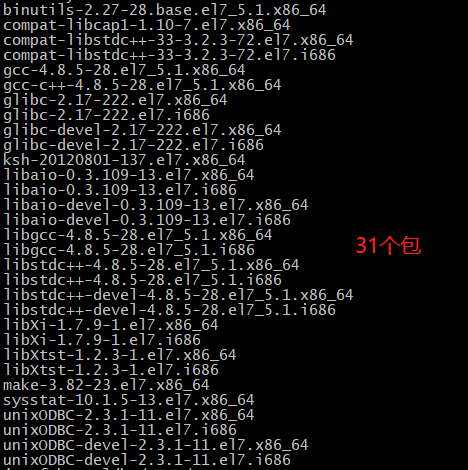
执行检查命令:
rpm -q binutils compat-libcap1 compat-libstdc++-33 gcc gcc-c++ glibc glibc-devel ksh libaio libaio-devel libgcc libstdc++ libstdc++-devel libXi libXtst make sysstat unixODBC unixODBC-devel
5
B、用户组创建
1、创建 oinstall 和 dba 组
zrgldb:/root/> groupadd oinstall
zrgldb:/root/> groupadd dba
2、创建 oracle 用户,设置密码
jrxxfwb-zrgldb:/root/> useradd -g oinstall -G dba oracle
jrxxfwb-zrgldb:/root/> passwd oracle
Changing password for user oracle.
New password:
BAD PASSWORD: it is based on a dictionary word
BAD PASSWORD: is too simple
Retype new password:
BAD PASSWORD: The password is shorter than 8 characters
Retype new password:
passwd: all authentication tokens updated successfully.
3、查看用户 id oracle
zrgldb:/root/> id oracle
uid=1004(oracle) gid=1004(oinstall) groups=1004(oinstall),1005(dba)
C、修改系统内核参数
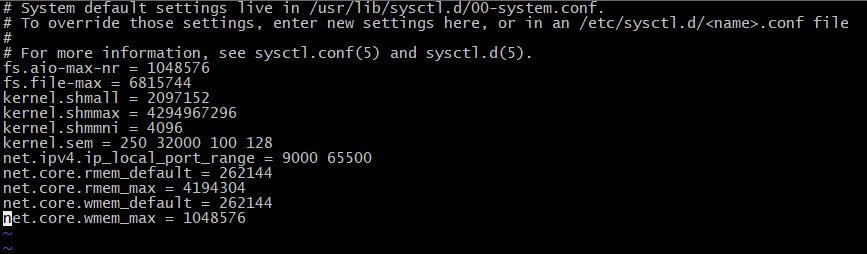
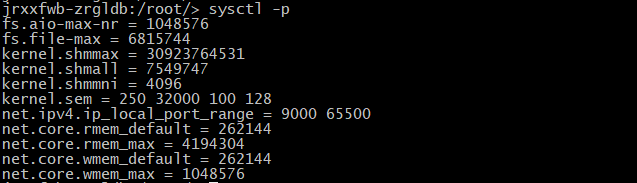
1、修改系统配置: vi /etc/sysctl.conf ,增加如下内容:
fs.aio-max-nr = 1048576
fs.file-max = 6815744
# shmall 是全部允许使用的共享内存大小,shmmax 是单个段允许使用的大小。这两个可以设置为内存的 90%。例如 16G 内存,16*1024*1024*1024*90% = 15461882265,shmall 的大小为 15461882265/4k(getconf PAGESIZE可得到) = 3774873# 因为本机是32G内存,所以shmmax 是 32*1024*1024*1024*90% = 30,923,764,531,shmall 是 30,923,764,531/4096 = 7,549,747kernel.shmmax = 30923764531kernel.shmall = 7549747 kernel.shmmni = 4096 kernel.sem = 250 32000 100 128 net.ipv4.ip_local_port_range = 9000 65500 net.core.rmem_default = 262144 net.core.rmem_max = 4194304 net.core.wmem_default = 262144 net.core.wmem_max = 1048576结果如下:
2、使配置生效: sysctl -p
D、修改用户配置
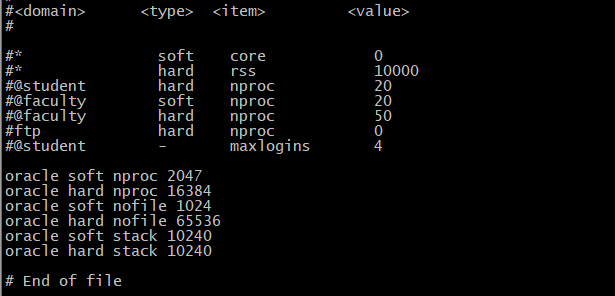
1、修改用户限制。
打开文件: vi /etc/security/limits.conf
在文件末尾添加如下6行内容:
oracle soft nproc 2047
oracle hard nproc 16384
oracle soft nofile 1024
oracle hard nofile 65536
oracle soft stack 10240
oracle hard stack 10240
最终结果如图:
2、修改用户登录库文件引用
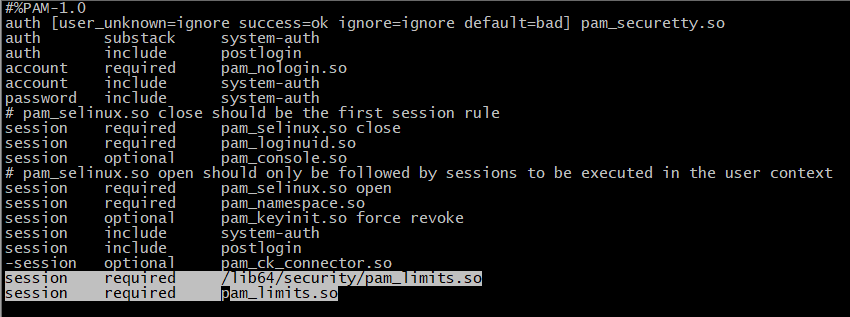
打开系统文件: vi /etc/pam.d/login
在文件末尾添加如下2行内容:
session required /lib64/security/pam_limits.so
session required pam_limits.so最终结果如图:
3、修改用户登录环境变量
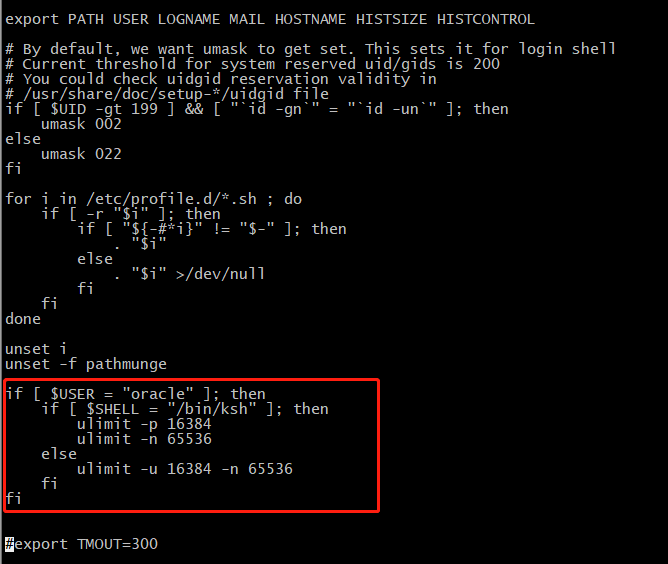
打开系统文件: vi /etc/profile
在文件末尾添加如下内容:
if [ $USER = "oracle" ]; then
    if [ $SHELL = "/bin/ksh" ]; then
        ulimit -p 16384
        ulimit -n 65536
    else
        ulimit -u 16384 -n 65536
    fi
fi
最终结果如图:
退出编辑状态,使修改的文件生效:
source /etc/profile
4、创建安装目录,配置安装目录权限。
mkdir -p /usr/app/
chown -R oracle:oinstall /usr/app/
chmod -R 775 /usr/app/
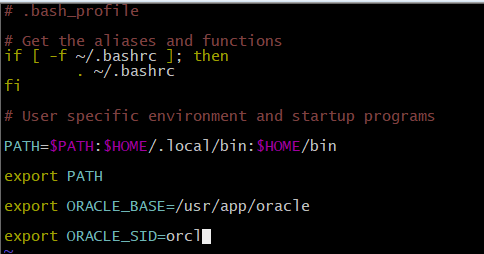
5、配置 Oracle 用户环境变量
切换用户: su – oracle
编辑环境变量: vi .bash_profile
新增配置如下:
export ORACLE_BASE=/usr/app/oracle
export ORACLE_SID=orcl
export PS1=`uname -n`':$PWD/> '
生效配置文件: source .bash_profile
E、数据库应用安装
1、使用 oracle 用户,创建数据库安装配置文件夹 etc 。
zrgldb://> su - oraclezrgldb:/home/oracle/> mkdir etc
2、上传安装文件到 oracle 用户目录下,并解压文件。
执行命令:
zrgldb:/home/oracle/> unzip linuxamd64_12102_database_1of2.zipzrgldb:/home/oracle/> unzip linuxamd64_12102_database_2of2.zip解压完成会在用户目录下出现一个 database 文件夹,如下:
3、复制 Oracle配置文件到 etc 目录下,并修改配置文件权限
zrgldb:/home/oracle/> cp ./database/response/* ./etc/zrgldb:/home/oracle/> chmod 700 ./etc/*.rsp复制后的etc目录文件如下:
4、修改静默安装配置文件 db_install.rsp
vi ./etc/db_install.rsp
Look这里# 修改文件配置 #------------------------------------------------------------------------------- # Specify the installation option. # It can be one of the following: # - INSTALL_DB_SWONLY # - INSTALL_DB_AND_CONFIG # - UPGRADE_DB #------------------------------------------------------------------------------- oracle.install.option=INSTALL_DB_SWONLY #------------------------------------------------------------------------------- # Specify the Unix group to be set for the inventory directory. #------------------------------------------------------------------------------- UNIX_GROUP_NAME=oinstall #------------------------------------------------------------------------------- # Specify the location which holds the inventory files. # This is an optional parameter if installing on # Windows based Operating System. #------------------------------------------------------------------------------- INVENTORY_LOCATION=/usr/app/oracle/oraInventory # Specify value as the following to select all the languages. # Example : SELECTED_LANGUAGES=all_langs #------------------------------------------------------------------------------- SELECTED_LANGUAGES=en,zh_CN #------------------------------------------------------------------------------- # Specify the complete path of the Oracle Home. #------------------------------------------------------------------------------- ORACLE_HOME=/usr/app/oracle/product/12/db_1 #------------------------------------------------------------------------------- # Specify the complete path of the Oracle Base. #------------------------------------------------------------------------------- ORACLE_BASE=/usr/app/oracle #------------------------------------------------------------------------------- # Specify the installation edition of the component. # # The value should contain only one of these choices. # - EE : Enterprise Edition #------------------------------------------------------------------------------- oracle.install.db.InstallEdition=EE #------------------------------------------------------------------------------ # The DBA_GROUP is the OS group which is to be granted OSDBA privileges. #------------------------------------------------------------------------------- oracle.install.db.DBA_GROUP=dba #------------------------------------------------------------------------------ # The OPER_GROUP is the OS group which is to be granted OSOPER privileges. # The value to be specified for OSOPER group is optional. #------------------------------------------------------------------------------ oracle.install.db.OPER_GROUP=oinstall #------------------------------------------------------------------------------ # The BACKUPDBA_GROUP is the OS group which is to be granted OSBACKUPDBA privileges. #------------------------------------------------------------------------------ oracle.install.db.BACKUPDBA_GROUP=oinstall #------------------------------------------------------------------------------ # The DGDBA_GROUP is the OS group which is to be granted OSDGDBA privileges. #------------------------------------------------------------------------------ oracle.install.db.DGDBA_GROUP=oinstall #------------------------------------------------------------------------------ # The KMDBA_GROUP is the OS group which is to be granted OSKMDBA privileges. #------------------------------------------------------------------------------ oracle.install.db.KMDBA_GROUP=oinstall #------------------------------------------------------------------------------- # Specify the type of database to create. # It can be one of the following: # - GENERAL_PURPOSE # - DATA_WAREHOUSE # GENERAL_PURPOSE: A starter database designed for general purpose use or transaction-heavy applications. # DATA_WAREHOUSE : A starter database optimized for data warehousing applications. #------------------------------------------------------------------------------- oracle.install.db.config.starterdb.type=GENERAL_PURPOSE #------------------------------------------------------------------------------- # Specify the Starter Database Global Database Name. #------------------------------------------------------------------------------- oracle.install.db.config.starterdb.globalDBName=orcl #------------------------------------------------------------------------------- # Specify the Starter Database SID. #------------------------------------------------------------------------------- oracle.install.db.config.starterdb.SID=orcl #------------------------------------------------------------------------------- # Specify the Starter Database character set. # # One of the following # AL32UTF8, WE8ISO8859P15, WE8MSWIN1252, EE8ISO8859P2, # EE8MSWIN1250, NE8ISO8859P10, NEE8ISO8859P4, BLT8MSWIN1257, # BLT8ISO8859P13, CL8ISO8859P5, CL8MSWIN1251, AR8ISO8859P6, # AR8MSWIN1256, EL8ISO8859P7, EL8MSWIN1253, IW8ISO8859P8, # IW8MSWIN1255, JA16EUC, JA16EUCTILDE, JA16SJIS, JA16SJISTILDE, # KO16MSWIN949, ZHS16GBK, TH8TISASCII, ZHT32EUC, ZHT16MSWIN950, # ZHT16HKSCS, WE8ISO8859P9, TR8MSWIN1254, VN8MSWIN1258 #------------------------------------------------------------------------------- oracle.install.db.config.starterdb.characterSet=AL32UTF8 #------------------------------------------------------------------------------ # This variable should be set to true if Automatic Memory Management # in Database is desired. # If Automatic Memory Management is not desired, and memory allocation # is to be done manually, then set it to false. #------------------------------------------------------------------------------ oracle.install.db.config.starterdb.memoryOption=true #------------------------------------------------------------------------------ # This variable holds the password that is to be used for all schemas in the # starter database. #------------------------------------------------------------------------------- oracle.install.db.config.starterdb.password.ALL=oracle #------------------------------------------------------------------------------ # Specify whether to enable the user to set the password for # My Oracle Support credentials. The value can be either true or false. # If left blank it will be assumed to be false. # # Example : SECURITY_UPDATES_VIA_MYORACLESUPPORT=true #------------------------------------------------------------------------------ SECURITY_UPDATES_VIA_MYORACLESUPPORT=true #------------------------------------------------------------------------------ # Specify whether user doesn't want to configure Security Updates. # The value for this variable should be true if you don't want to configure # Security Updates, false otherwise. # # The value can be either true or false. If left blank it will be assumed # to be false. # # Example : DECLINE_SECURITY_UPDATES=false #------------------------------------------------------------------------------ DECLINE_SECURITY_UPDATES=true

