If you’re installing SharePoint Server 2010, you will need to address the hardware and software prerequisites for SharePoint 2010. This time around, Microsoft put together a nice TechNet page that tells you the basics of what you need before you install SP 2010:
http://technet.microsoft.com/en-us/library/cc262485.aspx
This is a fairly comprehensive page, but there are some gaps in this document. For instance, it tells you that you need to configure your server with the following roles:
However, each of these roles consists of a number of role services – how do you know which role services need to be turned on for SharePoint 2010? And if you miss one of the role services, you’ll get the following error when trying to install SharePoint 2010:
“Setup is unable to proceed due to the following error(s):
Windows Server Features or role services required by this product are not enabled. ”
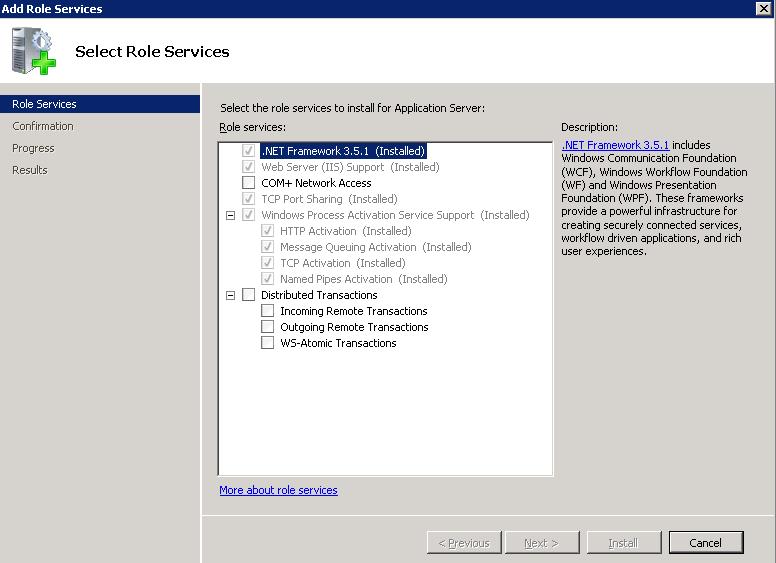
Below I’ve posted screenshots from one of my virtual machines where I was able to successfully install SharePoint Server 2010. If you’re getting the error shown above, compare these screenshots to your configuration to find out which role services you’re missing.
1. Turn on Application Server Role and make sure these role services are also turned on:
2. Turn on Web Server Role and make sure that these role services are also turned on:


3. On my VM, I also have the File Services role turned on:

4. Go to Server Manager > Features and make sure that you have the following Features turned on:


Good luck with your SP 2010 install!