解决方法:
在C:\Documents and Settings\Administrator\.m2中放入setting.xml,并修改本地仓库为
<localRepository>D:\Maven\localRepository</localRepository>
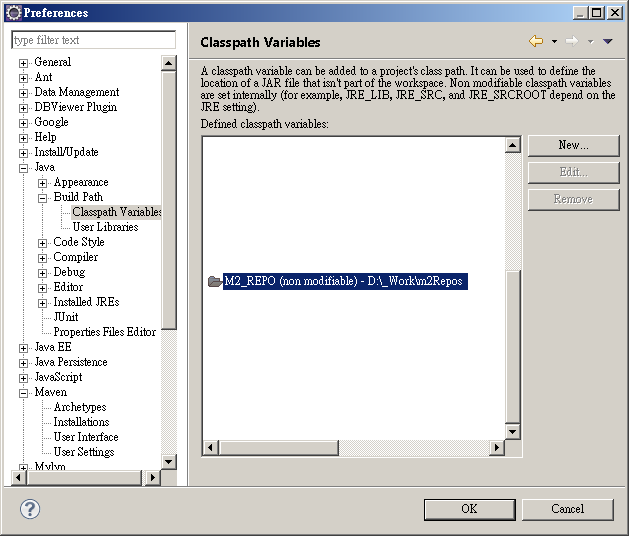
为什么 Eclipse 里的 Classpath Variables M2_REPO 无法修改(non modifiable),并且指向 User Home 里的一个位置,如下图:

最后在下图里找到答案:
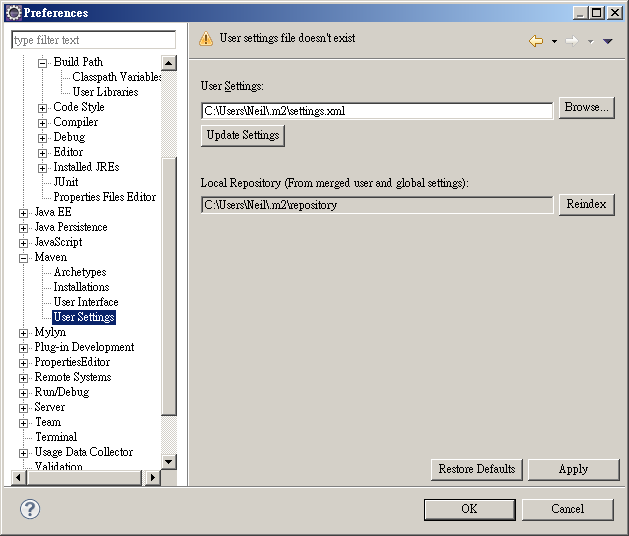
原来 Eclipse 里的 Maven 会去读 User Home 里的 Maven 配置文件 settings.xml,预设是没有这个文档的,所以会使用默认的位置 User Home/.m2/repository。
只要在上图修改 settings.xml 到想要的位置,或者去修改 User Home/.m2/settings.xml。
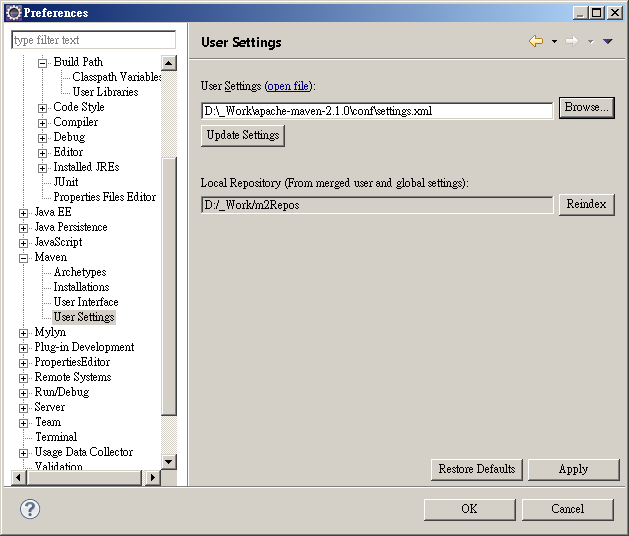
不管用哪个 settings.xml,里面一定要有以下的配置:
D:/_Work/m2Repos
完成后,M2_REPO 就会指向 settings.xml 里的配置位置了,虽然还是 non modifiable。