前面我们已经了解到使用DataAnotations特性来覆写Code-First默认约定,现在我们来学习Fluent API。
Fluent API是另一种配置领域类的方法,它比DataAnnotations特性提供更多的配置方法,下表是Fluent API支持的类型映射。
| 映射种类 | 配置数据库 |
|---|---|
| 模型(Model-wide)映射 |
|
| 实体(Entity)映射 |
|
| 属性(Property)映射 |
|
下面,我们开始使用Fluent API来配置领域类。
我们首先创建Student和Standard两个领域类,同样也创建出DbContext类,DbContext类中有个OnModelCreating方法,这里我们在它的继承类中把它覆写出来。
代码如下:
public class SchoolContext: DbContext
{
    public SchoolDBContext(): base()
    {
    }

    public DbSet<Student> Students { get; set; }
    public DbSet<Standard> Standards { get; set; }

    protected override void OnModelCreating(DbModelBuilder modelBuilder)
    {
        //Configure domain classes using modelBuilder here

        base.OnModelCreating(modelBuilder);
    }
}
使用Fluent API配置领域类时,所有的配置代码都要写在OnModelCreating方法里面,所有的领域类都可以在这个方法里面写上他们的初始化代码。程序初始化的时候,DataAnnotation和Fluent API的优先级是:Fluent API > DataAnnotations > 默认约定。
DbModelBuilder类包含了重要的用于配置的属性和方法,更多详情请翻阅MSDN文档。
接下来我们详细讲一些常用的Fluent API配置方法。
一、EntityTypeConfiguration类:
EntityTypeConfiguration类在Fluent API中有着重要的作用,它提供了一系列重要的方法和属性来覆写默认约定。
EntityTypeConfiguration类可以运行DbModelBuilder类的Entity<TEntity>()方法获得,如下所示:
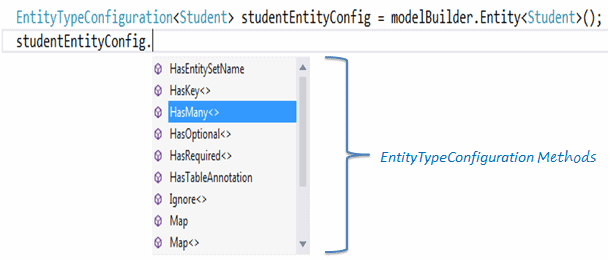
EntityTypeConfiguration有下面这些重要的方法:
| 方法名 | 返回类型 | 描述 |
|---|---|---|
| HasKey<TKey> | EntityTypeConfiguration | 为这个实体类型配置主键 |
| HasMany<TTargetEntity> | ManyNavigationPropertyConfiguration | 为实体类型配置多对多关系 |
| HasOptional<TTargetEntity> | OptionalNavigationPropertyConfiguration |
为实体类配置可选关系。没有指定关系的实体类型的实例会被存入数据库。数据库里外键可为空(nullable)。 |
| HasRequired<TTargetEntity> | RequiredNavigationPropertyConfiguration |
为实体类型配置必须关系。除非关系确定,否则实体类型的实例不能存入数据库。数据库中的外键将不能为空(non-nullable)。 |
| Ignore<TProperty> | Void |
从模型中排除一个属性,这个属性将不会映射到数据库。 |
| Map | EntityTypeConfiguration |
允许高级配置有关该实体类型映射到数据库模式。 |
| Property<T> | StructuralTypeConfiguration |
配置一个定义了这种类型的结构属性 |
| ToTable | Void |
配置实体类型映射的表名 |
可以访问MSDN查询更多关于 EntityTypeConfiguration 类的信息。
下面介绍怎么用Fluent API配置实体类
二、Entity Mappings:
我们继续使用在学校应用里面的Student和Standard两个领域类
代码如下:
public class Student
{
    public Student()
    {

    }
    public int StudentID { get; set; }
    public string StudentName { get; set; }
    public DateTime? DateOfBirth { get; set; }
    public byte[]  Photo { get; set; }
    public decimal Height { get; set; }
    public float Weight { get; set; }

    public Standard Standard { get; set; }
}

public class Standard
{
    public Standard()
    {

    }
    public int StandardId { get; set; }
    public string StandardName { get; set; }

    public ICollection<Student> Students { get; set; }

    }
}
配置默认架构:
当我们想为一组特殊的表设置一个不同的构架时,可以使用HasDefaultSchema方法:
public class SchoolContext: DbContext
{
    public SchoolDBContext(): base()
    {
    }

    public DbSet<Student> Students { get; set; }
    public DbSet<Standard> Standards { get; set; }

    protected override void OnModelCreating(DbModelBuilder modelBuilder)
    {
        //Configure default schema
        modelBuilder.HasDefaultSchema("Admin");
    }
}
映射实体到表:
Code-First将会为context类中的所有DbSet属性创建数据库表,表名就是属性名,比如上面的Students和Standards。我们也可以给表配置一个不同于DbSet属性名的表名,如下代码所示:
namespace CodeFirst_FluentAPI_Tutorials
{

    public class SchoolContext: DbContext
    {
        public SchoolDBContext(): base()
        {
        }

        public DbSet<Student> Students { get; set; }
        public DbSet<Standard> Standards { get; set; }

        protected override void OnModelCreating(DbModelBuilder modelBuilder)
        {
                //Configure default schema
            modelBuilder.HasDefaultSchema("Admin");

            //Map entity to table
            modelBuilder.Entity<Student>().ToTable("StudentInfo");
            modelBuilder.Entity<Standard>().ToTable("StandardInfo","dbo");

        }
    }
}
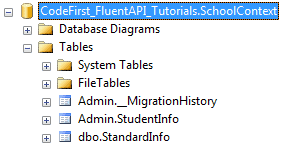
如上代码,我们配置表名的ToTable方法是接在Entity<TEntity>()方法后面,上面代码已经把映射Student实体的表名改成StudentInfo,把映射Standard实体的表名改成了StandardInfo,特别留意的是,虽然我们把默认的架构名改成了Admin,但是Standard实体又特别指定了dbo架构,所以生成的数据库如下所示:
映射实体到多张表:
下面的代码演示了怎样把Student实体映射到数据库的多张表:
namespace CodeFirst_FluentAPI_Tutorials
{

    public class SchoolContext: DbContext
    {
        public SchoolDBContext(): base()
        {
        }

        public DbSet<Student> Students { get; set; }
        public DbSet<Standard> Standards { get; set; }

        protected override void OnModelCreating(DbModelBuilder modelBuilder)
        {
            modelBuilder.Entity<Student>().Map(m =>
            {
                m.Properties(p => new { p.StudentId, p.StudentName});
                m.ToTable("StudentInfo");

            }).Map(m => {
                m.Properties(p => new { p.StudentId, p.Height, p.Weight, p.Photo, p.DateOfBirth});
                m.ToTable("StudentInfoDetail");

            });

            modelBuilder.Entity<Standard>().ToTable("StandardInfo");

        }
    }
}
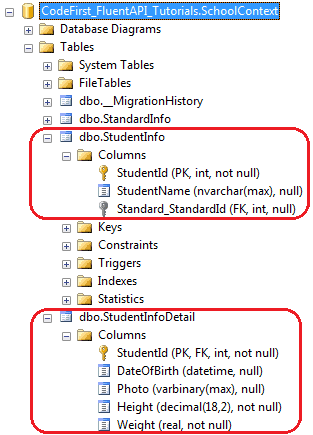
如上所示,使用Map()方法可以映射Student实体的一些属性到StudentInfo表中,另一些属性到StudentInfoDetail表中,我们把Student实体分裂成了两张表,生成的数据库如下所示:
Map method need the delegate method as a parameter. You can pass or in Map method, as shown below.
Map方法的传入参数是一个委托,具体可以参考 Action delegate 和 lambda expression。
完成代码如下:
using System.Data.Entity.ModelConfiguration.Configuration;

namespace CodeFirst_FluentAPI_Tutorials
{

    public class SchoolContext: DbContext
    {
        public SchoolDBContext(): base()
        {
        }

        public DbSet<Student> Students { get; set; }
        public DbSet<Standard> Standards { get; set; }

        protected override void OnModelCreating(DbModelBuilder modelBuilder)
        {
            modelBuilder.Entity<Student>().Map(delegate(EntityMappingConfiguration<Student> studentConfig)
            {
                studentConfig.Properties(p => new { p.StudentId, p.StudentName });
                studentConfig.ToTable("StudentInfo");
            });

            Action<EntityMappingConfiguration<Student>> studentMapping = m =>
            {
                m.Properties(p => new { p.StudentId, p.Height, p.Weight, p.Photo, p.DateOfBirth });
                m.ToTable("StudentInfoDetail");
            };
            modelBuilder.Entity<Student>().Map(studentMapping);

            modelBuilder.Entity<Standard>().ToTable("StandardInfo");

        }
    }
}