本文根据数据库中的car表做一个汽车查询页面,巩固php查询关键字操作,感兴趣的小伙伴们可以参考一下
本文实例为大家分享了php查询操作的实现代码,供大家参考,具体内容如下
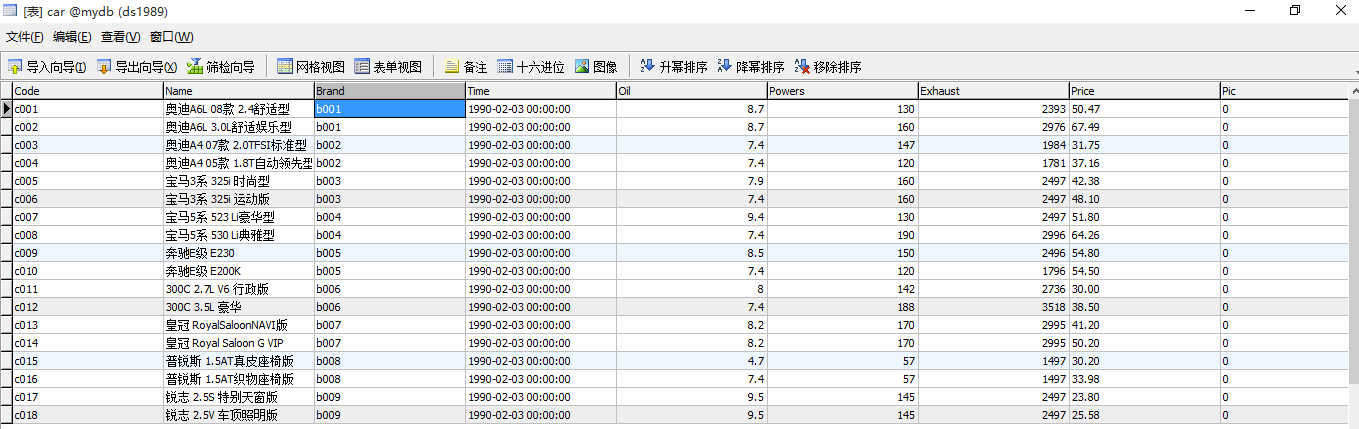
一、一个关键字查询
主页面:
|
1
2
3
4
5
6
7
8
9
10
11
12
13
14
15
16
17
18
19
20
21
22
23
24
25
26
27
28
29
30
31
32
33
34
35
36
37
38
39
40
41
42
43
44
45
46
47
48
49
50
51
52
53
54
55
56
57
58
59
60
61
62
63
|
<html>
<head>
<meta http-equiv="Content-Type" content="text/html; charset=utf-8" />
<title>汽车查询页面</title>
</head>
<body>
<h1>汽车查询页面</h1>
<?php
include("QiChe.class.php"); $db=new QiChe();
//保留输入查询的内容 $cx="";
$value="";
if(!empty($_POST["name"]))//判断查询内容是否为空 { $name=$_POST["name"];
$cx=" where name like '%{$name}%'";//查询的字符串
$value=$name;
}?> <br>
<form action="QiChe.php" method="post">
<div>
请输入查询内容:<input type="text" name="name" value="<?php echo $value; ?>"/>
<input type="submit" value="查询"/>
</div>
</form>
<br />
<table width="100%" border="1" cellpadding="0" cellspacing="0">
<tr>
<td>代号</td>
<td>汽车名称</td>
<td>油耗</td>
<td>功率</td>
<td>价格</td>
</tr>
<?php
$sql="select * from Car".$cx;
$attr=$db->query($sql); foreach ($attr as $v) { //使输入查询的关键字变色,处理name
//$rp="<mark>{$value}</mark>";
$rp="<span style='color:red'>{$value}</span>";
$arr=str_replace($value,$rp,$v[1]);
echo "<tr>
<td>{$v[0]}</td>
<td>{$arr}</td>
<td>{$v[4]}</td>
<td>{$v[5]}</td>
<td>{$v[7]}</td>
</tr>";
}?> </table>
</body>
</html>
|
封装类:
|
1
2
3
4
5
6
7
8
9
10
11
12
13
14
15
16
17
18
19
20
21
22
23
24
|
<?phpclass QiChe
{ public $localhost="localhost";//服务器
public $uid="root";//用户名
public $password="";//密码
//执行查询语句sql方法:
//参数的含义:$sql代表要执行的sql语句;$type代表sql语句的类型,自义0为查询,1为其他(增删改查);$db代表要查询的数据库
public function Query($sql,$type="0",$db="mydb")
{
$dbconnect=new MySQLi($this->localhost,$this->uid,$this->password,$db);
!mysqli_connect_error() or die("连接失败 !");
$result=$dbconnect->query($sql);
if($type==0)
{
return $result->fetch_all();
}
else
{
return $result;
}
}
} |
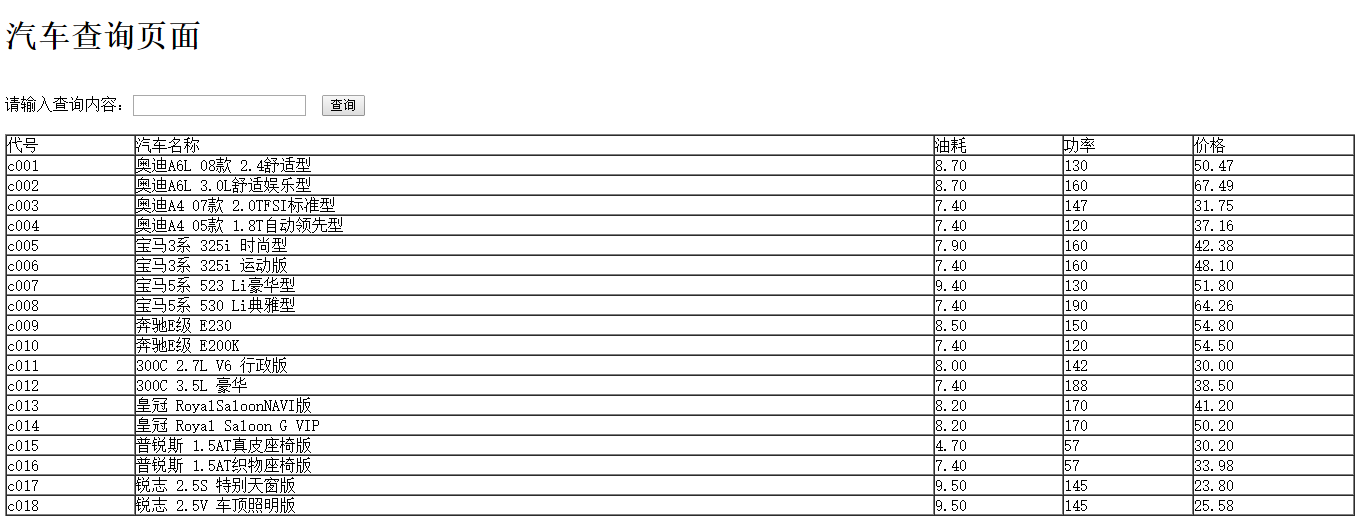
运行结果:

二、多个关键字查询
主页面:
|
1
2
3
4
5
6
7
8
9
10
11
12
13
14
15
16
17
18
19
20
21
22
23
24
25
26
27
28
29
30
31
32
33
34
35
36
37
38
39
40
41
42
43
44
45
46
47
48
49
50
51
52
53
54
55
56
57
58
59
60
61
62
63
64
65
66
67
68
69
70
71
72
73
74
75
76
77
|
<html>
<head>
<meta http-equiv="Content-Type" content="text/html; charset=utf-8" />
<title>汽车查询页面</title>
</head>
<body>
<h1>汽车查询页面</h1>
<br>
<?php
include ("./DBDA.class.php");$db=new DBDA();
$cx="";
$value="";
$value1="";
$tj1=" 1=1";//条件1的判断name
$tj2=" 1=1";//条件2的判断brand
if(!empty($_POST["name"])){ $name=$_POST["name"];
$tj1="name like '%{$_POST['name']}%'";
$value=$name;
}if(!empty($_POST["brand"])){ $name1=$_POST["brand"];
$tj2="brand= '{$_POST['brand']}'";
$value1=$name1;
}$cx=" where $tj1 and $tj2";//查询字符串
?> <form action="ChaXun1.php" method="post">
<div>
请输入名称:<input type="text" name="name" value="<?php echo $value; ?>"/>
系列:<input type="text" name="brand" value="<?php echo $value1; ?>">
<input type="submit" name="" value="查询">
</div>
</form>
<br>
<table width="100%" border="1" cellpadding="0" cellspacing="0">
<tr>
<td>代号</td>
<td>汽车名称</td>
<td>系列</td>
<td>价格</td>
<td>油耗</td>
<td>功率</td>
</tr>
<?php
$sql="select * from Car".$cx;
$attr=$db->Query($sql);foreach ($attr as $v){ //处理name
//$rp="<mark>{$value}</mark>";
$rp="<span style='color:red'>{$value}</span>";
$str=str_replace($value,$rp,$v[1]);
echo "<tr>
<td>{$v[0]}</td>
<td>{$str}</td>
<td>{$v[2]}</td>
<td>{$v[7]}</td>
<td>{$v[4]}</td>
<td>{$v[5]}</td>
</tr>";
}
?></table>
</body>
</html>
|
运行结果:
