摘要 Android系统 小米,三星,索尼手机发送桌面快键提醒数字图标,在Android系统中,众所周知不支持BadgeNumber,虽然第三方控件BadgeView可以实现应用内的数字提醒,但对于系统的图标,特别是app的logo图标很难实现数字标志,即使是绘图的方式不断修改,但这种方式天生弊端,实用性很差。
Android系统 小米,三星,索尼手机发送桌面快键提醒数字图标,在Android系统中,众所周知不支持BadgeNumber,虽然第三方控件BadgeView可以实现应用内的数字提醒,但对于系统的图标,特别是app的logo图标很难实现数字标志,即使是绘图的方式不断修改,但这种方式天生弊端,实用性很差。但幸运的是,某些ROM厂商提供了私有的API,但也带来了难度,API的不同意意味着代码量的增加和兼容性问题更加突出。
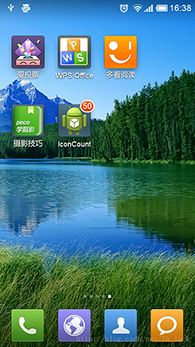
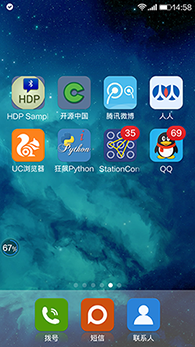
我们现在来实现桌面logo或者说icon右上角的图标,先来看2张图,第一张来自互联网,第二张来自个人实践!(由于实验条件有限,只能测试小米的(⊙o⊙)…,有兴趣的同学测试一下其他的吧)
好了,上代码
|
1
2
3
4
5
6
7
8
9
10
11
12
13
14
15
16
17
18
19
20
21
22
23
24
25
26
27
28
29
30
31
32
33
34
35
36
37
38
39
40
41
42
43
44
45
46
47
48
49
50
51
52
53
54
55
56
57
58
59
60
61
62
63
64
65
66
67
68
69
70
71
72
73
74
75
76
77
78
79
80
81
82
83
84
85
86
87
88
89
90
91
92
93
94
95
96
97
98
99
100
101
102
103
|
public class MainActivity extends Activity {
//必须使用,Activity启动页
private final static String lancherActivityClassName = Welcome.class.getName();
@Override
protected void onCreate(Bundle savedInstanceState) {
super.onCreate(savedInstanceState);
setContentView(R.layout.common_listview_layout);
}
@Override
protected void onResume() {
super.onResume();
sendBadgeNumber();
}
private void sendBadgeNumber() {
String number = "35";
if (TextUtils.isEmpty(number)) {
number = "0";
} else {
int numInt = Integer.valueOf(number);
number = String.valueOf(Math.max(0, Math.min(numInt, 99)));
}
if (Build.MANUFACTURER.equalsIgnoreCase("Xiaomi")) {
sendToXiaoMi(number);
} else if (Build.MANUFACTURER.equalsIgnoreCase("samsung")) {
sendToSony(number);
} else if (Build.MANUFACTURER.toLowerCase().contains("sony")) {
sendToSamsumg(number);
} else {
Toast.makeText(this, "Not Support", Toast.LENGTH_LONG).show();
}
}
private void sendToXiaoMi(String number) {
NotificationManager nm = (NotificationManager) getSystemService(Context.NOTIFICATION_SERVICE);
Notification notification = null;
boolean isMiUIV6 = true;
try {
NotificationCompat.Builder builder = new NotificationCompat.Builder(this);
builder.setContentTitle("您有"+number+"未读消息");
builder.setTicker("您有"+number+"未读消息");
builder.setAutoCancel(true);
builder.setSmallIcon(R.drawable.common_icon_lamp_light_red);
builder.setDefaults(Notification.DEFAULT_LIGHTS);
notification = builder.build();
Class miuiNotificationClass = Class.forName("android.app.MiuiNotification");
Object miuiNotification = miuiNotificationClass.newInstance();
Field field = miuiNotification.getClass().getDeclaredField("messageCount");
field.setAccessible(true);
field.set(miuiNotification, number);// 设置信息数
field = notification.getClass().getField("extraNotification");
field.setAccessible(true);
field.set(notification, miuiNotification);
Toast.makeText(this, "Xiaomi=>isSendOk=>1", Toast.LENGTH_LONG).show();
}catch (Exception e) {
e.printStackTrace();
//miui 6之前的版本
isMiUIV6 = false;
Intent localIntent = new Intent("android.intent.action.APPLICATION_MESSAGE_UPDATE");
localIntent.putExtra("android.intent.extra.update_application_component_name",getPackageName() + "/"+ lancherActivityClassName );
localIntent.putExtra("android.intent.extra.update_application_message_text",number);
sendBroadcast(localIntent);
}
finally
{
if(notification!=null && isMiUIV6 )
{
//miui6以上版本需要使用通知发送
nm.notify(101010, notification);
}
}
}
private void sendToSony(String number) {
boolean isShow = true;
if ("0".equals(number)) {
isShow = false;
}
Intent localIntent = new Intent();
localIntent.putExtra("com.sonyericsson.home.intent.extra.badge.SHOW_MESSAGE",isShow);//是否显示
localIntent.setAction("com.sonyericsson.home.action.UPDATE_BADGE");
localIntent.putExtra("com.sonyericsson.home.intent.extra.badge.ACTIVITY_NAME",lancherActivityClassName );//启动页
localIntent.putExtra("com.sonyericsson.home.intent.extra.badge.MESSAGE", number);//数字
localIntent.putExtra("com.sonyericsson.home.intent.extra.badge.PACKAGE_NAME",getPackageName());//包名
sendBroadcast(localIntent);
Toast.makeText(this, "Sony," + "isSendOk", Toast.LENGTH_LONG).show();
}
private void sendToSamsumg(String number)
{
Intent localIntent = new Intent("android.intent.action.BADGE_COUNT_UPDATE");
localIntent.putExtra("badge_count", number);//数字
localIntent.putExtra("badge_count_package_name", getPackageName());//包名
localIntent.putExtra("badge_count_class_name",lancherActivityClassName ); //启动页
sendBroadcast(localIntent);
Toast.makeText(this, "Samsumg," + "isSendOk", Toast.LENGTH_LONG).show();
}
} |
注意lancherActivityClassName 必须被配置为 启动页 android.intent.category.LAUNCHER
|
1
2
3
4
5
6
7
8
9
10
11
12
13
14
|
<activity
android:name="com.sample.activites.Welcome"
android:configChanges="locale|keyboard|screenSize"
android:label="@string/app_name"
android:screenOrientation="portrait" >
<intent-filter>
<action android:name="android.intent.action.MAIN" />
<category android:name="android.intent.category.LAUNCHER" />
</intent-filter>
<intent-filter>
<action android:name="android.intent.action.CREATE_SHORTCUT" />
</intent-filter>
</activity>
|
try doing it
在启动的Activity中、发送未读消息数目广播 和 重置/清除未读消息数目广播 的调用如下:
// 发送未读消息数目广播:count为未读消息数目(int类型)
BadgeUtil.setBadgeCount(getApplicationContext(), count);// 发送重置/清除未读消息数目广播:
BadgeUtil.resetBadgeCount(getApplicationContext());资料参考:
http://blog.csdn.net/andylao62/article/details/41794695
http://blog.csdn.net/wx_962464/article/details/37997299
https://github.com/ekinlyw/android-badge
http://www.tuicool.com/articles/JV7vIr
—————————————————————————————————————
如果文章内容对您有帮助, 可以帮 顶 一下,来支持一下哦!
如果您对文章内容有任何疑问或有更好的见解, 欢迎通过留言或发邮件的方式联系我:
ice_zhengbin@163.com
如需要转载,请注明出处,谢谢!!
—————————————————————————————————————