1 Ceph版本选择
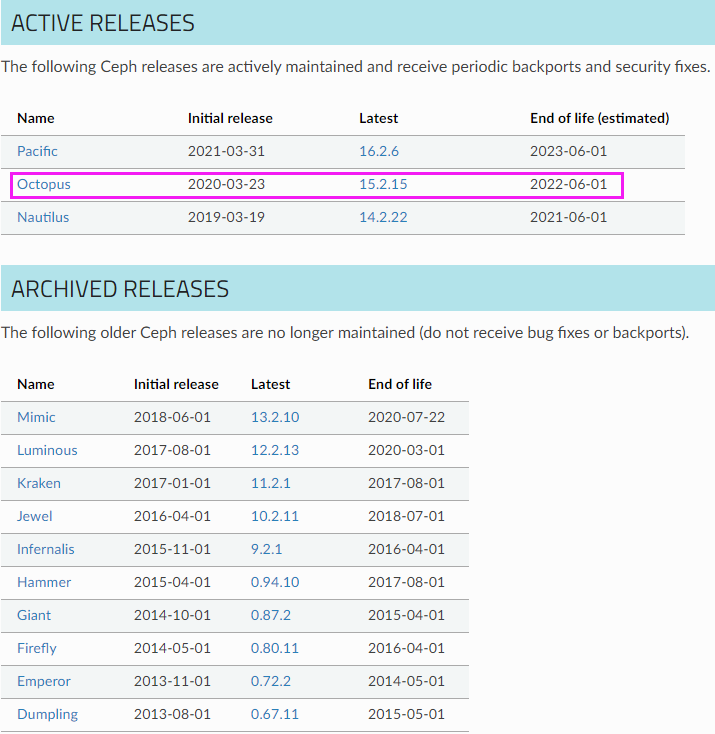
还没有同步到最新的Ceph版本,所以我这里使用的Ceph版本为15.2.15(O版)稳定版。

2 服务器配置建议
最少三台Centos7系统用于部署Ceph集群,最低硬件配置为2C/2G,另外每台机器最少挂载2块独立硬盘(每块盘20G)。
| 环境 |
服务器数量 |
CPU/内存配置 |
磁盘配置 |
| 测试环境 |
3 |
2C/2G |
20G * 2 |
| 生产环境 |
3 |
8C/16G |
1T * 2 |
3 Ceph集群部署规划
| 主机名 |
操作系统 |
IP地址 |
CPU/内存配置 |
磁盘配置 |
服务器角色 |
| ceph-deploy |
CentOS 7.5.1804 |
172.16.1.30 |
2C/2G |
系统盘: sda |
ceph部署、集群控制节点 |
| ceph-node01 |
CentOS 7.5.1804 |
172.16.1.31 |
2C/2G |
OSD盘: sdb、sdc
|
mon * 1、osd * 2、mgr * 1 |
| ceph-node02 |
CentOS 7.5.1804 |
172.16.1.32 |
2C/2G |
OSD盘: sdb、sdc
|
mon * 1、osd * 2、mgr * 1 |
| ceph-node03 |
CentOS 7.5.1804 |
172.16.1.33 |
2C/2G |
OSD盘: sdb、sdc
|
mon * 1、osd * 2、mgr * 1 |
| ceph-node04 |
CentOS 7.5.1804 |
172.16.1.34 |
1C/1G |
系统盘: sda |
用于ceph集群测试 |

相同级别的高可用。使用active/standby模式,多节点部署,可以在master down时,无缝顶替。
4 操作系统初始化配置
在 172.16.1.30-33节点上进行操作
5 Ceph集群部署
注: 在172.16.1.30节点上操作
均衡到新加的盘上,等所有的平衡完之后,这个就能给用户正常提供访问了,它有两种状态,一种是OK,一种是WARN。
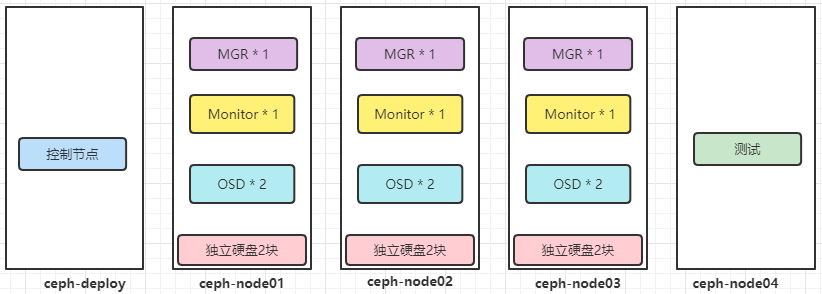
ceph集群各节点进程信息图示:
6 Ceph集群服务管理
ceph集群node节点上操作
# systemctl restart ceph-mgr.target
7 Ceph集群常用管理命令
ceph集群管理节点和node节点都可以操作
| 组件状态 |
命令 |
| POOL 状态 |
ceph osd lspools
ceph osd pool ls detail
|
| PG 状态 |
ceph pg dump # pg详情
|
| OSD 状态 |
ceph osd dump #OSD详情
ceph osd tree #OSD分布
ceph osd df #OSD使用
|
| Monitor状态 |
ceph mon dump #mon详情
ceph quorum_status #mon的仲裁状态
|
| 集群空间使用 |
ceph df |
| 查看ceph集群状态 |
ceph health detail #集群健康状态
ceph -w # 观察集群正在发生的事件
|
| mgr的状态 |
ceph mgr dump |
8 Ceph.conf 配置文件详解
rbd cache target dirty = 235544320 # 默认值16777216,开始执行回写过程的脏数据大小,不能超过rbd_cache_max_dirty
9 Ceph集群生效ceph.conf
# systemctl restart ceph-mgr.target