5.3 Ceph存储使用
在ceph-deploy节点上操作
1 RBD 块存储
(2) RBD常用管理命令
rbd块设备在非挂载的情况下可以进行快照的回滚操作。
/dev/rbd0 xfs 15G 33M 15G 1% /mnt
2 CephFS文件存储
# ceph fs set cephfs-pool max_mds 1
3 对象存储
要安装这个服务。
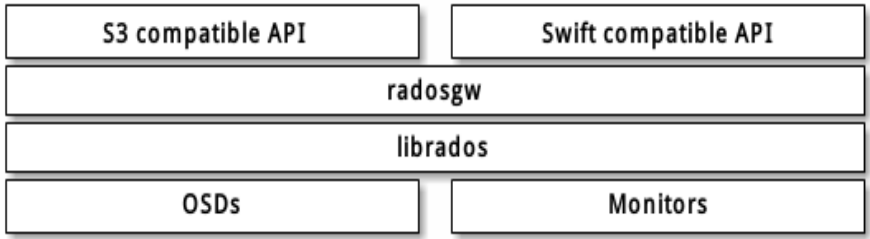
RGW默认7480端口,浏览器访问(http://172.16.1.31-33:7480),返回anonymous说明服务正常。

# pip3 install boto
) 脚本
# cat ceph-s3test.py
import boto.s3.connection

access_key = 'GAJUYDS9KBP090E2IKDX' # 创建S3用户时返回的秘钥
secret_key = 'GegAR4WtkgdxhgHlkBksNdUCcCiPyvj3AlXUDTlB'
host = '172.16.1.31' # RWG节点IP和端口
port = 7480
# 新建一个连接
conn = boto.connect_s3(
        aws_access_key_id=access_key,
        aws_secret_access_key=secret_key,
        host=host, port=port,
        is_secure=False, calling_format=boto.s3.connection.OrdinaryCallingFormat(),
       )
# 新建一个Bucket
bucket = conn.create_bucket('my-new-bucket')

# 列出用户的所有Bucket
for bucket in conn.get_all_buckets():
    print("桶名称: %s, 创建时间: %s" %(bucket.name,bucket.creation_date))

# 列出Bucket内容
for key in bucket.list():
    print("key名称: %s, 文件大小: %s, 修改时间: %s" %(key.name,key.size,key.last_modified))

# 新建一个对象
key = bucket.new_key('hello.txt')
key.set_contents_from_string('Hello World!')

# 下载一个对象到文件
key = bucket.get_key('hello.txt')
key.get_contents_to_filename('/tmp/hello.txt')

3) 执行脚本
# python3 ceph-s3test.py
桶名称: my-new-bucket, 创建时间: 2021-11-26T15:14:50.946Z
key名称: hello.txt, 文件大小: 12, 修改时间: 2021-11-26T15:33:41.092Z

# cat /tmp/hello.txt
Hello World!