Outline
Sometimes we cannot handle some conditions or problems with Webdriver, web controls don’t react well against selenium commands. In this kind of situations, we use Javascript. It is useful for custom synchronizations, hide or show the web elements, change values, test flash/HTML5 and so on. In order to do these, we can use Selenium’s JavascriptExecutor interface which executes JavaScript through Selenium driver. It has “executeScript” & “executeAsyncScript” methods, to run JavaScript on current browser.
Please, also check my “Selenium Webdriver wait for JavaScript JQuery and Angular” article to learn how to wait Asynchronous calls in your test automation codes.
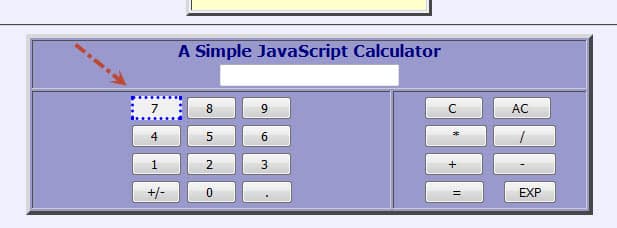
Before sync and async JavaScript theory and examples, I want to show how to see and run javascript commands on a browser’s console tab. For example, when you go http://www.anaesthetist.com/mnm/javascript/calc.htmwebsite you will see a calculator which is written with Javascript.
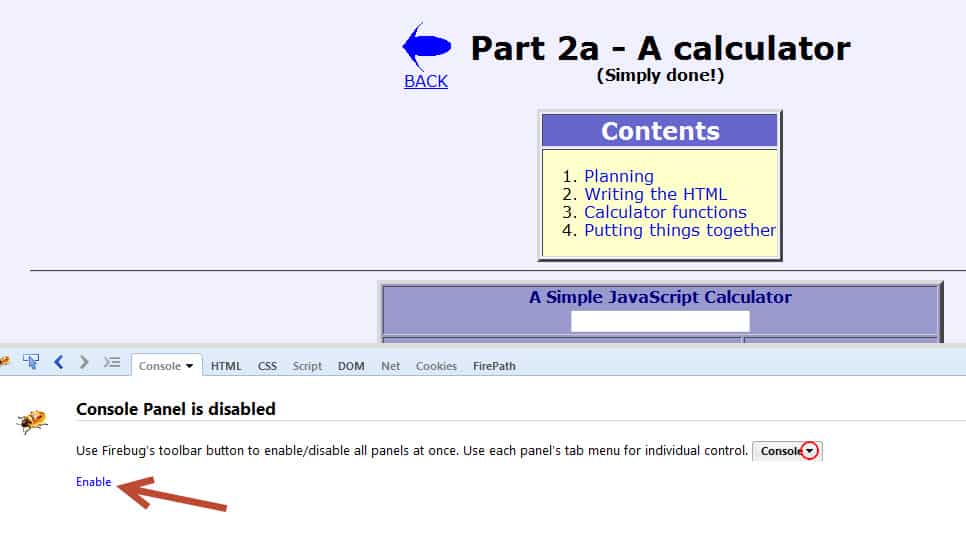
First of all, we have to enable Script and Console panels.
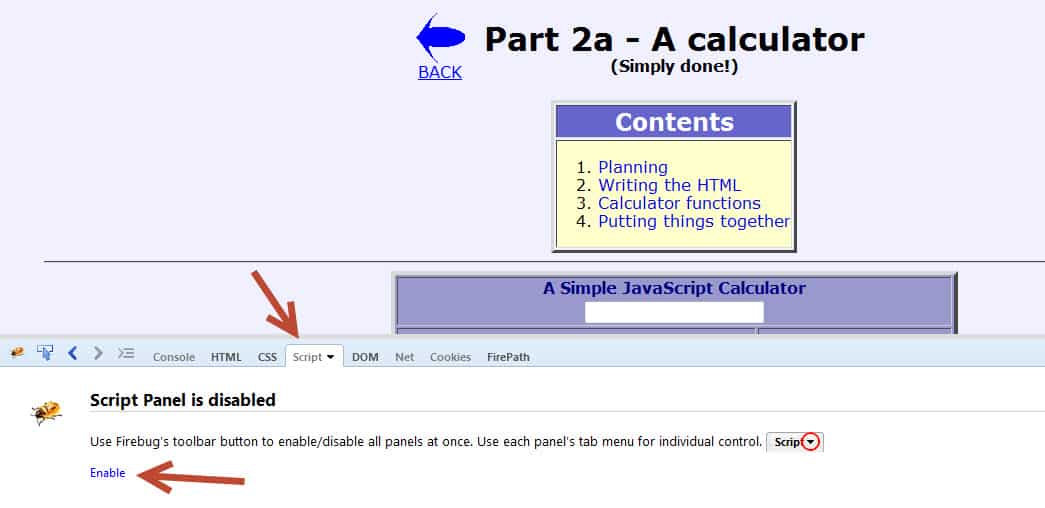
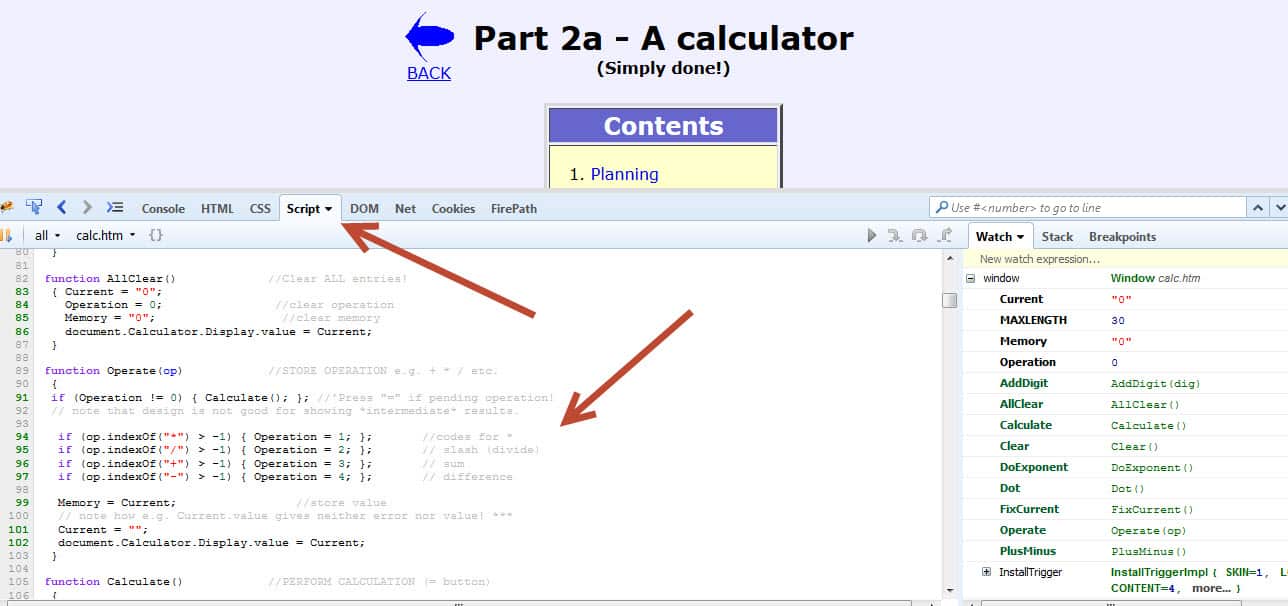
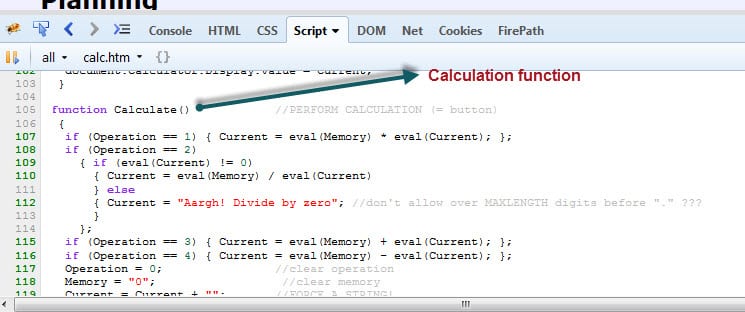
In Script tab you can see the written Javascript code.
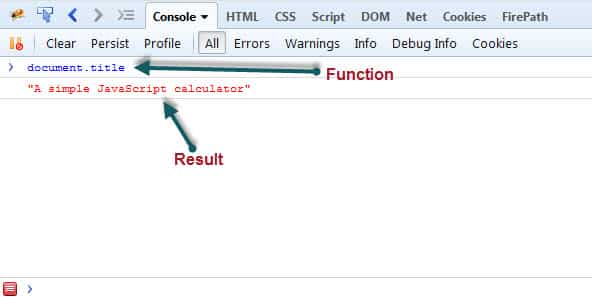
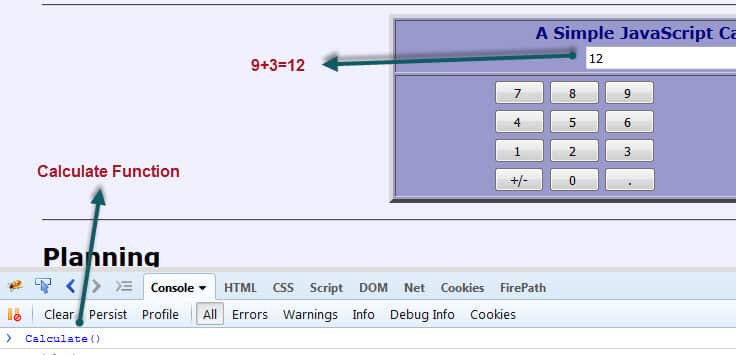
In Console tab you can call JavaScript functions and see their results.

Let’s do an example. In our example page as you see below calculation is done by “Calculate()” function. If we click “9” and then click “+” and then click “3” and at last step call “Calculate()” function on Console tab, we will get the “12” as a result.
Now, let’s do this example with Selenium JavascriptExecutor.
Test Scenario
- Go to http://www.anaesthetist.com/mnm/javascript/calc.htm
- Click “9”
- Click “+”
- Click “3”
- Declare JavascriptExecutor and Call Calculate() method.
- Assert that result is 12
Test Code:
|
1
2
3
4
5
6
7
8
9
10
11
12
13
14
15
16
17
18
19
20
21
22
23
24
25
26
27
28
29
30
31
32
33
34
35
36
37
38
39
40
41
42
43
44
45
46
47
48
49
50
51
|
;
;
;
;
;
;
;
;
;
;
;
{
;
;
//Setup Driver
@BeforeClass
{
;
;
;
}
@Test
{
;
;
;
;
;
//5-) Assert that result is 12
;
;
}
//Close Driver
@AfterClass
{
;
}
}
|
Execute JavaScript with executeScript() Method
JavascriptExecutor interface comprises of executeScript() method that executes JavaScript in the context of the currently selected frame or window.
Within the script, use document to refer to the current document. Local variables will not be available once the script has finished executing, though global variables will persist.
If the script has a return value (i.e. if the script contains a return statement), then the following steps will be taken: [1]
• For an HTML element, this method returns a WebElement
• For a decimal, a Double is returned
• For a non-decimal number, a Long is returned
• For a boolean, a Boolean is returned
• For all other cases, a String is returned.
• For an array, return a List<Object> with each object following the rules above. We support nested lists.
• Unless the value is null or there is no return value, in which null is returned.
Arguments must be a number, a boolean, a String, WebElement, or a list of any combination of the above. An exception will be thrown if the arguments do not meet these criteria. [1]

I want to give extra examples that shows you what can you do with JavascriptExecutor.
Alert Pop window
|
1
2
3
|
;
;
;
|
Get Page Title
|
1
2
3
|
;
;
;
|
Refresh Browser Window
|
1
2
|
;
;
|
Scroll-Down Until an Element Displayed
|
1
2
3
|
;
;
;
|
Highlight an Element
|
1
2
3
|
;
;
;
|
Hide and Show an Element
|
1
2
3
4
5
|
;
//Hide an element
;
//Show an element
;
|

Create an Anonymous Function and add it to the Global Window
|
1
2
3
4
5
6
7
8
9
10
11
12
13
14
15
16
17
18
|
;
//Change title with JavascriptExecutor
;
;
//Create an anonymous function that will stored and added into the global window
+
;
;
//Change title manually
;
;
//Change title with Function
;
;
|
Navigate to Other Page
|
1
2
|
;
;
|
» Source Code of All Examples for executeScript() Method «
|
1
2
3
4
5
6
7
8
9
10
11
12
13
14
15
16
17
18
19
20
21
22
23
24
25
26
27
28
29
30
31
32
33
34
35
36
37
38
39
40
41
42
43
44
45
46
47
48
49
50
51
52
53
54
55
56
57
58
59
60
61
62
63
64
65
66
67
68
69
70
71
72
73
74
75
76
77
78
79
80
81
82
83
84
85
86
87
88
89
90
91
92
93
94
95
96
97
98
99
100
101
102
103
104
105
106
107
108
109
110
111
112
113
114
115
116
117
118
119
120
121
122
123
124
125
126
|
;
;
;
;
;
;
;
;
;
;
;
;
;
;
;
)
{
;
;
//Setup Driver
@BeforeClass
{
;
;
;
}
@Test
{
;
,
;
}
@Test
{
;
;
;
}
@Test
{
;
;
;
}
@Test
{
;
;
}
@Test
{
;
;
;
}
@Test
{
;
;
;
}
@Test
{
;
;
;
}
@Test
{
;
//Hide an element
;
//Show an element
;
}
@Test
{
;
//Change title with JavascriptExecutor
;
;
//Create an anonymous function that will stored and added into the global window
+
;
;
//Change title manually
;
;
//Change title with Function
;
;
}
@Test
{
;
;
}
//Close Driver
@AfterClass
{
;
}
}
|
Execute JavaScript with executeAsyncScript() Method
JavascriptExecutor interface comprises of executeAsyncScript() method that is called an additional final argument “arguments[arguments.lenght-1];” which is a callback function to signal that async execution has finished. We have to call from JavaScript, to tell Webdriver, that our Asynchronous execution has finished. If we do not do that, then executeAsyncScpript will timeout and throw a timeout exception.
The first argument passed to the callback function will be used as the script’s result. This value will be handled as follows: [1]
- For an HTML element, this method returns a WebElement
- For a number, a Long is returned
- For a boolean, a Boolean is returned
- For all other cases, a String is returned.
- For an array, return a List<Object> with each object following the rules above. We support nested lists.
- Unless the value is null or there is no return value, in which null is returned
Before we execute AsyncScript, we have to make sure to set the script timeout. Its default is 0. If we do not set a script timeout, our executeAsyncScript will immediately timeout and it won’t work.
Make sure you set the script timeout before you call it.
I want to show you two examples for AsyncScript. One of them is sleep browser for 4 seconds (4000 milliseconds). The second one is about injecting XMLHttpRequest and wait for the result.
First Example: Performing a sleep in the browser under test.
Test Scenario:
- First I will get the start time before waiting 4 seconds by using executeAsyncScript() method.
- Then, I will use executeAsyncScript() to wait 4 seconds.
- Then, I will get the current time
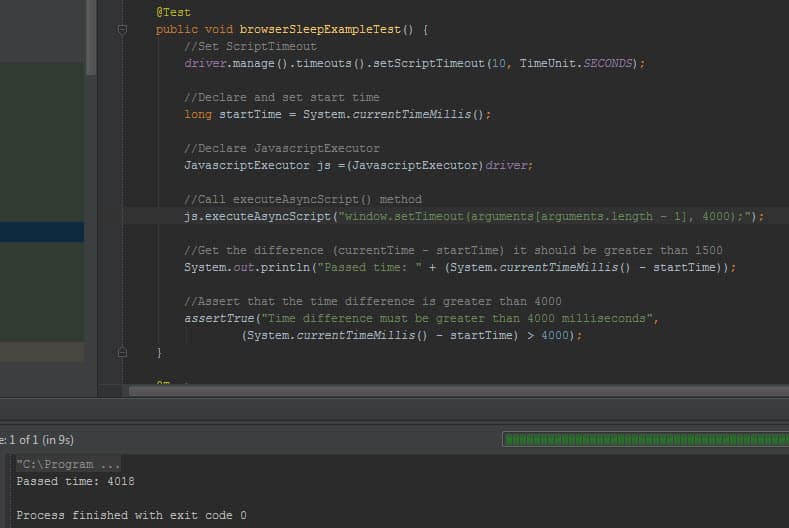
- I will subtract (current time – start time) = passed time
- Assert that passed time is greater than 4 seconds.
Test Code:
|
1
2
3
4
5
6
7
8
9
10
11
12
13
14
15
16
17
18
19
20
21
22
23
24
25
26
27
28
29
30
31
32
33
34
35
36
37
38
39
40
41
42
43
44
45
46
47
48
49
50
51
52
53
|
;
;
;
;
;
;
;
;
;
{
;
;
//Setup Driver
@BeforeClass
{
;
;
;
}
@Test
{
//Set ScriptTimeout
;
//Declare and set start time
;
//Declare JavascriptExecutor
;
//Call executeAsyncScript() method
;
//Get the difference (currentTime - startTime) it should be greater than 1500
;
//Assert that the time difference is greater than 4000
,
;
}
//Close Driver
@AfterClass
{
;
}
}
|
Console Output:
Second Example: Injecting a XMLHttpRequest with POST Method
Our test site is: http://phppot.com/demo/jquery-dependent-dropdown-list-countries-and-states/
It contains a getState(val) function to gather cities according to the country parameter.
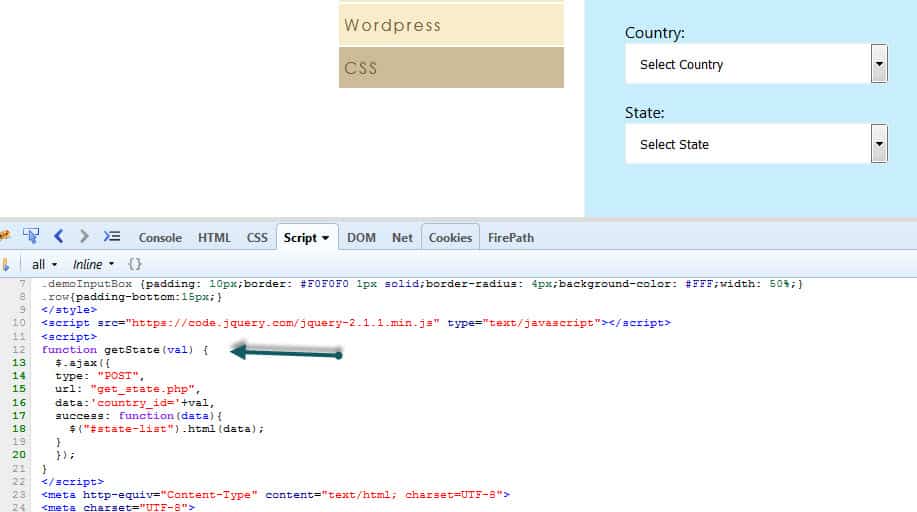
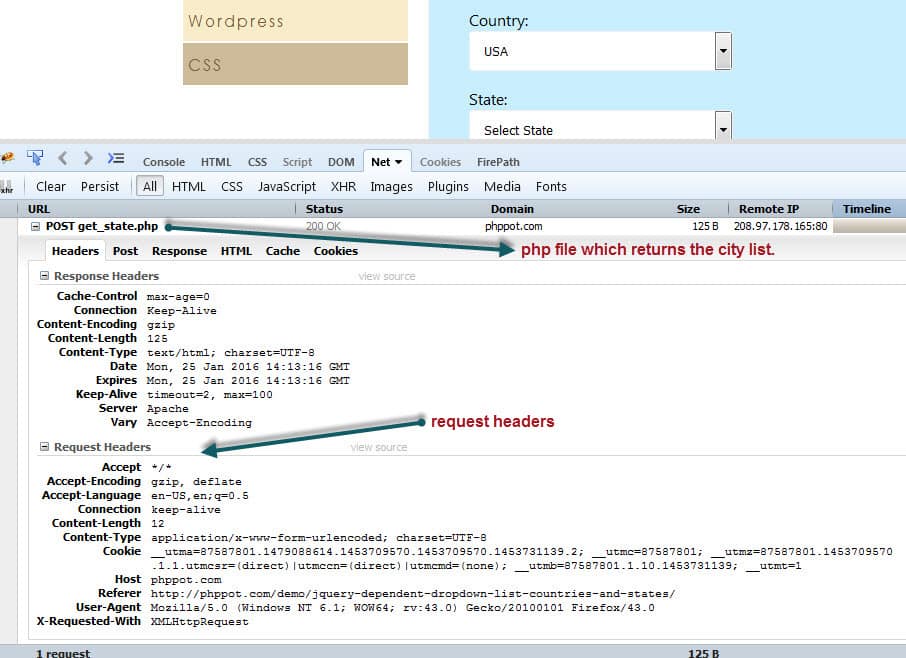
Before selecting country lets open Firefox or Chrome’s network tab and then select “USA” as a country.
Then you will see the POST request details as shown below:
Headers:
You can see the all details about headers as shown below.
Post:
Then click the POST tab to see parameters that we send by POST method. In this example our parameter is “country_id” and its value is “5”.

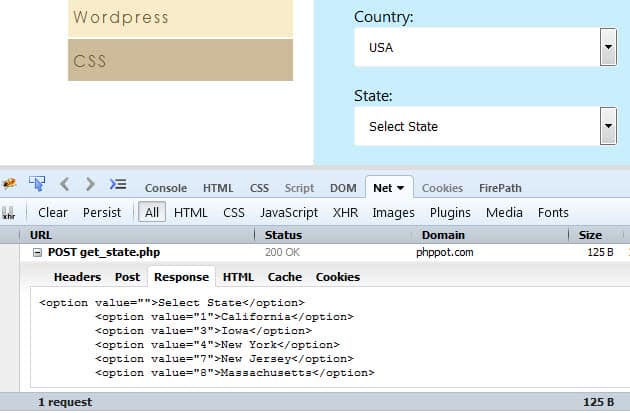
Response:
In this tab, you can see the response of the POST method.
Now it is time to test below scenario.
- Select USA as a country.
- Use executeAsyncScript() method to wait callback function executed. It signals that async execution has finished.
- Assert that response contains “New York”
Test Code:
|
1
2
3
4
5
6
7
8
9
10
11
12
13
14
15
16
17
18
19
20
21
22
23
24
25
26
27
28
29
30
31
32
33
34
35
36
37
38
39
40
41
42
43
44
45
46
47
48
49
50
51
52
53
54
55
56
57
58
59
60
61
62
63
64
65
66
67
68
69
70
71
72
73
74
75
76
77
78
79
80
81
82
|
;
;
;
;
;
;
;
;
;
;
;
/**
* Created by ONUR BASKIRT on 25.01.2016.
*/
{
;
;
//Setup Driver
@BeforeClass
{
;
;
;
}
@Test
{
;
//Set ScriptTimeout
;
//Declare JavascriptExecutor
;
//Injecting a XMLHttpRequest and waiting for the result
//Ref1: https://seleniumhq.github.io/selenium/docs/api/java/org/openqa/selenium/JavascriptExecutor.html
//Ref2: http://www.openjs.com/articles/ajax_xmlhttp_using_post.php
{
(
//Declare callback first!
+
//Declare url, parameters and method for POST
//Send country_id=5 (USA)
+
//url
//parameters
+
//Send the proper header information along with the request
+
+
+
//Call a function when the state changes.
+
+
+
+
+
;
{
;
}
//Assert that returned cities are related with USA
;
;
}
//Close Driver
@AfterClass
{
;
}
}
|
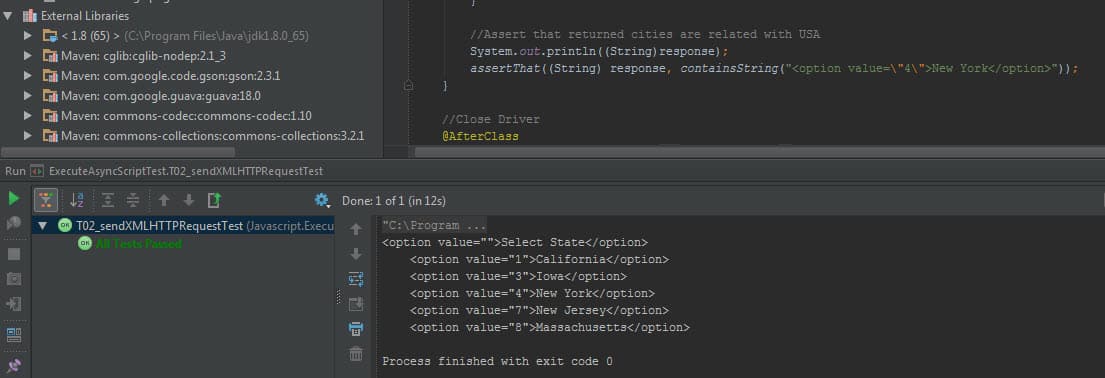
Console Output:
References
[1] https://seleniumhq.github.io/selenium/docs/api/java/org/openqa/selenium/JavascriptExecutor.html
Gained a lot of information and techniques through this article !
Very useful
Very good work!
Thanks a lot for sharing,
Can you share your thoughts on how to perform with DragAndDrop Action using javascript?
Hi Sampath,
Thanks for your valuable comments. I suggest you to check below two links.
Python Version: http://stackoverflow.com/questions/29381233/how-to-simulate-html5-drag-and-drop-in-selenium-webdriver#_=_
Java Version: https://github.com/vikramvi/Selenium-Java/commit/a1354ca5854315fded8fc80ba24a4717927d08c7
I have one question on selenium…..How to scroll up or down on modal pop-up window? When i try to scroll the modal pop-up by programmatically, it only scrolls the background page but not the modal pop-up. Anybody can help me on this?
Maybe you can try this with JAVASCRIPTEXECUTOR $(‘#yourmodal-id’).scrollTop($(‘#suggestDetails’).offset().top);
Also, please check this solutions on stackoverflow:
http://stackoverflow.com/questions/22709200/selenium-webdriver-scrolling-inside-a-div-popup
http://stackoverflow.com/questions/28212634/scrolling-to-a-element-in-bootstrap-modal-in-web-driver-is-not-working
Hello Onur,
Can you please help me understand what is wrong in the below mentioned
return (boolean) js.executeScript(“$(arguments[0]).hasAttribute($(arguments[1]))”, element, attr);…..element is the WebElement and attr is the attribute which I want to search in the element and js is the JavaScriptExecutor
Hi Amol,
Please try below code.
JavascriptExecutor js = (JavascriptExecutor) driver;
WebElement element = driver.findElement(By.linkText(“Click ME”)); //This should be your element
return js.executeScript(“arguments[0].hasAttribute(‘attr’)”,element);
Reference: http://stackoverflow.com/questions/19934703/how-to-use-javascript-to-set-attribute-of-selected-web-element-using-selenium-we
Hi Onur
I want to login to facebook and post. Able to login to facebook. Once i logged in, we have placeholder to post. It is being displayed as “What’s in your mind”.
I am able to control the container through javascript executor but unable to click. It means we have to make the container to be active to click. Do we really need to use Javascript executor or any other way to click and post in facebook (our) home page. Can i request you to clarify? Please do the needful. Please input facebook credentials to run this below code.
import org.openqa.selenium.By;
import org.openqa.selenium.JavascriptExecutor;
import org.openqa.selenium.WebDriver;
import org.openqa.selenium.WebElement;
import org.openqa.selenium.firefox.FirefoxDriver;
import org.openqa.selenium.interactions.Actions;
import org.openqa.selenium.support.ui.ExpectedConditions;
import org.openqa.selenium.support.ui.WebDriverWait;
public class FBTextArea {
WebDriver driver;
public FBTextArea()
{
driver = new FirefoxDriver();
}
private void login(String userName, String password)
{
driver.get(“http://www.facebook.com”);
driver.findElement(By.id(“email”)).sendKeys(userName);
driver.findElement(By.id(“pass”)).sendKeys(password);
driver.findElement(By.id(“loginbutton”)).click();
}
private WebElement waitAndGet(By by)
{
WebDriverWait wait = new WebDriverWait(driver, 30);
return wait.until(ExpectedConditions.visibilityOfElementLocated(by));
}
public void textAreaPostActions()
{
JavascriptExecutor js = (JavascriptExecutor) driver;
js.executeScript(“document.getElementById(‘feedx_container’).style.display=’block'”);
js.executeScript(“arguments[0].click();”, driver.findElement(By.xpath(“//div[@class=’_1mf _1mj’]”)));
}
public static void main(String[] args) {
FBTextArea Fbt = new FBTextArea();
Fbt.login(“”,””);
Fbt.textAreaPostActions();
}
}
Hi Sri,
As I know you are doing the right. I really could not figure out whats wrong with that solution. Maybe it is better to put some breakpoints and some debugging texts in your code and examine the problem. If you find a solution, please let us know. One more thing if the page use AJAX call, it is better to wait it with Jquery active property as shown below. Reference: http://stackoverflow.com/questions/33348600/selenium-wait-for-ajax-content-to-load-universal-approach
public boolean waitForJSandJQueryToLoad() {
WebDriverWait wait = new WebDriverWait(driver, 30);
// wait for jQuery to load
ExpectedCondition jQueryLoad = new ExpectedCondition() {
@Override
public Boolean apply(WebDriver driver) {
try {
return ((Long)((JavascriptExecutor)getDriver()).executeScript(“return jQuery.active”) == 0);
}
catch (Exception e) {
// no jQuery present
return true;
}
}
};
// wait for Javascript to load
ExpectedCondition jsLoad = new ExpectedCondition() {
@Override
public Boolean apply(WebDriver driver) {
return ((JavascriptExecutor)getDriver()).executeScript(“return document.readyState”)
.toString().equals(“complete”);
}
};
return wait.until(jQueryLoad) && wait.until(jsLoad);
}