We have seen in the Code-First Convention section that Code-First creates {Class Name}_{Primary Key} foreign key column if you have not included foreign key property in a parent class. The InverseProperty attribute is used when you have multiple relationships between classes.
Consider the following example.
public class Student
{
    public Student()
    {

    }
    public int StudentID { get; set; }
    public string StudentName { get; set; }

    public Standard CurrentStandard { get; set; }
    public Standard PreviousStandard { get; set; }
}

public class Standard
{
    public Standard()
    {

    }
    public int StandardId { get; set; }
    public string StandardName { get; set; }

    public ICollection<Student> CurrentStudents { get; set; }
    public ICollection<Student> PreviousStudents { get; set; }

    }
As you can see in the above example, Student class includes two navigation properties to Standard class. The same way Standard class includes two collection navigation properties for Student. Code-First creates four columns for this relationship, as shown below.
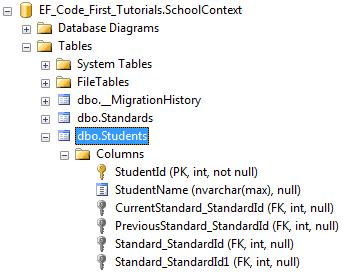
InverseProperty overrides this convention and specifies alignment of the properties. The following example uses InverseProperty in Standard class to fix this problem.
public class Student
{
    public Student()
    {

    }
    public int StudentID { get; set; }
    public string StudentName { get; set; }

    public Standard CurrentStandard { get; set; }
    public Standard PreviousStandard { get; set; }
}

public class Standard
{
    public Standard()
    {

    }
    public int StandardId { get; set; }
    public string StandardName { get; set; }

    [InverseProperty("CurrentStandard")]
    public ICollection<Student> CurrentStudents { get; set; }

    [InverseProperty("PreviousStandard")]
        public ICollection<Student> PreviousStudents { get; set; }

    }
As you can see in the above example, we have applied InverseProperty attribute to CurrentStudents & PreviousStudents property and specify which reference property of Student class it belongs to. Now, Code-First will create only two foreign key column in Student table as shown below.
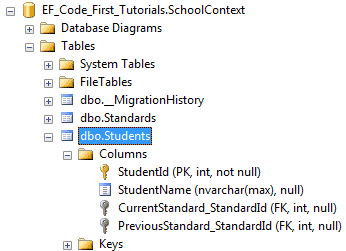
You can also use ForeignKey attribute to include foreign key property with different name as shown below.
public class Student
{
    public Student()
    {

    }
    public int StudentID { get; set; }
    public string StudentName { get; set; }

    public int CurrentStandardId { get; set; }
    public int PreviousStandardId { get; set; }

    [ForeignKey("CurrentStandardId")]
    public Standard CurrentStandard { get; set; }

    [ForeignKey("PreviousStandardId")]
    public Standard PreviousStandard { get; set; }
}

public class Standard
{
    public Standard()
    {

    }
    public int StandardId { get; set; }
    public string StandardName { get; set; }

    [InverseProperty("CurrentStandard")]
    public ICollection<Student> CurrentStudents { get; set; }

    [InverseProperty("PreviousStandard")]
    public ICollection<Student> PreviousStudents { get; set; }

}
The above example will create the following columns.
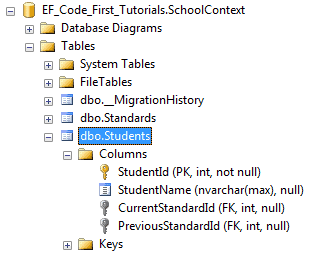
Thus, you can use InverseProperty and ForeignKey attribute for multiple relationships between the same classes.