导读
1. 如何添加自定义的claims.
前请提要
目前我们拥有了三个web应用.
- localhost:40010, 验证服务器
- localhost:40011, mvc客户端, 充当webapp请求者
- localhost:40012, webapi, 资源, 受到验证服务器的保护
在http://localhost:40011/Home/secure登录之后, 我们看到了很多的claims, 其中有name, ( 来自aspnetUsers表的userName字段)
那么, 如果我想在accesstoken中增加其他的字段呢, 比如, 用户头像url, 性别等等
那么下面我们开始工作
打开验证服务器(这次只需要修改验证服务器)的Model/ApplicationUser文件, 添加两个字段
然后去对应的数据表增加两个字段.
新增一个ProfileService继承自IdentityServer4.Services.IProfileService
public class CustomProfileService : IProfileService
    {
        private readonly IUserClaimsPrincipalFactory<ApplicationUser> _claimsFactory;
        private readonly UserManager<ApplicationUser> _userManager;

        public CustomProfileService(UserManager<ApplicationUser> userManager, IUserClaimsPrincipalFactory<ApplicationUser> claimsFactory)
        {
            _userManager = userManager;
            _claimsFactory = claimsFactory;
        }

        public async Task GetProfileDataAsync(ProfileDataRequestContext context)
        {
            //获得登录用户的ID
            var sub = context.Subject.GetSubjectId();
            var user = await _userManager.FindByIdAsync(sub);
            //创建一个以当前用户为主体的凭证
            var principal = await _claimsFactory.CreateAsync(user);

            var claims = principal.Claims.ToList();
            //idsv服务器的默认claim
            claims = claims.Where(claim => context.RequestedClaimTypes.Contains(claim.Type)).ToList();

            //自定义claims区间
            claims.Add(new Claim(JwtClaimTypes.GivenName, user.UserName));
            claims.Add(new Claim("headimgurl", user.HeadImgUrl));
            claims.Add(new Claim("gender", user.Gender));

            //设置claims
            context.IssuedClaims = claims;

        }

        public async Task IsActiveAsync(IsActiveContext context)
        {
            var sub = context.Subject.GetSubjectId();
            var user = await _userManager.FindByIdAsync(sub);
            context.IsActive = user != null;
        }
    }
然后在Startup的注册idsv的地方添加自定义的ProfileService的注入即可
services.AddIdentityServer()
.AddDeveloperSigningCredential()
.AddInMemoryPersistedGrants()
.AddInMemoryIdentityResources(AuthorizationConfig.GetIdentityResources())
.AddInMemoryApiResources(AuthorizationConfig.ApiResources())
.AddInMemoryClients(AuthorizationConfig.Clients())
.AddAspNetIdentity<ApplicationUser>()
.AddProfileService<CustomProfileService>();

运行起所有的服务
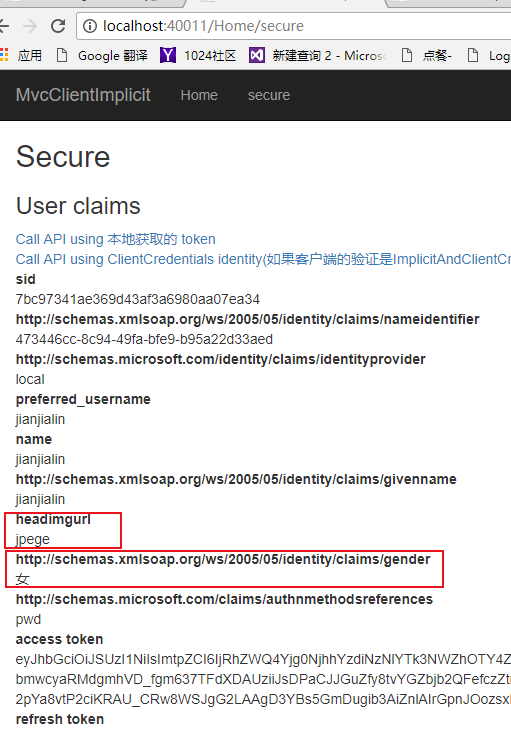
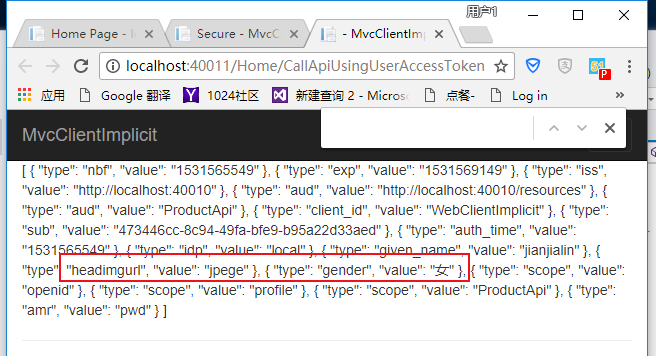
左图是mvc客户端读取的自定义claims, 右侧是在mvc客户端去请求受保护的webapi后, webapi拿到的信息
注意
通过ProfileService的使用, 可以不受管制地向客户端发送claims.
这是什么意思如何理解呢?
在我们的idsv的配置类中, 有IdentityResources, 有Clients, 有apiResources, 这些配置限制了客户端能请求到的服务器资源.
在客户端程序中的startup中, 我们能看到一句代码
这就是客户端添加能访问的资源的地方. 我们将在以后的consent授权页面去细说这方面的知识
那么, 通过profileservice颁发的claims, 任意clients都能拿到
