原文:https://www.yuque.com/yuejiangliu/dotnet/cvmvr9
04 建立 IdentityServer4 项目,Client Credentials.mp4 (159.9 MB)
大纲:
- 介绍 ldentityServer4
- 搭建 IdentityServer4 项目
- 保护客户端:使用 OAuth 2.0 Client Credentials
IdentityServer4
Terminology。
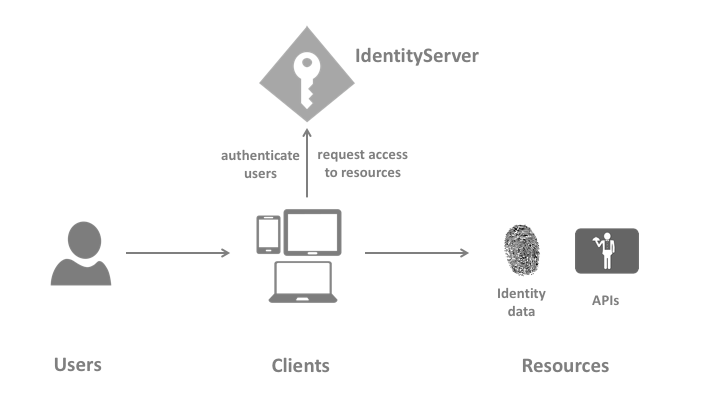
Terminology 配图)
IdentityServer4 是一个 OpenID Connect provider,它的主要功能包括:
- protect your resources
- authenticate users using a local account store or via an external identity provider
- provide session management and single sign-on(单点登录)
- manage and authenticate clients
- issue identity and access tokens to clients
- validate tokens
Packaging and Builds 里面列出了 IdentityServer 4 相关的包的位置。
搭建 IdentityServer4 项目
- QuickStarts/Overview
- IdentityServer4.Templates
- IdentityServer4.Samples
通过 dotnet new is4inmem --name Idp 命令创建一个 IdentityServer4 with In-Memory Stores and Test Users 项目。
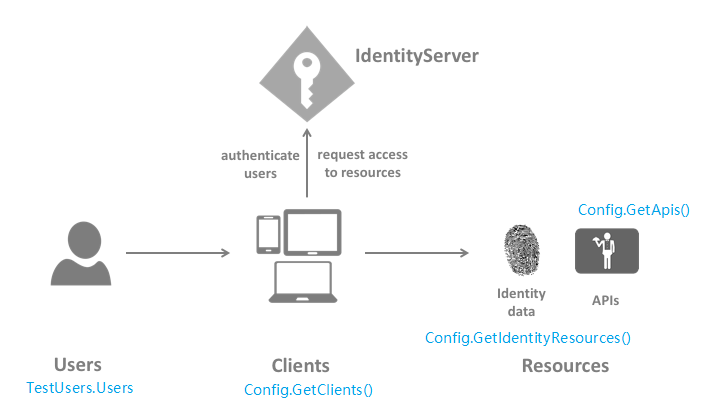
查看项目 Startup ConfigureServices 的代码,依次匹配官方示意图中的每个部分。
var builder = services.AddIdentityServer(options =>
{
    options.Events.RaiseErrorEvents = true;
    options.Events.RaiseInformationEvents = true;
    options.Events.RaiseFailureEvents = true;
    options.Events.RaiseSuccessEvents = true;
})
    .AddTestUsers(TestUsers.Users);

// in-memory, code config
builder.AddInMemoryIdentityResources(Config.GetIdentityResources());
builder.AddInMemoryApiResources(Config.GetApis());

builder.AddInMemoryClients(Config.GetClients());
使用 OAuth 2.0 Client Credentials
官方文档“创建 Console 客户端,通过 Client Credentials 向 IdentityServer 请求 Access Token,并访问受保护资源”。
The Client Credentials grant is used when applications request an access token to access their own resources, not on behalf of a user.
C# 7.1 异步的 Main 方法
创建 console client 时通过在 csproj 里面指定 Language Version 使项目支持异步的 Main 方法:
<Project Sdk="Microsoft.NET.Sdk">
  <PropertyGroup>
    <OutputType>Exe</OutputType>
    <TargetFramework>netcoreapp2.2</TargetFramework>
    <LangVersion>latest</LangVersion>
  </PropertyGroup>
  ...
</Project>
老写法:
static void Main(string[] args)
{
    var client = new HttpClient();
    Task.Run(async () =>
    {
        var disco = await client.GetDiscoveryDocumentAsync("http://localhost:5000/");
    }).GetAwaiter().GetResult();
}