一、flink处理的主要过程
从上一节wordcount的示例可以看到,flink的处理过程分为下面3个步骤:
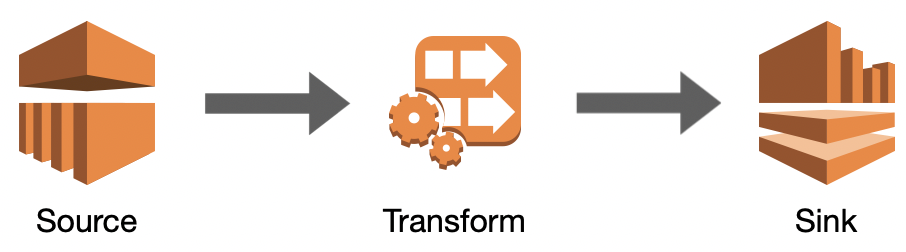
1.1 、添加数据源addSource,这里的数据源可以是文件,网络数据流,MQ,Mysql...
1.2、数据转换(或者称为数据处理),比如wordcount里的处理过程,就是把一行文本,按空格拆分成单词,并按单词计数
1.3、将处理好的结果,输出(或下沉)到目标系统,这里的目标系统,可以是控制台、MQ、Redis、Mysql、ElasticSearch...
可能有同学有疑问,上节wordcount里,最后的结果只是调用了1个print方法,好象并没有addSink的过程?
org.apache.flink.streaming.api.datastream.DataStream#print() 可以看下这个方法的源码:
	/**
	 * Writes a DataStream to the standard output stream (stdout).
	 *
	 * <p>For each element of the DataStream the result of {@link Object#toString()} is written.
	 *
	 * <p>NOTE: This will print to stdout on the machine where the code is executed, i.e. the Flink
	 * worker.
	 *
	 * @return The closed DataStream.
	 */
	@PublicEvolving
	public DataStreamSink<T> print() {
		PrintSinkFunction<T> printFunction = new PrintSinkFunction<>();
		return addSink(printFunction).name("Print to Std. Out");
	}
其实最后1行,就已经调用了addSink
二、kafka基本操作
下面将把之前WordCount的流式处理版本,其中的Source与Sink改成常用的Kafka:
注:不熟悉kafka的同学,可以参考下面的步骤学习kafka的常用命令行(kafka老手可跳过)
到kafka官网下载最新的版本,并解压到本机。
2.1 启动zookeeper
.\zookeeper-server-start.bat ..\..\config\zookeeper.properties
2.2 启动kafka
.\kafka-server-start.bat ..\..\config\server.properties
2.3 查看topic list
.\kafka-topics.bat --list --zookeeper localhost:2181
2.4 启动procduer
.\kafka-console-producer.bat --broker-list localhost:9092 --topic test1
2.5 启动consumer
.\kafka-console-consumer.bat --bootstrap-server localhost:9092 --topic test1
添加Source
1 <dependency>
2     <groupId>org.apache.flink</groupId>
3     <artifactId>flink-connector-kafka-0.11_2.12</artifactId>
4     <version>1.11.2</version>
5 </dependency>
代码: