1. 安装libunwind
|
cd /usr/local/src wget http://download.savannah.gnu.org/releases/libunwind/libunwind-1.2-rc1.tar.gz tar -zxf libunwind-1.2-rc1.tar.gz cd libunwind-1.2-rc1 sh autogen.sh ./configure make make install cd .. rm -rf libunwind-1.2-rc1 |
2. 安装cli
|
wget https://dotnetcli.blob.core.windows.net/dotnet/beta/Binaries/Latest/dotnet-centos-x64.latest.tar.gz tar -zxf dotnet-centos-x64.latest.tar.gz mkdir /usr/dotnet mv bin /usr/dotnet vi ~/.bash_profile |
在export PATH前加入新行
PATH=$PATH:/usr/dotnet/bin
保存退出
source ~/.bash_profile
3. 测试cli
|
dotnet --version |

4. 使用cli
|
mkdir ~/temp cd ~/temp dotnet new dotnet restore --configfile=temp/NuGet.config dotnet run |

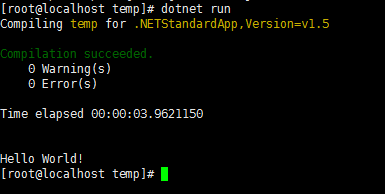
5. 编译和发布
| dotnet build dotnet publish |
build和publish的时候都可以加些参数,具体可看帮助,没有太研究。