本文以一个生成、获取“客户列表”的demo来介绍如何用js调用wcf,以及遇到的各种问题。
1.1 定义接口
创建一个接口,指定用json的格式:
![]()
[ServiceContract]
interface IQueue
{
[OperationContract]
[WebInvoke(Method = "
POST", BodyStyle = WebMessageBodyStyle.Wrapped, RequestFormat = WebMessageFormat.Json, ResponseFormat = WebMessageFormat.Json)]
void Add(string roomName);
[OperationContract]
[WebGet(ResponseFormat=WebMessageFormat.Json)]
List<string> GetAll();
}
.
1.2 接口实现
实现上面的接口,并加上AspNetCompatibilityRequirements 和 JavascriptCallbackBehavior :
.
![]()
[AspNetCompatibilityRequirements(RequirementsMode = AspNetCompatibilityRequirementsMode.Allowed)]
[JavascriptCallbackBehavior(UrlParameterName = "
callback")]
public class Queue : IQueue
{
static readonly ObjManager<string, ClientQueue> m_Queues;
static Queue()
{
m_Queues =
new ObjManager<string, ClientQueue>();
}
public void Add(string roomName)
{
m_Queues.Add(roomName,
new ClientQueue() { CreateTime = DateTime.Now });
}
public List<string> GetAll()
{
return m_Queues.GetAllQueues().OrderBy(q => q.Value.CreateTime).Select(q => q.Key).ToList();
}
}
.
这里使用了一个静态的构造函数,这样它就只会被调用一次,以免每次调用时都会初始化队列。
1.3 定义服务
添加一个wcf service, 就一行:
<%@ ServiceHost Language="C#" Debug="true" Service="Youda.WebUI.Service.Impl.Queue" CodeBehind="~/Service.Impl/Queue.cs" %>
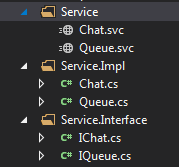
整体结构如下:

.
2 调用WCF
客户端调用Add方法,创建一组对话:
.
![]()
var data = { 'roomName': clientID };
$.ajax({
type: "
POST",
url: "
Service/Queue.svc/Add",
data: JSON.stringify(data),
contentType: "
application/json; charset=utf-8",
dataType: "
json",
processData:
true,
success:
function (msg) {
ServiceSucceeded(msg);
},
error: ServiceFailed
});
.
客服端取所有的客户:
.
![]()
$.ajax({
type: "
GET",
url: "
Service/Queue.svc/GetAll",
contentType: "
application/json; charset=utf-8",
dataType: "
json",
processData:
true,
success:
function (result) {
ServiceSucceeded(result);
},
error: ServiceFailed
});
.
3 配置
webconfig配置如下:
.
![]()
<system.serviceModel>
<serviceHostingEnvironment aspNetCompatibilityEnabled="
true" multipleSiteBindingsEnabled="
true" minFreeMemoryPercentageToActivateService="
0" />
<bindings>
<webHttpBinding>
<binding
name="
HttpBind" openTimeout="
00:10:00" sendTimeout="
00:10:00"
maxBufferSize="
5242880" maxBufferPoolSize="
5242880" maxReceivedMessageSize="
5242880"
crossDomainScriptAccessEnabled="
true" />
<binding
name="
HttpsBind" sendTimeout="
00:10:00" maxBufferSize="
5242880"
maxReceivedMessageSize="
5242880" crossDomainScriptAccessEnabled="
true">
<security mode="
Transport">
<transport clientCredentialType="
None" />
</security>
</binding>
</webHttpBinding>
</bindings>
<behaviors>
<endpointBehaviors>
<behavior
name="
web">
<webHttp helpEnabled="
true" />
</behavior>
</endpointBehaviors>
<serviceBehaviors>
<behavior
name="
ServiceBehavior">
<serviceMetadata httpGetEnabled="
true" httpsGetEnabled="
true" />
<serviceDebug includeExceptionDetailInFaults="
true" />
</behavior>
<behavior
name="
web">
<serviceDebug includeExceptionDetailInFaults="
true" />
<serviceMetadata httpGetEnabled="
true" httpsGetEnabled="
true" />
</behavior>
</serviceBehaviors>
</behaviors>
<services>
<service behaviorConfiguration="
ServiceBehavior"
name="
Youda.WebUI.Service.Impl.Queue">
<endpoint address="" behaviorConfiguration="
web" binding="
webHttpBinding"
bindingConfiguration="
HttpBind"
name="
HttpBind" contract="
Youda.WebUI.Service.Interface.IQueue" />
<endpoint behaviorConfiguration="
web" binding="
webHttpBinding"
bindingConfiguration="
HttpsBind"
name="
httpsBind" contract="
Youda.WebUI.Service.Interface.IQueue" />
</service>
<service behaviorConfiguration="
ServiceBehavior"
name="
Youda.WebUI.Service.Impl.Chat">
<endpoint address="" behaviorConfiguration="
web" binding="
webHttpBinding"
bindingConfiguration="
HttpBind"
name="
HttpBind" contract="
Youda.WebUI.Service.Interface.IChat" />
<endpoint behaviorConfiguration="
web" binding="
webHttpBinding"
bindingConfiguration="
HttpsBind"
name="
HttpsBind" contract="
Youda.WebUI.Service.Interface.IChat" />
</service>
</services>
</system.serviceModel>
.
4 遇到的各种坑
4.1 Status 为 200, status text为 ok, 但报错
http STATUS 是200,但是回调的却是error方法
查了下资料,应该是dataType的原因,dataType为json,但是返回的data不是json格式
于是将ajax方法里把参数dataType:"json"去掉就ok了
4.2 Json 数据请求报错(400 错误 )
详细的错误信息如下:
Service call failed:
status: 400 ; status text: Bad Request ; response text: <?xml version="1.0" encoding="utf-8"?>
The server encountered an error processing the request. The exception message is 'The formatter threw an exception while trying to deserialize the message: There was an error while trying to deserialize parameter http://tempuri.org/:content. The InnerException message was 'There was an error deserializing the object of type System.String. Encountered invalid character…
解决方法是,要用JSON.stringify把data转一下,跟
data: '{"clientID":"' + clientID + '", "serviceID":"' + serviceID + '", "content":"' + content + '"}',
这样与拼是一样的效果,但明显简单多了
参考上面Add方法的调用。
4.3 参数没传进wcf方法里
调试进了这个方法,但参数全为空,发现用的是webget,改成post后就行了
[OperationContract]
[WebInvoke(Method = "POST", RequestFormat = WebMessageFormat.Json, BodyStyle = WebMessageBodyStyle.Wrapped, ResponseFormat = WebMessageFormat.Json)]
List<string> GetMsg(string clientID, int count);
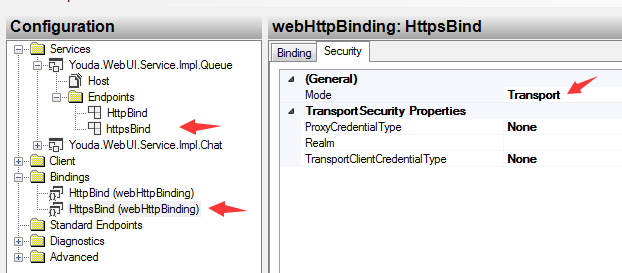
4.4 使用https时遇到了404 、 500的错误
先添加https的binding:

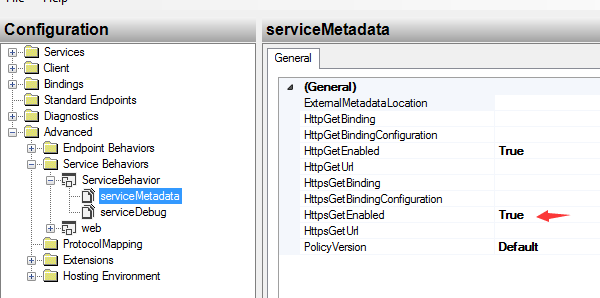
再设置下Service Behaviors:

详细的配置,可参考上面的完整文本配置
4.5 其它配置
时间设置长点, size设置大点:
<binding name="HttpBind" openTimeout="00:10:00" sendTimeout="00:10:00"
maxBufferSize="5242880" maxBufferPoolSize="5242880" maxReceivedMessageSize="5242880"
crossDomainScriptAccessEnabled="true" />
使用webHttpBinding 的binding;name和 contract 要写全:
<service behaviorConfiguration="ServiceBehavior" name="Youda.WebUI.Service.Impl.Queue">
<endpoint address="" behaviorConfiguration="web" binding="webHttpBinding"
bindingConfiguration="HttpBind" name="HttpBind" contract="Youda.WebUI.Service.Interface.IQueue" />
一步一步搭建客服系统
.