在html文件使用字体图标并且预览时正常,但是启动工程后显示不正常,浏览器调试界面显示字体文件无法decode:
Failed to decode downloaded font: xxxxx
如图所示:
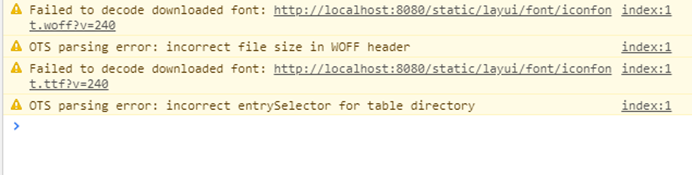
显示结果:

原因:经过maven的filter,会破坏font文件的二进制文件格式,导致前台解析出错。
解决办法:在pom文件中配置maven的filter,在<build>标签内添加如下配置:
       <resources>
            <resource>
                <directory>src/main/resources</directory>
                <excludes>
                    <!--<exclude>reference</exclude>-->
                    <exclude>static/**/*</exclude>
                    <!--<exclude>MyBatisGeneratorConfig.xml</exclude>-->
                </excludes>
                <filtering>true</filtering>
            </resource>
            <resource>
                <directory>src/main/resources</directory>
                <includes>
                    <include>static/**/*</include>
                </includes>
                <filtering>false</filtering>
            </resource>
        </resources>
然后清除服务端缓存(mvn clean)与浏览器缓存即可。