当安装 4.8 遇到错误:
Number of applicable items: 6

Exe (D:\ad09fc0d5edc03b1c1fa0ff76cea\SetupUtility.exe) succeeded.
Exe Log File: dd_SetupUtility.txt

Exe (D:\ad09fc0d5edc03b1c1fa0ff76cea\SetupUtility.exe) succeeded.
Exe Log File: dd_SetupUtility.txt

Exe (D:\ad09fc0d5edc03b1c1fa0ff76cea\x64-Windows10.0-KB4486153-x64.cab) failed with 0x80092004 - 找不到对象或属性。 .
Exe Log File: CBS.log

Final Result: Installation failed with error code: (0x80092004), "找不到对象或属性。 "
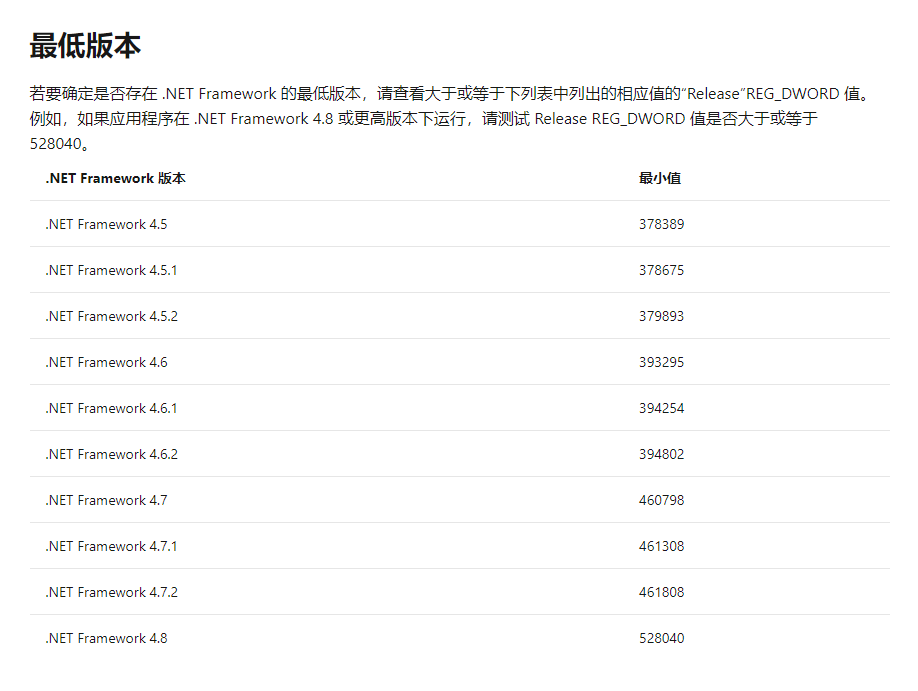
请不要慌张,也许您的电脑已经安装了 .NET Framework 4.8,请根据以下文章检查下已安装的 .NET Framework 版本
在运行中输入 regedit,找到 HKEY_LOCAL_MACHINE\SOFTWARE\Microsoft\NET Framework Setup\NDP\v4\Full 中的 Release 数字