前言
想必小伙伴都经历过,当你想要把PDF转为WORD时,自己打字赫赫甩在你眼前:

不充钱就想白嫖??想得美~ 然而,博主是不会退缩的,毕竟迎难而上是传统美德。于是,今天的主题出来了:用python写一个PDF转WORD的小工具(基于某网站接口)。
一、思路分析
网上一搜,你可以发现很多PDF转换的工具,其中不乏在线转换的网站,比如这样的:
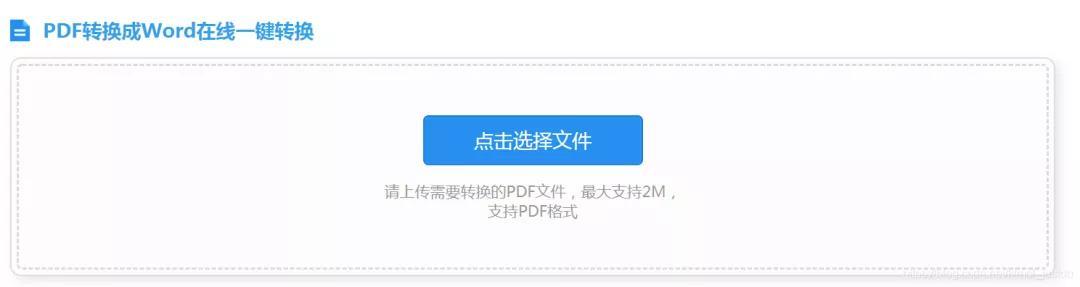
那么,通过网站提供的测试接口,我们便可以通过爬虫模拟的方式实现转换。 没有错了~思路就是如此的简单明了,今天的主角便是:
https://app.xunjiepdf.com
通过抓包分析,知道这是一个POST请求,接下来用requests库模拟即可。 需要注意的是,这个接口仅用于测试,所以可供转换的页面等都有所限制,如需更完整的功能还请支持原版。
二、我的代码
正所谓一万个coders,就有一万种codes,以下为我的代码,仅供参考。 导入相关库:
import time
import requests
定义PDF2Word类:
class PDF2Word():
    def __init__(self):
        self.machineid = \'ccc052ee5200088b92342303c4ea9399\'
        self.token = \'\'
        self.guid = \'\'
        self.keytag = \'\'
    #2020最新python学习资源分享:1156465813
    def produceToken(self):
        url = \'https://app.xunjiepdf.com/api/producetoken\'
        headers = {
                \'User-Agent\': \'Mozilla/5.0 (Windows NT 6.3; Win64; x64; rv:76.0) Gecko/20100101 Firefox/76.0\',
                \'Accept\': \'application/json, text/javascript, */*; q=0.01\',
                \'Accept-Language\': \'zh-CN,zh;q=0.8,zh-TW;q=0.7,zh-HK;q=0.5,en-US;q=0.3,en;q=0.2\',
                \'Content-Type\': \'application/x-www-form-urlencoded; charset=UTF-8\',
                \'X-Requested-With\': \'XMLHttpRequest\',
                \'Origin\': \'https://app.xunjiepdf.com\',
                \'Connection\': \'keep-alive\',
                \'Referer\': \'https://app.xunjiepdf.com/pdf2word/\',}
        data = {\'machineid\':self.machineid}
        res = requests.post(url,headers=headers,data=data)
        res_json = res.json()
        if res_json[\'code\'] == 10000:
            self.token = res_json[\'token\']
            self.guid = res_json[\'guid\']
            print(\'成功获取token\')
            return True
        else:
            return False

    def uploadPDF(self,filepath):
        filename = filepath.split(\'/\')[-1]
        files = {\'file\': open(filepath,\'rb\')}
        url = \'https://app.xunjiepdf.com/api/Upload\'
        headers = {
                \'User-Agent\': \'Mozilla/5.0 (Windows NT 6.3; Win64; x64; rv:76.0) Gecko/20100101 Firefox/76.0\',
                \'Accept\': \'*/*\',
                \'Accept-Language\': \'zh-CN,zh;q=0.8,zh-TW;q=0.7,zh-HK;q=0.5,en-US;q=0.3,en;q=0.2\',
                \'Content-Type\': \'application/pdf\',
                \'Origin\': \'https://app.xunjiepdf.com\',
                \'Connection\': \'keep-alive\',
                \'Referer\': \'https://app.xunjiepdf.com/pdf2word/\',}
        params = (
                (\'tasktype\', \'pdf2word\'),
                (\'phonenumber\', \'\'),
                (\'loginkey\', \'\'),
                (\'machineid\', self.machineid),
                (\'token\', self.token),
                (\'limitsize\', \'2048\'),
                (\'pdfname\', filename),
                (\'queuekey\', self.guid),
                (\'uploadtime\', \'\'),
                (\'filecount\', \'1\'),
                (\'fileindex\', \'1\'),
                (\'pagerange\', \'all\'),
                (\'picturequality\', \'\'),
                (\'outputfileextension\', \'docx\'),
                (\'picturerotate\', \'0,undefined\'),
                (\'filesequence\', \'0,undefined\'),
                (\'filepwd\', \'\'),
                (\'iconsize\', \'\'),
                (\'picturetoonepdf\', \'\'),
                (\'isshare\', \'0\'),
                (\'softname\', \'pdfonlineconverter\'),
                (\'softversion\', \'V5.0\'),
                (\'validpagescount\', \'20\'),
                (\'limituse\', \'1\'),
                (\'filespwdlist\', \'\'),
                (\'fileCountwater\', \'1\'),
                (\'languagefrom\', \'\'),
                (\'languageto\', \'\'),
                (\'cadverchose\', \'\'),
                (\'pictureforecolor\', \'\'),
                (\'picturebackcolor\', \'\'),
                (\'id\', \'WU_FILE_1\'),
                (\'name\', filename),
                (\'type\', \'application/pdf\'),
                (\'lastModifiedDate\', \'\'),
                (\'size\', \'\'),)
        res= requests.post(url,headers=headers,params=params,files=files)
        res_json = res.json()
        if res_json[\'message\'] == \'上传成功\':
            self.keytag = res_json[\'keytag\']
            print(\'成功上传PDF\')
            return True
        else:
            return False

    def progress(self):
        url = \'https://app.xunjiepdf.com/api/Progress\'
        headers = {
                \'User-Agent\': \'Mozilla/5.0 (Windows NT 6.3; Win64; x64; rv:76.0) Gecko/20100101 Firefox/76.0\',
                \'Accept\': \'text/plain, */*; q=0.01\',
                \'Accept-Language\': \'zh-CN,zh;q=0.8,zh-TW;q=0.7,zh-HK;q=0.5,en-US;q=0.3,en;q=0.2\',
                \'Content-Type\': \'application/x-www-form-urlencoded; charset=UTF-8\',
                \'X-Requested-With\': \'XMLHttpRequest\',
                \'Origin\': \'https://app.xunjiepdf.com\',
                \'Connection\': \'keep-alive\',
                \'Referer\': \'https://app.xunjiepdf.com/pdf2word/\',}
        data = {
              \'tasktag\': self.keytag,
              \'phonenumber\': \'\',
              \'loginkey\': \'\',
              \'limituse\': \'1\'}
        res= requests.post(url,headers=headers,data=data)
        res_json = res.json()
        if res_json[\'message\'] == \'处理成功\':
            print(\'PDF处理完成\')
            return True
        else:
            print(\'PDF处理中\')
            return False

    def downloadWord(self,output):
        url = \'https://app.xunjiepdf.com/download/fileid/%s\'%self.keytag
        res = requests.get(url)
        with open(output,\'wb\') as f:
            f.write(res.content)
            print(\'PDF下载成功("%s")\'%output)

    def convertPDF(self,filepath,outpath):
        filename = filepath.split(\'/\')[-1]
        filename = filename.split(\'.\')[0]+\'.docx\'
        self.produceToken()
        self.uploadPDF(filepath)
        while True:
            res = self.progress()
            if res == True:
                break
            time.sleep(1)
        self.downloadWord(outpath+filename)
执行主函数:
if __name__==\'__main__\':
    pdf2word = PDF2Word()
    pdf2word.convertPDF(\'001.pdf\',\'\')
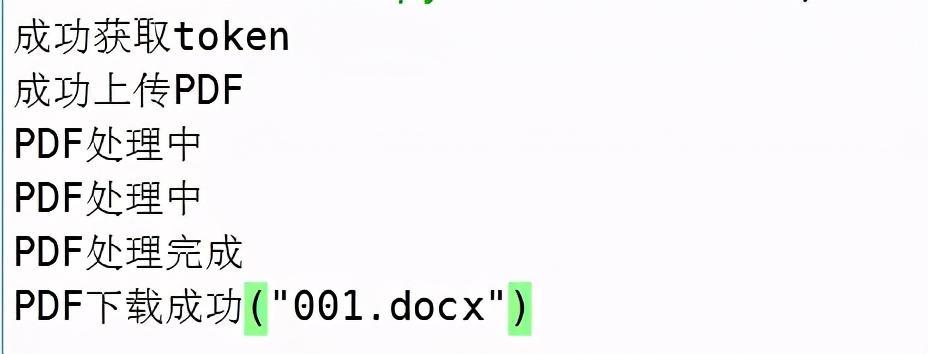
注意:convertPDF函数有两个参数,第一个为需要转换的PDF,第二个参数为转换后的目录。 run一下,一键入魂,".docx"文件已经躺在了我的目录中,舒服了~
三.运行结果
注意:如果你是打算找python高薪工作的话。我建议你多写点真实的企业项目积累经验。不然工作都找不到,当然很多人没进过企业,怎么会存在项目经验呢? 所以你得多找找企业项目实战多练习下撒。如果你很懒不想找,也可以进我的Python交流圈:1156465813。群文件里面有我之前在做开发写过的一些真实企业项目案例。你可以拿去学习,不懂都可以在裙里找我,有空会耐心给你解答下。
以下内容无用,为本篇博客被搜索引擎抓取使用
(* ̄︶ ̄)(* ̄︶ ̄)(* ̄︶ ̄)(* ̄︶ ̄)(* ̄︶ ̄)(* ̄︶ ̄)(* ̄︶ ̄)(* ̄︶ ̄)
python 是干什么的 零基础学 python 要多久 python 为什么叫爬虫
python 爬虫菜鸟教程 python 爬虫万能代码 python 爬虫怎么挣钱
python 基础教程 网络爬虫 python python 爬虫经典例子
python 爬虫
(* ̄︶ ̄)(* ̄︶ ̄)(* ̄︶ ̄)(* ̄︶ ̄)(* ̄︶ ̄)(* ̄︶ ̄)(* ̄︶ ̄)(* ̄︶ ̄)
以上内容无用,为本篇博客被搜索引擎抓取使用