一、前言
自从之前写了一篇《Webapi文档描述-swagger优化》这篇文章后,欠了大家一篇使用文档的说明,现在给大家补上哈。
二、环境
- .Net Framework 4.5
- WebApi 2
- SwashbuckleEx 1.1.2:个人修改后的版本
三、SwashbuclkeEx 优化说明
- 汉化:支持中、英文。
- 接口搜索:模块名、注释名、接口名
- 注释:控制器备注、开发进度说明、开发人员注释
- 区域文档分组:支持多种文档切换、并分组显示在左侧,可通过点击进行切换文档
- 接口数量统计
展示如下:
三、SwashbuckleEx 使用文档
4.1 安装SwashbuckleEx
Install-Package SwashbuckleEx4.2 包含指定XML注释文件
- 设置库生成Xml文件:右键点击
项目属性->生成->输出勾选Xml文档文件 -
配置注释文件:
IncludeXmlComments('绝对路径'),可配置多个,但是发布服务器的时候需要将XML带上,如果没有则会访问报错。GlobalConfiguration.Configuration .EnableSwagger(c => { c.IncludeXmlComments(string.Format("{0}/bin/SwashbuckleEx.WebApiTest.XML", AppDomain.CurrentDomain.BaseDirectory)); }
4.3 简单Api文档信息配置-单文档
- 配置Api版本信息:
SingleApiVersion('版本','文档标题') - 配置联系方式:
Contarct- 邮箱:
Email - 创建人:
Name - 联系地址:
Url
- 邮箱:
- 配置许可证:
Lincese- 许可证名称:
Name - 地址:
Url
- 许可证名称:
- 配置备注:
Description('自定义内容') - 配置服务条款:
TermsOfService('条款内容')。这个方法没看到在界面哪个地方展示。
配置代码如下:
GlobalConfiguration.Configuration
                .EnableSwagger(c =>
                {
                    c.SingleApiVersion("v1", "Test.WebApi").Contact(x =>
                    {
                        x.Email("jianxuanhuo1@126.com");
                        x.Name("jian玄冰");
                        x.Url("https://www.cnblogs.com/jianxuanbing");
                    }).TermsOfService("jian玄冰").License(x =>
                    {
                        x.Name("MIT");
                        x.Url("https://www.cnblogs.com/jianxuanbing");
                    }).Description("自定义文案内容,可以随便输入内容");
                }
效果图如下:
4.4 多版本Api文档信息配置-多文档
该方式主要用于API版本处理使用,但是本人用区域进行划分,用于分隔多个系统的接口。
-
路由配置:WebApiConfig.cs
public static class WebApiConfig { public static void Register(HttpConfiguration config) { // Web API 路由 config.MapHttpAttributeRoutes(); config.Routes.MapHttpRoute( name: "AdminApi", routeTemplate: "api/Admin/{controller}/{action}/{id}", defaults: new { action = RouteParameter.Optional, id = RouteParameter.Optional, namespaces = new string[] { "SwashbuckleEx.WebApiTest.Areas.Admin.Controllers" } }); config.Routes.MapHttpRoute( name: "ClientApi", routeTemplate: "api/Client/{controller}/{action}/{id}", defaults: new { action = RouteParameter.Optional, id = RouteParameter.Optional, namespaces = new string[] { "SwashbuckleEx.WebApiTest.Areas.Client.Controllers" } }); config.Routes.MapHttpRoute( name: "CommonApi", routeTemplate: "api/{controller}/{action}/{id}", defaults: new { action = RouteParameter.Optional, id = RouteParameter.Optional, namespaces = new string[] { "SwashbuckleEx.WebApiTest.Controllers" } } ); } } -
配置Api版本信息:
MultipleApiVersions()Version进行了修改,提供支持默认路由
```
public static void Register()
{
GlobalConfiguration.Configuration
.EnableSwagger(c =>
{
c.MultipleApiVersions(ResolveAreasSupportByRouteConstraint, (vc) =>
{
vc.Version("Admin", "中文后台 API").Description("这个用于测试一下备注信息").TermsOfService("jian玄冰").License(
x =>
{
x.Name("jian玄冰");
x.Url("https://www.cnblogs.com/jianxuanbing");
})
.Contact(x =>
{
x.Name("2017").Email("jianxuanhuo1@126.com").Url("www.baidu.xxxx");
});
vc.Version("v1", "Common API", true);// 设置为默认路由vc.Version("Client", "Client API"); }); // 添加区域路由文档过滤 c.DocumentFilter<AddAreasSupportDocumentFilter>(); }}
// 处理默认路由以及区域路由问题
private static bool ResolveAreasSupportByRouteConstraint(ApiDescription apiDescription, string targetApiVersion)
{
if (targetApiVersion == "v1")
{
return apiDescription.Route.RouteTemplate.StartsWith("api/{controller}");
}
var routeTemplateStart = "api/" + targetApiVersion;
return apiDescription.Route.RouteTemplate.StartsWith(routeTemplateStart);
}
## 4.5 区域文档过滤
用于区分每个区域内文档切换问题,仅供参考,因为里面调整的内容与命名空间`.`相关。
///
/// 添加 Area 文档过滤器
///
public class AddAreasSupportDocumentFilter:IDocumentFilter
{
///
/// 配置
///
private readonly SwaggerConfiguration _config = ConfigProvider.Default.GetConfiguration
/// <summary>
/// 重写Apply方法,加入Area文档处理
/// </summary>
public void Apply(SwaggerDocument swaggerDoc, SchemaRegistry schemaRegistry, IApiExplorer apiExplorer)
{
    IDictionary<string,PathItem> replacePaths=new ConcurrentDictionary<string, PathItem>();
    foreach (var item in swaggerDoc.paths)
    {
        // api/Areas/Namespace.Controller/Action
        string key = item.Key;
        if (key.Contains(_config.JwtRoute))
        {
            replacePaths.Add(item.Key,item.Value);
            continue;
        }

        var value = item.Value;
        var keys = key.Split('/');

        // Areas路由:keys[0]:"",keys[1]:api,keys[2]:Areas,keys[3]:{ProjectName}.Api.Areas.{AreaName}.Controllers.{ControllerName}Controller,keys[4]:{ActionName}
        if (keys[3].IndexOf('.') != -1)
        {
            // 区域路径
            string areaName = keys[2];
            string namespaceFullName = keys[3];
            var directoryNames = namespaceFullName.Split('.');
            string namespaceName = directoryNames[3];
            if (areaName.Equals(namespaceName, StringComparison.OrdinalIgnoreCase))
            {
                string controllerName = directoryNames[5];
                replacePaths.Add(
                    item.Key.Replace(namespaceFullName,
                        controllerName.Substring(0,
                            controllerName.Length - DefaultHttpControllerSelector.ControllerSuffix.Length)),
                    value);
            }
        }
        // 通用路由:keys[0]:"",keys[1]:api,keys[2]:{ProjectName}.Api.Controllers.{ControllerName}Controller,keys[3]:{ActionName}
        else if (keys[2].IndexOf('.') != -1)
        {
            // 基础路径
            string namespaceFullName = keys[2];
            var directoryNames = namespaceFullName.Split('.');
            bool isControllers = directoryNames[2].Equals("Controllers", StringComparison.OrdinalIgnoreCase);
            string controllerName = directoryNames[3];
            if (isControllers)
            {
                replacePaths.Add(
                    item.Key.Replace(namespaceFullName,
                        controllerName.Substring(0,
                            controllerName.Length - DefaultHttpControllerSelector.ControllerSuffix.Length)), value);
            }
        }

        swaggerDoc.paths = replacePaths;
    }
}
}
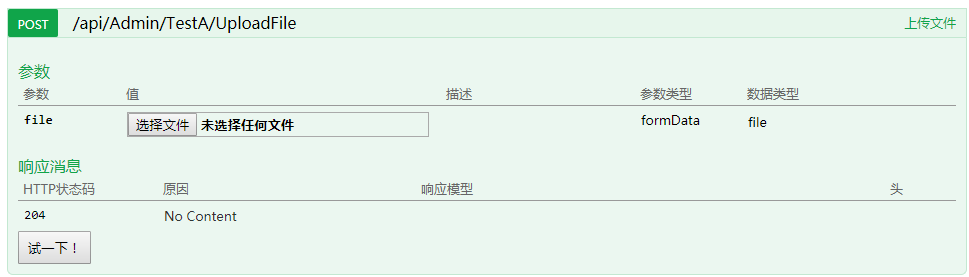
## 4.6 显示上传文件参数
SwaggerUI 有上传文件的功能,与添加自定义`HTTP Header`做法相类似,我们可以通过特性来标识API是否具有上传功能。
///
/// 添加 上传操作过滤
///
public class AddUploadOperationFilter:IOperationFilter
{
///
/// 重写Apply方法,加入Upload操作过滤
///
public void Apply(Operation operation, SchemaRegistry schemaRegistry, ApiDescription apiDescription)
{
var upload = apiDescription.ActionDescriptor.GetCustomAttributes
if (upload == null)
{
return;
}
operation.consumes.Add("application/form-data");
operation.parameters.Add(new Parameter()
{
name = upload.Name,
@in = "formData",
required = upload.Require,
type = "file",
description = upload.Description
});
}
}
///
/// 上传属性,用于标识接口是否包含上传信息参数
///
public class UploadAttribute:Attribute
{
///
/// 参数名
///
public string Name { get; set; } = "file";
/// <summary>
/// 是否必须包含文件
/// </summary>
public bool Require { get; set; } = true;

/// <summary>
/// 备注
/// </summary>
public string Description { get; set; } = "";
}
然后再`SwaggerConfig.cs`的`EnableSwagger`配置类添加一行操作过滤注册代码即可。c.OperationFilter
效果图如下:
## 4.7 自定义接口备注内容
由于不想将一些跟接口名无关的信息放在接口名那里,那么这个时候可以将部分业务相关的注释放在`<remarks></remarks>`标签当中///
/// 获取后台Guid
///
///
/// 测试一些内容,不想将无用的东西放在接口名称当中
/// 换行输出一下内容
///
///
[HttpGet][ApiAuthor(Name = "jian玄冰",Status = DevStatus.Wait,Time = "2018-04-28")]
public Guid GetGuid()
{
return Guid.NewGuid();
}
效果图如下:

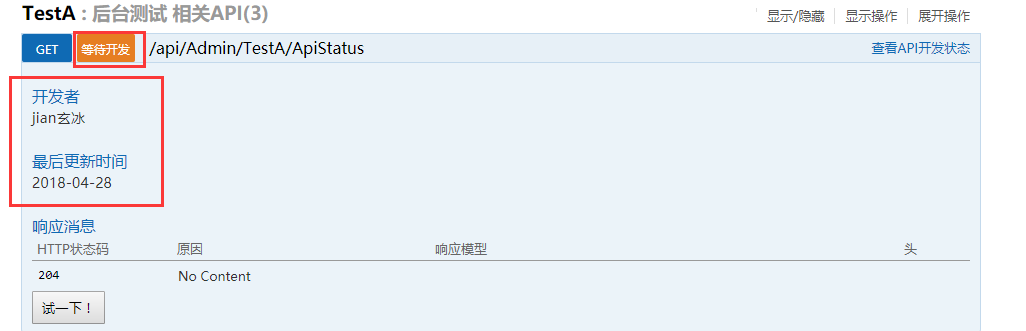
## 4.8 设置接口开发信息
增加`ApiAuthor`特性,用于设置接口开发状态、开发人、完成时间等相关信息。///
/// 获取后台Guid
///
///
/// 测试一些内容,不想将无用的东西放在接口名称当中
/// 换行输出一下内容
///
///
[HttpGet][AllowAnonymous]
[ApiAuthor(Name = "jian玄冰",Status = DevStatus.Wait,Time = "2018-04-28")]
public Guid GetGuid()
{
return Guid.NewGuid();
}
然后再`SwaggerConfig.cs`的`EnableSwagger`配置类添加一行启用代码即可。c.ShowDeveloperInfo();
效果图如下:
## 4.9 自定义响应信息
使用`SwaggerResponse`特性,可用于生成自定义响应结果实体、状态码、响应信息备注等信息,多用于返回类型为`HttpResponseMessage`结果。
参数说明:
- 状态码:`StatusCode`,用于设置返回成功状态的状态码
- 备注:`Description`,用于设置响应类备注信息
- 类型:`Type`,用于设置返回结果类型的实体。这是主要设置项,因为返回类型`HttpResponseMessage`无法解析出结果类型。///
/// 获取用户信息
///
///
[HttpGet][SwaggerResponse(HttpStatusCode.OK,"自定义内容",Type = typeof(UserInfo))]
public HttpResponseMessage GetUserInfo()
{
return Request.CreateResponse(HttpStatusCode.OK, new UserInfo(), "application/json");
}
```
效果图如下: