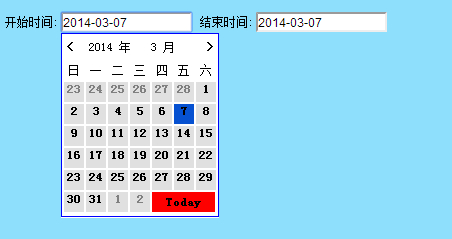
日期插件的包为:mydate.js
1:首先将日期插件的包引入到页面中
|
1
|
<script language="JavaScript" src="../Inc/Js/mydate.js"></script>
|
2:设置鼠标点击事件,当鼠标点击获得焦点的时候,触发事件,调用方法
|
1
2
|
<input type="text" name="starttime" onfocus="MyCalendar.SetDate(this)" value="<?php echo $rq;?>">
<input type="text" name="endtime" onfocus="MyCalendar.SetDate(this)" value="<?php echo $rq;?>">
|
3:完整页面代码
|
1
2
3
4
5
6
7
8
9
10
11
12
13
14
15
16
17
18
19
|
<?php date_default_timezone_set("PRC");
$nowtime = time();
$rq = date("Y-m-d",$nowtime);
?><html><head><meta http-equiv="Content-Type" content="text/html; charset=gb2312" />
<meta name="generator" content="FFKJ.Net" />
<link rev="MADE" href="mailto:FFKJ@FFKJ.Net">
<title>在线--后台</title><link rel="stylesheet" type="text/css" href="../Skins/Admin_Style.Css" />
<script language="JavaScript" src="../Inc/Js/mydate.js"></script>
</head><body>开始时间:<input type="text" name="starttime" onfocus="MyCalendar.SetDate(this)" value="<?php echo $rq;?>">
结束时间:<input type="text" name="endtime" onfocus="MyCalendar.SetDate(this)" value="<?php echo $rq;?>">
</body></html> |
4:页面效果: