1.Overview
基于MVVM实现一段绑定大伙都不陌生,Binding是wpf整个体系中最核心的对象之一这里就来解读一下我花了纯两周时间有哪些秘密。这里我先提出几个问题应该是大家感兴趣的,如下:
(1)INotifyPropertyChanged是如何被加载、触发的(Binding如何完成数据更新的)?
(2)为什么需要开发者手动实现INotifyPropertyChanged接口来为每个成员实现数据通知,为什么不集成在wpf框架里?
(3)藏在WPF体系里的观察者模式在哪里?
2.Detail
想了解以上问题,我们先补充以下前置知识点。
我们带着以上几个问题来看本文的后续内容,首先我们通过下面这张图来了解绑定的过程。
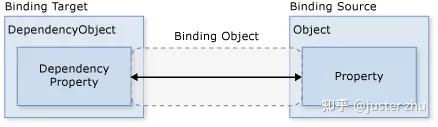
根据以上过程我们可以基于MVVM模式下,在Xaml中写出这样的语句来表示绑定。
<TextBoxName="mytextbox"Height="25"Width="150"Text="{BindingPath=Name,Mode=**TwoWay**,UpdateSourceTrigger=**PropertyChanged**}"></TextBox>那么如果把他转换成c#代码,将会是如下表示。
public string BeachName{ get; set; }

private void Test()
{
  BeachName="BikiniBeach";

  TextBoxtextBox = newTextBox();
  textBox.Name = "myTextBox";

  Binding binding = new Binding();
  binding.Source = BeachName;
  binding.Path = new PropertyPath("BeachName");

  textBox.SetBinding(TextBox.TextProperty, binding);
}
(1-1)
上面这段代码,包含了两个关键对象Textbox和Binding它们里面大有文章首先我们逐个拆解这两个对象里都有什么。
Textbox
在(1-1)的代码中初始化一个Textbox对象,它会创建一个依赖属性TextProperty用于绑定要素之一。
public static readonly DependencyProperty TextProperty = DependencyProperty.Register(nameof (Text), typeof (string), typeof (TextBox), (PropertyMetadata) new FrameworkPropertyMetadata((object) string.Empty, FrameworkPropertyMetadataOptions.BindsTwoWayByDefault | FrameworkPropertyMetadataOptions.Journal, new PropertyChangedCallback(TextBox.OnTextPropertyChanged), new CoerceValueCallback(TextBox.CoerceText), true, UpdateSourceTrigger.LostFocus));
Binding
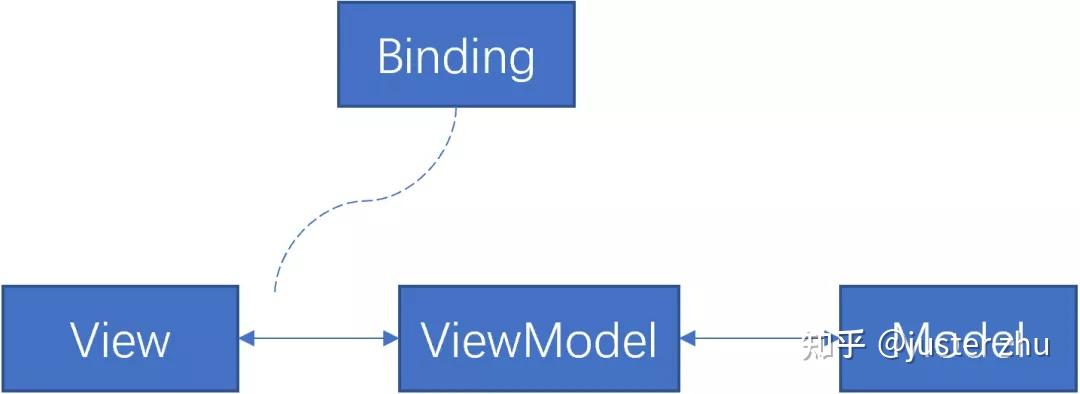
当我们在日常开发实现绑定过程当中,WPF的体系会默默帮你创建Binding对象,这里我们来看看Binding包含了哪些定义(为了观看体验删除了大部分不相关代码)。
namespace System.Windows.Data
{
 public class Binding : BindingBase
{
   //....其它代码省略
   public static void AddSourceUpdatedHandler(
     DependencyObject element,
     EventHandler<DataTransferEventArgs> handler)
  {
     UIElement.AddHandler(element, Binding.SourceUpdatedEvent, (Delegate) handler);
  }

   public static void RemoveSourceUpdatedHandler(
     DependencyObject element,
     EventHandler<DataTransferEventArgs> handler)
  {
     UIElement.RemoveHandler(element, Binding.SourceUpdatedEvent, (Delegate) handler);
  }

   public static void AddTargetUpdatedHandler(
     DependencyObject element,
     EventHandler<DataTransferEventArgs> handler)
  {
     UIElement.AddHandler(element, Binding.TargetUpdatedEvent, (Delegate) handler);
  }

   public static void RemoveTargetUpdatedHandler(
     DependencyObject element,
     EventHandler<DataTransferEventArgs> handler)
  {
     UIElement.RemoveHandler(element, Binding.TargetUpdatedEvent, (Delegate) handler);
  }

   public Binding(string path)
  {
     if (path == null)
       return;
     if (Dispatcher.CurrentDispatcher == null)
       throw new InvalidOperationException();
     this.Path = new PropertyPath(path, (object[]) null);
  }

   public PropertyPath Path
  {
     get => this._ppath;
     set
    {
       this.CheckSealed();
       this._ppath = value;
       this._attachedPropertiesInPath = -1;
       this.ClearFlag(BindingBase.BindingFlags.PathGeneratedInternally);
       if (this._ppath == null || !this._ppath.StartsWithStaticProperty)
         return;
       if (this._sourceInUse == Binding.SourceProperties