可以参照下面这个修改WinRM兼容性实例的步骤作为模版来配置WinRM.
关闭WinRM新旧版本兼容性事例:
(1)在powershell中输入“ls wsman:\localhost\service”,可查看有哪些属性可以修改;
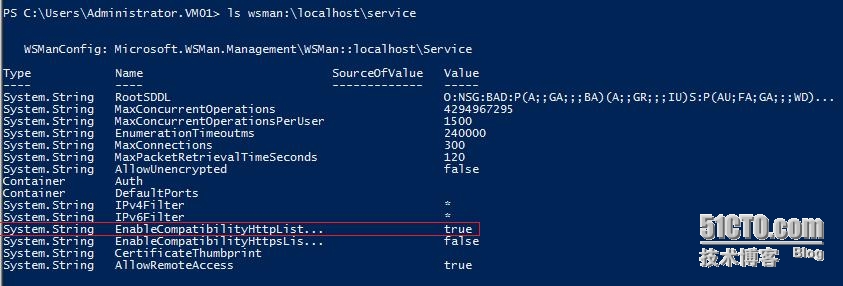
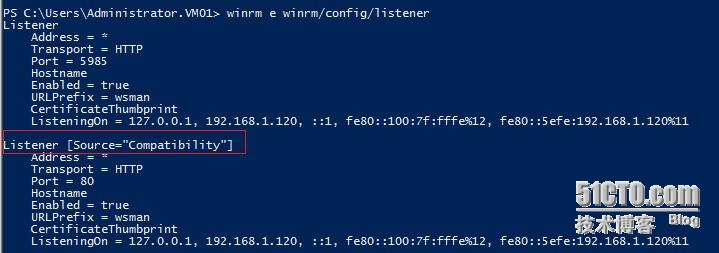
(2)我们先查看WFM3.0中WinRM默认的兼容性:
(3)输入“set-item wsman:\localhost\serivce\enablecompatibilityhttplistener false”;
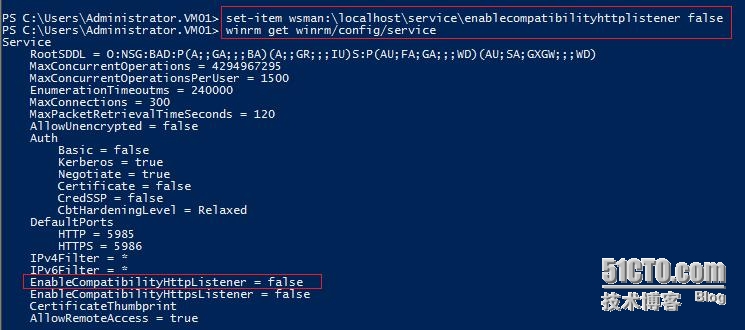
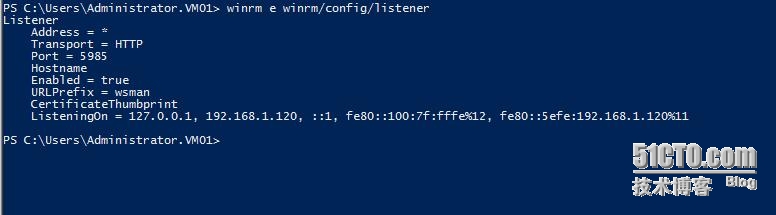
(4)修改结果如下:
The following commands can be used to configure WinRM from the PowerShell command prompt.
-
To enumerate the existing WinRM listeners:
winrm enumerate winrm/config/listener -
To enable the "compatibility" HTTP listener on port 80:
winrm set winrm/config/service @{EnableCompatibilityHttpListener="true"} -
To enable the "compatibility" HTTPS listener on port 443:
winrm set winrm/config/service @{EnableCompatibilityHttpsListener="true"} -
To disable the "compatibility" HTTP listener on port 80:
winrm set winrm/config/service @{EnableCompatibilityHttpListener="false"} -
To disable the "compatibility" HTTPS listener on port 443:
winrm set winrm/config/service @{EnableCompatibilityHttpsListener="false"}
The following Group Policy settings can be used to enable/disable the "compatibility" listeners:
-
Windows Components > Windows Remote Management (WinRM) > WinRM Service > Turn On Compatibility HTTP Listener
-
Windows Components > Windows Remote Management (WinRM) > WinRM Service > Turn On Compatibility HTTPS Listener
本文转自 bannerpei 51CTO博客,原文链接:http://blog.51cto.com/281816327/1394891,如需转载请自行联系原作者