|
1
2
3
4
5
6
7
8
9
10
11
12
13
14
15
16
17
18
19
20
21
22
23
24
25
26
27
28
29
30
31
32
33
34
35
36
37
38
39
40
41
42
43
44
45
46
47
48
49
50
51
52
53
54
55
56
57
58
59
60
61
62
63
64
65
66
67
68
69
70
71
72
73
74
75
76
77
78
79
80
81
82
83
84
85
86
87
88
89
90
91
92
93
94
95
96
97
98
99
100
101
102
103
104
105
106
107
108
109
110
111
112
113
114
115
116
117
118
119
120
121
122
123
124
125
126
127
128
129
130
131
132
133
134
135
136
137
138
139
140
141
142
143
144
145
|
我的博客已迁移到xdoujiang.com请去那边和我交流一、基础环境1、版本cat /etc/debian_version 7.82、内核uname -r
3.2.0-4-amd643、proftpd版本ProFTPD Version 1.3.4a4、ip(eth0)10.1.10.117服务端10.1.10.160客户端5、proftpd官网http://www.proftpd.org/
6、需求只允许fileftp用户连接并登录ftp并锁定在自定义的家目录中 其他系统(匿名)用户不能登录ftp,监听在本机的eth0地址
二、安装配置proftpd服务端10.1.10.1171、apt方式安装apt-get -y install proftpd-basic
2、创建ftp目录
mkdir /opt/ftpdata -p
3、创建ftp账户并修改密码
1)useradd -s /bin/false fileftp -d /opt/ftpdata
2)echo fileftp:redhat|chpasswd
4、修改配置1)备份下配置cp /etc/proftpd/proftpd.conf /etc/proftpd/proftpd.conf.bak
2)cat /etc/proftpd/proftpd.conf
Include /etc/proftpd/modules.conf
RootLogin offIdentLookups offUseReverseDNS offServerIdent offAllowStoreRestart onAllowRetrieveRestart onServerName "Debian"
ServerType standaloneMultilineRFC2228 onDefaultServer offListOptions "-l"
DenyFilter \*.*/DefaultRoot /opt/ftpdata
RequireValidShell offDefaultAddress 10.1.10.117SocketBindTight onPort 21MaxInstances 30User proftpdGroup nogroupUmask 022 022AllowOverwrite onTransferLog /var/log/proftpd/xferlog
SystemLog /var/log/proftpd/proftpd.log
5、配置说明Include /etc/proftpd/modules.conf
RootLogin off #禁止root登录
IdentLookups off #禁止DNS反查
UseReverseDNS off #禁止DNS反查
ServerIdent off #隐藏版本号
AllowStoreRestart on #支持上传续传
AllowRetrieveRestart on #支持下载续传
ServerName "Debian" #服务器名称
ServerType standalone #使用standalone方式启动服务
MultilineRFC2228 on #FTP安全扩展
DefaultServer off #关闭默认主机
ListOptions "-l" #
DenyFilter \*.*/ #
DefaultRoot /opt/ftpdata #锁定在/opt/ftpdata目录中,可以进下一级目录
RequireValidShell off #不指定ftp用户的shell
DefaultAddress 10.1.10.117 #监听地址
SocketBindTight onPort 21 #监听端口
MaxInstances 30 #最大线程数
User proftpd #以proftpd用户运行
Group nogroup #以nogroup组运行
Umask 022 022 #用户文件属性
AllowOverwrite on #能重写、覆盖
TransferLog /var/log/proftpd/xferlog #日志
SystemLog /var/log/proftpd/proftpd.log #日志
6、修改/etc/shell配置文件增加/bin/false
echo "/bin/false" >> /etc/shells
7、/etc/proftpd/modules.conf还需要注释掉1个modules
sed -i "s/LoadModule mod_tls_memcache.c/#LoadModule mod_tls_memcache.c/g" /etc/proftpd/modules.conf
8、配置/etc/ftpusers使只能fileftp用户登录ftp
1)cp /etc/ftpusers /etc/ftpusers.bak
2)cat /etc/passwd|grep -v "fileftp"|awk -F: '{print $1}' > /etc/ftpusers
9、重启proftpd服务/etc/init.d/proftpd restart
[ ok ] Stopping ftp server: proftpd.
[ ok ] Starting ftp server: proftpd.
10、查看端口netstat -tupnl |grep 21
tcp 0 0 10.1.10.117:21 0.0.0.0:* LISTEN 7441/proftpd: (acce
11、查看进程ps -ef |grep proftpd
proftpd 7441 1 0 15:03 ? 00:00:00 proftpd: (accepting connections) 三、客户端测试10.1.10.1601、先安装lftpapt-get -y install lftp
2、创建fileftp用户ftp传输目录
mkdir /opt/ftpdata/fileftp -p && cd /opt/ftpdata/ && chown fileftp.fileftp fileftp
3、linux下使用lftp命令测试lftp fileftp:'redhat'@10.1.10.117
lftp jimmy:'redhat'@10.1.10.117
lftp root:'redhat'@10.1.10.117
lftp 10.1.10.1174、查看日志可以看到只有fileftp用户可以登录Aug 05 15:54:14 debian proftpd[7660] 10.1.10.117: ProFTPD killed (signal 15)Aug 05 15:54:14 debian proftpd[7660] 10.1.10.117: ProFTPD 1.3.4a standalone mode SHUTDOWNAug 05 15:54:16 debian proftpd[7733] 10.1.10.117: ProFTPD 1.3.4a (maint) (built Thu Sep 4 2014 14:41:08 UTC) standalone mode STARTUPAug 05 15:54:20 debian proftpd[7751] 10.1.10.117 (10.1.10.160[10.1.10.160]): FTP session opened.Aug 05 15:54:20 debian proftpd[7751] 10.1.10.117 (10.1.10.160[10.1.10.160]): USER anonymous: no such user found from 10.1.10.160 [10.1.10.160] to 10.1.10.117:21Aug 05 15:54:23 debian proftpd[7751] 10.1.10.117 (10.1.10.160[10.1.10.160]): FTP session closed.Aug 05 15:54:30 debian proftpd[7752] 10.1.10.117 (10.1.10.160[10.1.10.160]): FTP session opened.Aug 05 15:54:30 debian proftpd[7752] 10.1.10.117 (10.1.10.160[10.1.10.160]): SECURITY VIOLATION: root login attempted.Aug 05 15:54:33 debian proftpd[7752] 10.1.10.117 (10.1.10.160[10.1.10.160]): FTP session closed.Aug 05 15:54:38 debian proftpd[7753] 10.1.10.117 (10.1.10.160[10.1.10.160]): FTP session opened.Aug 05 15:54:40 debian proftpd[7753] 10.1.10.117 (10.1.10.160[10.1.10.160]): USER jimmy (Login failed): User in /etc/ftpusers
Aug 05 15:54:40 debian proftpd[7753] 10.1.10.117 (10.1.10.160[10.1.10.160]): FTP session closed.Aug 05 15:54:47 debian proftpd[7754] 10.1.10.117 (10.1.10.160[10.1.10.160]): FTP session opened.Aug 05 07:54:47 debian proftpd[7754] 10.1.10.117 (10.1.10.160[10.1.10.160]): Preparing to chroot to directory '/opt/ftpdata'
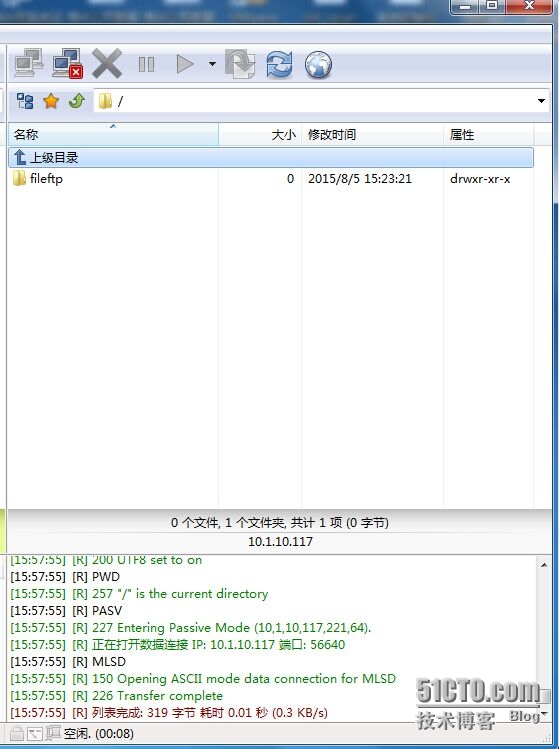
Aug 05 07:54:47 debian proftpd[7754] 10.1.10.117 (10.1.10.160[10.1.10.160]): USER fileftp: Login successful.5、工具测试(FlashFXP) |
|
1
2
3
4
5
6
7
8
9
10
11
12
13
14
15
16
17
18
19
20
21
22
23
24
25
26
27
28
29
30
31
32
33
34
35
36
37
38
39
40
41
42
43
|
四、服务端配置ssl1、安装包apt-get -y install openssl
2、创建一个证书(时间365天)并填写相关一些信息openssl req -x509 -nodes -days 365 -newkey rsa:2048 -out /etc/ssl/certs/proftpd.pem -keyout /etc/ssl/certs/proftpd.pem
Generating a 2048 bit RSA private key............................................................................................................................+++...................+++writing new private key to '/etc/ssl/certs/proftpd.pem'
-----You are about to be asked to enter information that will be incorporatedinto your certificate request.What you are about to enter is what is called a Distinguished Name or a DN.There are quite a few fields but you can leave some blankFor some fields there will be a default value,If you enter '.', the field will be left blank.
-----Country Name (2 letter code) [AU]:CNState or Province Name (full name) [Some-State]:shanghaiLocality Name (eg, city) []:shangahiOrganization Name (eg, company) [Internet Widgits Pty Ltd]:aaaOrganizational Unit Name (eg, section) []:aaaCommon Name (e.g. server FQDN or YOUR name) []:aaaEmail Address []:3、修改权限chmod 0400 /etc/ssl/certs/proftpd.pem
4、修改/etc/proftpd/proftpd.conf支持tls 添加在最后
TLSEngine onTLSRequired onTLSProtocol TLSv1 SSLv23TLSLog /var/log/proftpd/tls.log
TLSRSACertificateFile /etc/ssl/certs/proftpd.pem
TLSRSACertificateKeyFile /etc/ssl/certs/proftpd.pem
5、重启服务/etc/init.d/proftpd restart
[ ok ] Stopping ftp server: proftpd.
[ ok ] Starting ftp server: proftpd.
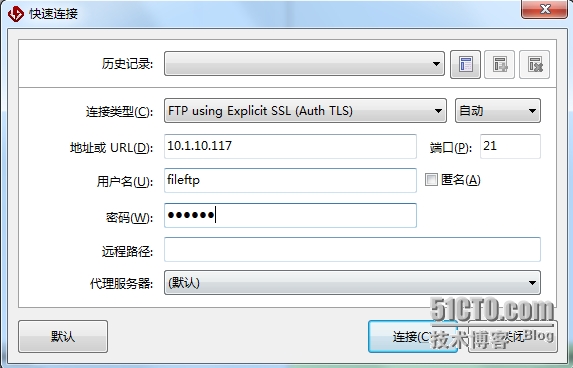
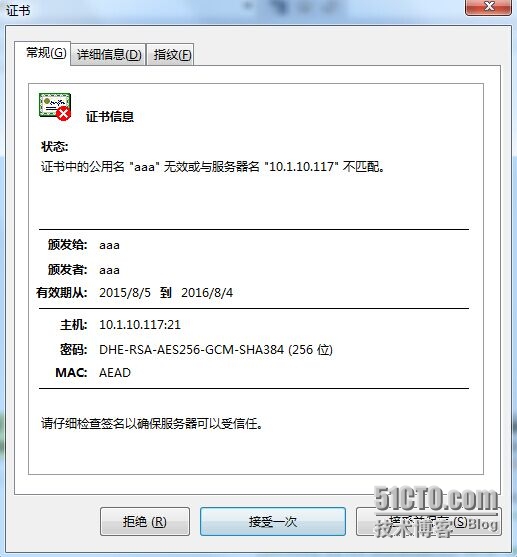
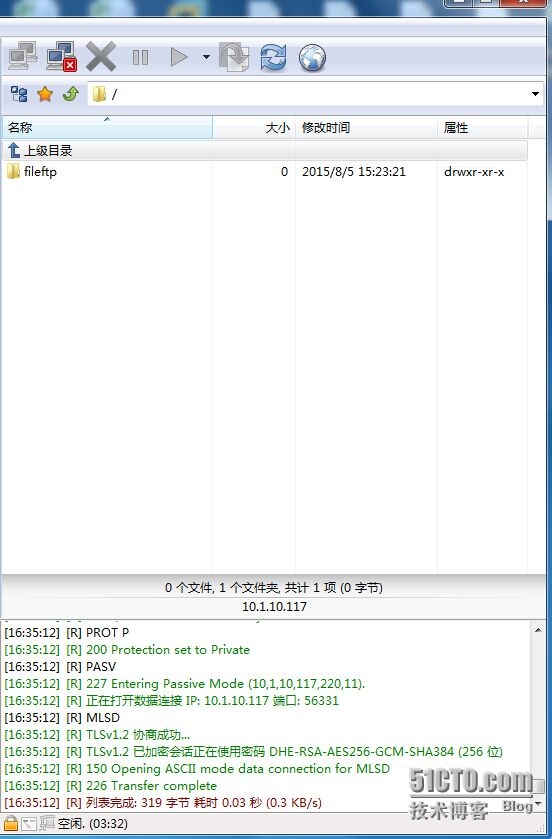
6、工具测试(FlashFXP) |
|
1
2
3
4
5
6
7
8
9
10
11
12
13
14
15
16
17
18
19
20
21
|
7、查看日志Aug 05 16:11:30 mod_tls/2.4.3[8577]: using default OpenSSL verification locations (see $SSL_CERT_DIR environment variable)
Aug 05 16:11:30 mod_tls/2.4.3[8577]: TLS/TLS-C requested, starting TLS handshake
Aug 05 16:11:30 mod_tls/2.4.3[8577]: TLSv1/SSLv3 connection accepted, using cipher DHE-RSA-AES128-SHA (128 bits)
Aug 05 08:11:31 mod_tls/2.4.3[8577]: Protection set to Private
Aug 05 08:11:31 mod_tls/2.4.3[8577]: starting TLS negotiation on data connection
Aug 05 08:11:31 mod_tls/2.4.3[8577]: TLSv1/SSLv3 renegotiation accepted, using cipher DHE-RSA-AES128-SHA (128 bits)
Aug 05 08:11:31 mod_tls/2.4.3[8577]: client reused SSL session for data connection
Aug 05 08:11:31 mod_tls/2.4.3[8577]: TLSv1/SSLv3 data connection accepted, using cipher DHE-RSA-AES128-SHA (128 bits)
Aug 05 16:33:45 mod_tls/2.4.3[8609]: using default OpenSSL verification locations (see $SSL_CERT_DIR environment variable)
Aug 05 16:33:45 mod_tls/2.4.3[8609]: SSL/TLS required but absent for authentication, denying USER command
Aug 05 16:33:45 mod_tls/2.4.3[8610]: using default OpenSSL verification locations (see $SSL_CERT_DIR environment variable)
Aug 05 16:34:48 mod_tls/2.4.3[8611]: using default OpenSSL verification locations (see $SSL_CERT_DIR environment variable)
Aug 05 16:34:48 mod_tls/2.4.3[8611]: TLS/TLS-C requested, starting TLS handshake
Aug 05 16:34:48 mod_tls/2.4.3[8611]: client supports secure renegotiations
Aug 05 16:34:48 mod_tls/2.4.3[8611]: TLSv1/SSLv3 connection accepted, using cipher DHE-RSA-AES256-GCM-SHA384 (256 bits)
Aug 05 08:35:11 mod_tls/2.4.3[8611]: Protection set to Private
Aug 05 08:35:11 mod_tls/2.4.3[8611]: starting TLS negotiation on data connection
Aug 05 08:35:11 mod_tls/2.4.3[8611]: TLSv1/SSLv3 renegotiation accepted, using cipher DHE-RSA-AES256-GCM-SHA384 (256 bits)
Aug 05 08:35:11 mod_tls/2.4.3[8611]: client reused SSL session for data connection
Aug 05 08:35:11 mod_tls/2.4.3[8611]: TLSv1/SSLv3 data connection accepted, using cipher DHE-RSA-AES256-GCM-SHA384 (256 bits)
|
本文转自 xdoujiang 51CTO博客,原文链接:http://blog.51cto.com/7938217/1682397,如需转载请自行联系原作者