这是一篇国外的文章,介绍如何通过 WebRTC、OpenCV 和 WebSocket 技术实现在 Web 浏览器上的人脸识别,架构在 Jetty 之上。
实现的效果包括:
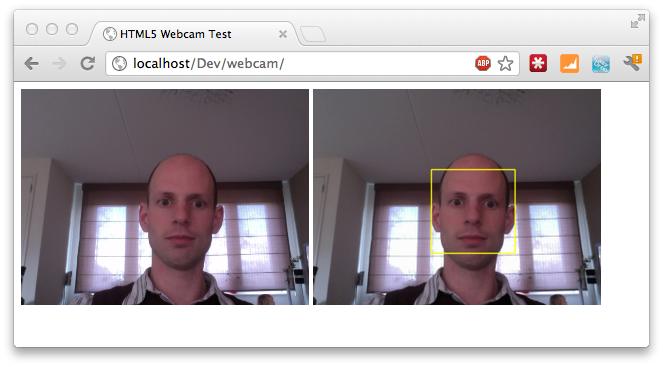
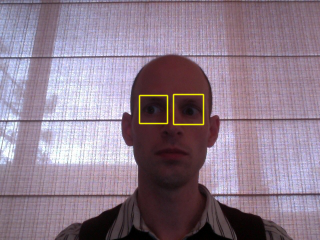
还能识别眼睛
人脸识别的核心代码:
页面:
|
1
2
3
4
5
6
7
8
9
10
11
12
13
14
15
16
17
18
19
20
21
22
23
24
|
<div> <video id="live" width="320" height="240" autoplay style="display: inline;"></video>
<canvas width="320" id="canvas" height="240" style="display: inline;"></canvas>
</div> <script type="text/javascript">
var video = $("#live").get()[0];
var canvas = $("#canvas");
var ctx = canvas.get()[0].getContext('2d');
navigator.webkitGetUserMedia("video",
function(stream) {
video.src = webkitURL.createObjectURL(stream);
},
function(err) {
console.log("Unable to get video stream!")
}
)
timer = setInterval(
function () {
ctx.drawImage(video, 0, 0, 320, 240);
}, 250);
</script> |
后台:
|
1
2
3
4
5
6
7
8
9
10
11
12
13
14
15
16
17
18
19
20
21
22
23
24
25
26
27
28
29
30
31
32
33
34
35
36
37
38
39
40
41
42
43
|
public class FaceDetection {
private static final String CASCADE_FILE = "resources/haarcascade_frontalface_alt.xml";
private int minsize = 20;
private int group = 0;
private double scale = 1.1;
/**
* Based on FaceDetection example from JavaCV.
*/
public byte[] convert(byte[] imageData) throws IOException {
// create image from supplied bytearray
IplImage originalImage = cvDecodeImage(cvMat(1, imageData.length,CV_8UC1, new BytePointer(imageData)));
// Convert to grayscale for recognition
IplImage grayImage = IplImage.create(originalImage.width(), originalImage.height(), IPL_DEPTH_8U, 1);
cvCvtColor(originalImage, grayImage, CV_BGR2GRAY);
// storage is needed to store information during detection
CvMemStorage storage = CvMemStorage.create();
// Configuration to use in analysis
CvHaarClassifierCascade cascade = new CvHaarClassifierCascade(cvLoad(CASCADE_FILE));
// We detect the faces.
CvSeq faces = cvHaarDetectObjects(grayImage, cascade, storage, scale, group, minsize);
// We iterate over the discovered faces and draw yellow rectangles around them.
for (int i = 0; i < faces.total(); i++) {
CvRect r = new CvRect(cvGetSeqElem(faces, i));
cvRectangle(originalImage, cvPoint(r.x(), r.y()),
cvPoint(r.x() + r.width(), r.y() + r.height()),
CvScalar.YELLOW, 1, CV_AA, 0);
}
// convert the resulting image back to an array
ByteArrayOutputStream bout = new ByteArrayOutputStream();
BufferedImage imgb = originalImage.getBufferedImage();
ImageIO.write(imgb, "png", bout);
return bout.toByteArray();
}
} |
详细的实现细节请阅读英文原文: