(一)Beats是什么?
Beats是elasticsearch公司开源的一款采集系统监控数据的代理agent,它可以发送不同类型的数据到elasticsearch中,也可以行将采集完的数据发送到logstash中转,然后在推送到elasticsearch中,目前还在发展中,与成熟的监控系统zabbix和ganglia相比就界面看起来爽了点,系统功能还是有点弱,不过与elasticsearch全文搜索框架集成后,数据查询过滤功能非常强悍,还是非常有前途
的,在ELKB中,各个框架角色如下:
Beats:负责收集系统数据,可以直接发送到es中,也可以通过logstash中转
logstash:收集日志,为beats提供中转功能
Elasticsearch:提供数据存储,服务端聚合计算功能
Kibana:提供炫丽的可视化图形展示并且作为elasticsearch的搜索的小清新客户端
(二)Beats的组成:
到目前elasticsearch已经提供的有:
(1)Packetbeat 网络流量监控采集
(2)Topbeat 类似linux top的监控采集
(3)Filebeat 文件log的监控采集
(4)WinlogBeat windows系统的log监控采集
(5)自定义beat ,如果上面的指标不能满足需求,elasticsarch公司鼓励开发者
使用go语言,扩展实现自定义的beats指标,只需要按照模板,实现监控的输入,日志,输出等即可
(三)Beats的基本拓扑

(四)安装部署
安装JAVA环境
[[email protected] ~]# rpm -ivh jdk-8u51-linux-x64.rpm
Preparing...                ########################################### [100%]
   1:jdk1.8.0_51            ########################################### [100%]
Unpacking JAR files...
	rt.jar...
	jsse.jar...
	charsets.jar...
	tools.jar...
	localedata.jar...
	jfxrt.jar...
	plugin.jar...
	javaws.jar...
	deploy.jar...
[[email protected] ~]# java -version
java version "1.8.0_51"
Java(TM) SE Runtime Environment (build 1.8.0_51-b16)
Java HotSpot(TM) 64-Bit Server VM (build 25.51-b03, mixed mode)
安装elasticsearch-2.3.4
[[email protected] ~]# tar zxvf elasticsearch-2.3.4.tar.gz  -C /usr/local/
elasticsearch-2.3.4/README.textile
elasticsearch-2.3.4/LICENSE.txt
elasticsearch-2.3.4/NOTICE.txt
elasticsearch-2.3.4/modules/
elasticsearch-2.3.4/modules/lang-groovy/
elasticsearch-2.3.4/modules/reindex/
elasticsearch-2.3.4/modules/lang-expression/
elasticsearch-2.3.4/modules/lang-groovy/plugin-security.policy
elasticsearch-2.3.4/modules/lang-groovy/plugin-descriptor.properties
........
新增elasticsearch用户
useradd elasticsearch
新增elasticsearch启动的日志目录及bin目录
[[email protected] bin]# mkdir /usr/local/elasticsearch-2.3.4/{logs,bin}
权限:
chown -R elasticsearch:elasticsearch /usr/local/elasticsearch-2.3.4/
启动elasticsearch
[[email protected] bin]$ ./elasticsearch -d
[2016-07-20 11:30:29,413][INFO ][env                      ] [Jon Spectre] heap size [1007.3mb], compressed ordinary object pointers [true]
[2016-07-20 11:30:29,413][WARN ][env                      ] [Jon Spectre] max file descriptors [4096] for elasticsearch process likely too low, consider increasing to at least [65536]
[2016-07-20 11:30:33,422][INFO ][node                     ] [Jon Spectre] initialized
[2016-07-20 11:30:33,423][INFO ][node                     ] [Jon Spectre] starting ...
[2016-07-20 11:30:33,651][INFO ][transport                ] [Jon Spectre] publish_address {127.0.0.1:9300}, bound_addresses {[::1]:9300}, {127.0.0.1:9300}
[2016-07-20 11:30:33,670][INFO ][discovery                ] [Jon Spectre] elasticsearch/Rr-U_JhCStexH5Htmj4qKQ
[2016-07-20 11:30:36,795][INFO ][cluster.service          ] [Jon Spectre] new_master {Jon Spectre}{Rr-U_JhCStexH5Htmj4qKQ}{127.0.0.1}{127.0.0.1:9300}, reason: zen-disco-join(elected_as_master, [0] joins received)
[2016-07-20 11:30:36,851][INFO ][http                     ] [Jon Spectre] publish_address {127.0.0.1:9200}, bound_addresses {[::1]:9200}, {127.0.0.1:9200}
[2016-07-20 11:30:36,852][INFO ][node                     ] [Jon Spectre] started
[2016-07-20 11:30:36,996][INFO ][gateway                  ] [Jon Spectre] recovered [0] indices into cluster_state
查看端口是否正常启动9200,9300
[email protected] logs]$ ss -tanl
State      Recv-Q Send-Q                                                                                                       Local Address:Port                                                                                                         Peer Address:Port
LISTEN     0      50                                                                                                        ::ffff:127.0.0.1:9200                                                                                                                   :::*
LISTEN     0      50                                                                                                                     ::1:9200                                                                                                                   :::*
LISTEN     0      50                                                                                                        ::ffff:127.0.0.1:9300                                                                                                                   :::*
LISTEN     0      50                                                                                                                     ::1:9300
至此:elasticsearch已经安装完成。
Kibana安装
Kibana安装非常简单。官网上下载好kibana-4.5.3-linux-x64
tar zxvf kibana-4.5.3-linux-x64.tar.gz -C /usr/local/
启动Kibana
[[email protected] bin]# cd /usr/local/kibana-4.5.3-linux-x64/bin
[[email protected] bin]# ./kibana &
[[email protected] bin]#   log   [12:11:05.529] [info][status][plugin:kibana] Status changed from uninitialized to green - Ready
  log   [12:11:05.609] [info][status][plugin:elasticsearch] Status changed from uninitialized to yellow - Waiting for Elasticsearch
  log   [12:11:05.648] [info][status][plugin:kbn_vislib_vis_types] Status changed from uninitialized to green - Ready
  log   [12:11:05.655] [info][status][plugin:markdown_vis] Status changed from uninitialized to green - Ready
[[email protected] bin]#   log   [12:11:05.662] [info][status][plugin:metric_vis] Status changed from uninitialized to green - Ready
  log   [12:11:05.669] [info][status][plugin:spyModes] Status changed from uninitialized to green - Ready
  log   [12:11:05.683] [info][status][plugin:statusPage] Status changed from uninitialized to green - Ready
  log   [12:11:05.690] [info][status][plugin:table_vis] Status changed from uninitialized to green - Ready
  log   [12:11:05.700] [info][listening] Server running at   log   [12:11:22.664] [info][status][plugin:elasticsearch] Status changed from yellow to green - Kibana index ready
查看端口5601是否监听
[[email protected] bin]# ss -tanl
State      Recv-Q Send-Q                                                                                                       Local Address:Port                                                                                                         Peer Address:Port
LISTEN     0      128                                                                                                                      *:5601
安装filebeat组件
官网下载filebeat-1.2.3-x86_64.tar.gz
[[email protected] ~]# rpm -ivh https://download.elastic.co/beats/filebeat/filebeat-1.2.3-x86_64.rpm
配置Filebeat
filebeat 默认预定了适应大部分场景的配置参数。对于最基本的Filebeat配置,可以定义一个单一路径的单一prospector,如:
      # Make sure not file is defined twice as this can lead to unexpected behaviour.
      paths:
        - /var/log/*.log
该配置将获取/va/log/目录下的所有以.log结尾的文件。
如果要获取子目录下的所有文件可以这么设置/var/log/*/*.log。只会收集到/var/log/目录的子目录以.log结尾的文件,不包括 /var/log自身目录下的以.log结尾的文件。同时,也不会递归的去获取子目录的子目录下的文件。
一个配置文件可以包含多个prospector和每个prospector多个路径,如:
filebeat:
  prospectors:
    -
      paths:
        - /var/log/system.log
        - /var/log/wifi.log
    -
      paths:
        - "/var/log/apache/*"
该配置文件启动两个prospector,第一个prospector具有两个harvester,一个获取system.log文件另一个获取wifi.log文件。第二个prospector启动一个harvester获取/var/log/apache目录下的每个文件。
向Elasticsearch加载索引模板:
[[email protected] ~]# curl -XPUT 'http://192.168.254.15:9200/_template/filebeat?preety' [email protected]/usr/local/filebeat-1.2.3-x86_64/filebeat.template.json
{"acknowledged":true}
安装Kibana dashboards 的模板数据
1, 下载 wget  http://download.elastic.co/beats/dashboards/beats-dashboards    -1.1.1.zip
2, 解压 unzip beats-dashboards-1.1.1.zip
3,  进入 cd beats-dashboards-1.1.1/
4, 执行 ./load.sh  或者  ./load.sh -url http://192.168.254.15:9200
    将dashboard的模板配置数据存进elasticsarch里面
查看kibana日志索引及仪表

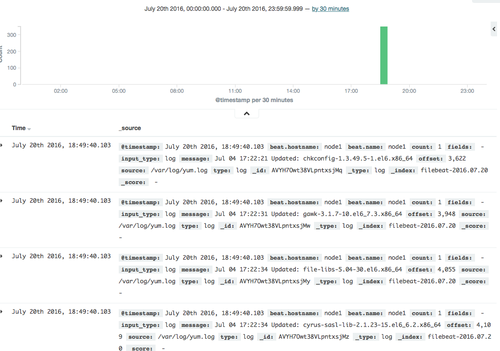
已经有日志产生了。
安装Packetbeat组件:
(A)安装初始化包
(1)安装依赖库 sudo yum install libpcap
 (2)官网上下载最新的Packbeat包 packetbeat-1.2.3-x86_64.tar.gz
 [[email protected] ~]# tar zxvf packetbeat-1.2.3-x86_64.tar.gz -C /usr/local/
packetbeat-1.2.3-x86_64/
packetbeat-1.2.3-x86_64/packetbeat.template.json
packetbeat-1.2.3-x86_64/packetbeat.yml
packetbeat-1.2.3-x86_64/packetbeat
发现tar包的文件,无法启动packbeat,索性用rpm的安装方式来操作如下:
 rpm -ivh https://download.elastic.co/beats/packetbeat/packetbeat-1.2.3-x86_64.rpm
(B)配置elasticsearch地址或者Logstash(可选)采集的beats指标
/etc/packetbeat/packetbeat.yml
主要是一些服务的端口以及OUTPUT EL的端口
(C)配置elasticsearch模板
[[email protected] ~]# curl -XPUT 'http://192.168.254.15:9200/_template/packetbeat' [email protected]/usr/local/packetbeat-1.2.3-x86_64/packetbeat.template.json
{"acknowledged":true}
(D)启动Packetbeat 指标收集进程
/etc/rc.d/init.d/packetbeat start
(E) 查看一下ES的索引
[[email protected] beats-dashboards-1.1.1]# curl -XGET 'http://192.168.254.15:9200/packetbeat-*/_search?pretty'
可以查看到搜集的相关数据信息。
{
  "took" : 4,
  "timed_out" : false,
  "_shards" : {
    "total" : 5,
    "successful" : 5,
    "failed" : 0
  },
  "hits" : {
    "total" : 39,
    "max_score" : 1.0,
    "hits" : [ {
      "_index" : "packetbeat-2016.07.21",
      "_type" : "dns",
      "_id" : "AVYLlEJXOy0XFf94lOui",
      "_score" : 1.0,
      "_source" : {
        "@timestamp" : "2016-07-21T03:51:20.846Z",
        "beat" : {
          "hostname" : "node1",
          "name" : "node1"
        },
        "bytes_in" : 37,
        "bytes_out" : 65,
        "client_ip" : "192.168.254.15",
        "client_port" : 36959,
        "client_proc" : "",
        "client_server" : "",
        "count" : 1,
        "direction" : "out",
        "dns" : {
          "additionals_count" : 0,
          "answers" : [ {
            "class" : "IN",
            "data" : "2001:da8:d800:95::110",
            "name" : "mirrors.ustc.edu.cn",
            "ttl" : 60,
            "type" : "AAAA"
          } ],
          "answers_count" : 1,
          "authorities_count" : 0,
          "flags" : {
            "authoritative" : false,
            "recursion_allowed" : true,
            "recursion_desired" : true,
            "truncated_response" : false
          },
          "id" : 51339,
          "op_code" : "QUERY",
          "question" : {
            "class" : "IN",
            "name" : "mirrors.ustc.edu.cn",
            "type" : "AAAA"
          },
          "response_code" : "NOERROR"
        },
        "ip" : "210.22.84.3",
        "method" : "QUERY",
        "port" : 53,
        "proc" : "",
        "query" : "class IN, type AAAA, mirrors.ustc.edu.cn",
        "resource" : "mirrors.ustc.edu.cn",
        "responsetime" : 2,
        "server" : "",
        "status" : "OK",
        "transport" : "udp",
        "type" : "dns"
      }
    }, {
      "_index" : "packetbeat-2016.07.21",
      "_type" : "dns",
      "_id" : "AVYLlEZAOy0XFf94lOum",
      "_score" : 1.0,
      "_source" : {
        "@timestamp" : "2016-07-21T03:51:21.576Z",
        "beat" : {
          "hostname" : "node1",
          "name" : "node1"
        },
        "bytes_in" : 27,
        "bytes_out" : 59,
        "client_ip" : "192.168.254.15",
        "client_port" : 57694,
        "client_proc" : "",
        "client_server" : "",
        "count" : 1,
        "direction" : "out",
        "dns" : {
          "additionals_count" : 0,
          "answers" : [ {
            "class" : "IN",
            "data" : "206.251.255.63",
            "name" : "nginx.org",
            "ttl" : 60,
            "type" : "A"
          }, {
            "class" : "IN",
            "data" : "95.211.80.227",
            "name" : "nginx.org",
            "ttl" : 60,
            "type" : "A"
          } ],
          "answers_count" : 2,
          "authorities_count" : 0,
          "flags" : {
            "authoritative" : false,
            "recursion_allowed" : true,
            "recursion_desired" : true,
            "truncated_response" : false
          },
          "id" : 34503,
          "op_code" : "QUERY",
          "question" : {
            "class" : "IN",
            "name" : "nginx.org",
            "type" : "A"
          },
          "response_code" : "NOERROR"
        },
        "ip" : "210.22.84.3",
        "method" : "QUERY",
        "port" : 53,
        "proc" : "",
        "query" : "class IN, type A, nginx.org",
        "resource" : "nginx.org",
        "responsetime" : 2,
        "server" : "",
        "status" : "OK",
        "transport" : "udp",
        "type" : "dns"
      }
    }, {
      "_index" : "packetbeat-2016.07.21",
      "_type" : "http",
      "_id" : "AVYLlF2wOy0XFf94lOur",
      "_score" : 1.0,
      "_source" : {
        "@timestamp" : "2016-07-21T03:51:27.368Z",
        "beat" : {
          "hostname" : "node1",
          "name" : "node1"
        },
        "bytes_in" : 169,
        "bytes_out" : 843202,
        "client_ip" : "192.168.254.15",
        "client_port" : 38464,
        "client_proc" : "",
        "client_server" : "",
        "count" : 1,
        "direction" : "out",
        "http" : {
          "code" : 200,
          "content_length" : 853092,
          "phrase" : "OK"
        },
        "ip" : "114.247.56.117",
        "method" : "GET",
        "notes" : [ "Packet loss while capturing the response", "Packet loss while capturing the response" ],
        "params" : "",
        "path" : "/centos/6.8/updates/x86_64/Packages/httpd-2.2.15-54.el6.centos.x86_64.rpm",
        "port" : 80,
        "proc" : "",
        "query" : "GET /centos/6.8/updates/x86_64/Packages/httpd-2.2.15-54.el6.centos.x86_64.rpm",
        "responsetime" : 34,
        "server" : "",
        "status" : "OK",
        "type" : "http"
      }
    }, {
      "_index" : "packetbeat-2016.07.21",
      "_type" : "dns",
      "_id" : "AVYLlIipOy0XFf94lOuy",
      "_score" : 1.0,
      "_source" : {
        "@timestamp" : "2016-07-21T03:51:38.673Z",
        "beat" : {
          "hostname" : "node1",
          "name" : "node1"
        },
        "bytes_in" : 33,
        "bytes_out" : 80,
        "client_ip" : "192.168.254.15",
        "client_port" : 39495,
        "client_proc" : "",
        "client_server" : "",
        "count" : 1,
        "direction" : "out",
        "dns" : {
          "additionals_count" : 0,
          "answers_count" : 0,
          "authorities" : [ {
            "class" : "IN",
            "data" : "localhost",
            "expire" : 86400,
            "minimum" : 3600,
            "name" : "localhost",
            "refresh" : 3600,
            "retry" : 1800,
            "rname" : "postmaster.localhost",
            "serial" : 1993050801,
            "ttl" : 3600,
            "type" : "SOA"
          } ],
          "authorities_count" : 1,
          "flags" : {
            "authoritative" : true,
            "recursion_allowed" : true,
            "recursion_desired" : true,
            "truncated_response" : false
          },
          "id" : 61452,
          "op_code" : "QUERY",
          "question" : {
            "class" : "IN",
            "name" : "node1.localhost",
            "type" : "AAAA"
          },
          "response_code" : "NXDOMAIN"
        },
        "ip" : "210.22.84.3",
        "method" : "QUERY",
        "port" : 53,
        "proc" : "",
        "query" : "class IN, type AAAA, node1.localhost",
        "resource" : "node1.localhost",
        "responsetime" : 2,
        "server" : "",
        "status" : "Error",
        "transport" : "udp",
        "type" : "dns"
      }
    }, {
      "_index" : "packetbeat-2016.07.21",
      "_type" : "http",
      "_id" : "AVYLlMcoOy0XFf94lOu2",
      "_score" : 1.0,
      "_source" : {
        "@timestamp" : "2016-07-21T03:51:54.121Z",
        "beat" : {
          "hostname" : "node1",
          "name" : "node1"
        },
        "bytes_in" : 315,
        "bytes_out" : 4211,
        "client_ip" : "192.168.254.88",
        "client_port" : 51951,
        "client_proc" : "",
        "client_server" : "",
        "count" : 1,
        "direction" : "in",
        "http" : {
          "code" : 200,
          "content_length" : 3956,
          "phrase" : "OK"
        },
        "ip" : "192.168.254.15",
        "method" : "GET",
        "params" : "",
        "path" : "/icons/poweredby.png",
        "port" : 80,
        "proc" : "",
        "query" : "GET /icons/poweredby.png",
        "responsetime" : 20,
        "server" : "",
        "status" : "OK",
        "type" : "http"
      }
    }, {
      "_index" : "packetbeat-2016.07.21",
      "_type" : "http",
      "_id" : "AVYLlMcoOy0XFf94lOu3",
      "_score" : 1.0,
      "_source" : {
        "@timestamp" : "2016-07-21T03:51:54.262Z",
        "beat" : {
          "hostname" : "node1",
          "name" : "node1"
        },
        "bytes_in" : 307,
        "bytes_out" : 469,
        "client_ip" : "192.168.254.88",
        "client_port" : 51952,
        "client_proc" : "",
        "client_server" : "",
        "count" : 1,
        "direction" : "in",
        "http" : {
          "code" : 404,
          "content_length" : 289,
          "phrase" : "Found"
        },
        "ip" : "192.168.254.15",
        "method" : "GET",
        "params" : "",
        "path" : "/favicon.ico",
        "port" : 80,
        "proc" : "",
        "query" : "GET /favicon.ico",
        "responsetime" : 1,
        "server" : "",
        "status" : "Error",
        "type" : "http"
      }
    }, {
      "_index" : "packetbeat-2016.07.21",
      "_type" : "http",
      "_id" : "AVYLlDqHOy0XFf94lOuY",
      "_score" : 1.0,
      "_source" : {
        "@timestamp" : "2016-07-21T03:51:17.055Z",
        "beat" : {
          "hostname" : "node1",
          "name" : "node1"
        },
        "bytes_in" : 147,
        "bytes_out" : 693,
        "client_ip" : "192.168.254.15",
        "client_port" : 48948,
        "client_proc" : "",
        "client_server" : "",
        "count" : 1,
        "direction" : "out",
        "http" : {
          "code" : 200,
          "content_length" : 533,
          "phrase" : "OK"
        },
        "ip" : "85.236.43.108",
        "method" : "GET",
        "params" : "arch=x86_64&infra=stock&release=6&repo=extras",
        "path" : "/",
        "port" : 80,
        "proc" : "",
        "query" : "GET /",
        "responsetime" : 1131,
        "server" : "",
        "status" : "OK",
        "type" : "http"
      }
    }, {
      "_index" : "packetbeat-2016.07.21",
      "_type" : "dns",
      "_id" : "AVYLlD5xOy0XFf94lOub",
      "_score" : 1.0,
      "_source" : {
        "@timestamp" : "2016-07-21T03:51:19.752Z",
        "beat" : {
          "hostname" : "node1",
          "name" : "node1"
        },
        "bytes_in" : 37,
        "bytes_out" : 53,
        "client_ip" : "192.168.254.15",
        "client_port" : 38047,
        "client_proc" : "",
        "client_server" : "",
        "count" : 1,
        "direction" : "out",
        "dns" : {
          "additionals_count" : 0,
          "answers" : [ {
            "class" : "IN",
            "data" : "202.141.176.110",
            "name" : "mirrors.ustc.edu.cn",
            "ttl" : 568,
            "type" : "A"
          } ],
          "answers_count" : 1,
          "authorities_count" : 0,
          "flags" : {
            "authoritative" : false,
            "recursion_allowed" : true,
            "recursion_desired" : true,
            "truncated_response" : false
          },
          "id" : 18929,
          "op_code" : "QUERY",
          "question" : {
            "class" : "IN",
            "name" : "mirrors.ustc.edu.cn",
            "type" : "A"
          },
          "response_code" : "NOERROR"
        },
        "ip" : "210.22.84.3",
        "method" : "QUERY",
        "port" : 53,
        "proc" : "",
        "query" : "class IN, type A, mirrors.ustc.edu.cn",
        "resource" : "mirrors.ustc.edu.cn",
        "responsetime" : 2,
        "server" : "",
        "status" : "OK",
        "transport" : "udp",
        "type" : "dns"
      }
    }, {
      "_index" : "packetbeat-2016.07.21",
      "_type" : "dns",
      "_id" : "AVYLlD5xOy0XFf94lOue",
      "_score" : 1.0,
      "_source" : {
        "@timestamp" : "2016-07-21T03:51:19.755Z",
        "beat" : {
          "hostname" : "node1",
          "name" : "node1"
        },
        "bytes_in" : 36,
        "bytes_out" : 68,
        "client_ip" : "192.168.254.15",
        "client_port" : 42875,
        "client_proc" : "",
        "client_server" : "",
        "count" : 1,
        "direction" : "out",
        "dns" : {
          "additionals_count" : 0,
          "answers" : [ {
            "class" : "IN",
            "data" : "112.124.140.210",
            "name" : "mirrors.aliyun.com",
            "ttl" : 595,
            "type" : "A"
          }, {
            "class" : "IN",
            "data" : "115.28.122.210",
            "name" : "mirrors.aliyun.com",
            "ttl" : 595,
            "type" : "A"
          } ],
          "answers_count" : 2,
          "authorities_count" : 0,
          "flags" : {
            "authoritative" : false,
            "recursion_allowed" : true,
            "recursion_desired" : true,
            "truncated_response" : false
          },
          "id" : 35325,
          "op_code" : "QUERY",
          "question" : {
            "class" : "IN",
            "name" : "mirrors.aliyun.com",
            "type" : "A"
          },
          "response_code" : "NOERROR"
        },
        "ip" : "210.22.84.3",
        "method" : "QUERY",
        "port" : 53,
        "proc" : "",
        "query" : "class IN, type A, mirrors.aliyun.com",
        "resource" : "mirrors.aliyun.com",
        "responsetime" : 2,
        "server" : "",
        "status" : "OK",
        "transport" : "udp",
        "type" : "dns"
      }
    }, {
      "_index" : "packetbeat-2016.07.21",
      "_type" : "dns",
      "_id" : "AVYLlD5xOy0XFf94lOuf",
      "_score" : 1.0,
      "_source" : {
        "@timestamp" : "2016-07-21T03:51:19.840Z",
        "beat" : {
          "hostname" : "node1",
          "name" : "node1"
        },
        "bytes_in" : 33,
        "bytes_out" : 65,
        "client_ip" : "192.168.254.15",
        "client_port" : 39388,
        "client_proc" : "",
        "client_server" : "",
        "count" : 1,
        "direction" : "out",
        "dns" : {
          "additionals_count" : 0,
          "answers" : [ {
            "class" : "IN",
            "data" : "123.58.173.185",
            "name" : "mirrors.163.com",
            "ttl" : 2312,
            "type" : "A"
          }, {
            "class" : "IN",
            "data" : "123.58.173.186",
            "name" : "mirrors.163.com",
            "ttl" : 2312,
            "type" : "A"
          } ],
          "answers_count" : 2,
          "authorities_count" : 0,
          "flags" : {
            "authoritative" : false,
            "recursion_allowed" : true,
            "recursion_desired" : true,
            "truncated_response" : false
          },
          "id" : 22466,
          "op_code" : "QUERY",
          "question" : {
            "class" : "IN",
            "name" : "mirrors.163.com",
            "type" : "A"
          },
          "response_code" : "NOERROR"
        },
        "ip" : "210.22.84.3",
        "method" : "QUERY",
        "port" : 53,
        "proc" : "",
        "query" : "class IN, type A, mirrors.163.com",
        "resource" : "mirrors.163.com",
        "responsetime" : 2,
        "server" : "",
        "status" : "OK",
        "transport" : "udp",
        "type" : "dns"
      }
    } ]
  }
}
查看packetbeat-*索引下的Discover

还可以查看HTTP、redis、mysql、mongodb等数据。
安装topbeat组件
(A)安装初始化包
[[email protected] ~]# rpm -ivh topbeat-1.2.3-x86_64.rpm
(B)配置elasticsearch地址或者Logstash(可选)采集的beats指标
[[email protected] ~]# vim /etc/topbeat/topbeat.yml
input:
  period: 10
  procs: [".*"]
  stats:
    system: true
    proc: true
    filesystem: trueoutput:
  elasticsearch:
    hosts: ["localhost:9200"]
shipper:
logging:
  files:
period 选项定义收集信息的频率,默认是10秒。
procs 选项定义正则表达式,以匹配你所要监控的进程。默认是所有正在运行的进程都进行监控。
如果不监控进程,可以这么做:
input:
  period: 10
  procs: ["^$"]
(C)配置elasticsearch模板
# curl -XPUT 'http://192.168.254.15:9200/_template/topbeat' [email protected]/etc/topbeat/topbeat.template.json
{"acknowledged":true}
运行topbeat
[[email protected] ~]# /etc/init.d/topbeat start
Starting topbeat:                                          [确定]
查看Kibana仪表盘:服务器的CPU、进程、空闲率、磁盘使用率等数据都已经有了。

转载于:https://blog.51cto.com/jiaxu201/1828017