NetBeans 7.2的“新建文件”向导使创建空的TestNG测试用例更加容易。 以下屏幕快照展示了这一点,该屏幕快照是使用“新建文件” |“开始”按钮启动的。 单元测试(请注意,在“文件”下拉菜单下或通过在“项目”窗口中单击鼠标右键可以使用“新文件”)。
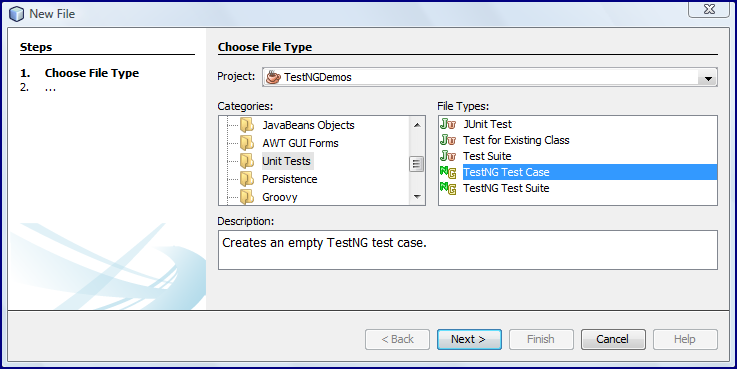

如上所示运行TestNG测试用例创建将导致以下生成的测试代码。
TestNGDemo.java(由NetBeans 7.2生成)
package dustin.examples;

import org.testng.annotations.AfterMethod;
import org.testng.annotations.AfterClass;
import org.testng.annotations.BeforeMethod;
import org.testng.annotations.BeforeClass;
import org.testng.annotations.Test;
import org.testng.Assert;

/**
 *
 * @author Dustin
 */
public class TestNGDemo
{
   public TestNGDemo()
   {
   }

   @BeforeClass
   public void setUpClass()
   {
   }

   @AfterClass
   public void tearDownClass()
   {
   }

   @BeforeMethod
   public void setUp()
   {
   }

   @AfterMethod
   public void tearDown()
   {
   }
   // TODO add test methods here.
   // The methods must be annotated with annotation @Test. For example:
   //
   // @Test
   // public void hello() {}
}
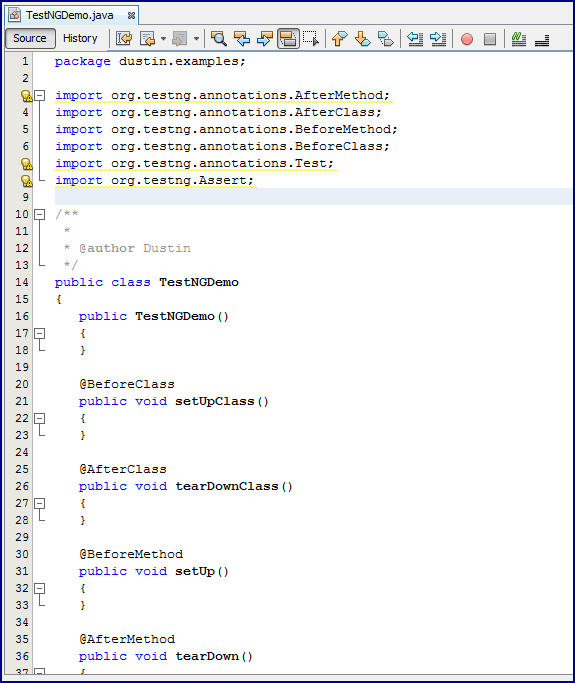
NetBeans 7.2生成的测试包含注释,这些注释指示如何添加和注释测试方法(类似于现代版本的JUnit)。 生成的代码还显示了一些注释,用于整体测试用例的设置和拆卸以及针对每次测试的设置和拆卸(注释与JUnit相似)。 NetBeans标识此时尚未使用的import语句( import org.testng.annotations.Test;和import org.testng.Assert; ),但是可能被使用,因此已包含在生成的代码中。
我可以轻松地将测试方法添加到此生成的测试用例中。 以下代码段是使用TestNG的测试方法。
testIntegerArithmeticMultiplyIntegers()
   @Test
   public void testIntegerArithmeticMultiplyIntegers()
   {
      final IntegerArithmetic instance = new IntegerArithmetic();
      final int[] integers = {4, 5, 6};
      final int expectedProduct = 2 * 3 * 4 * 5 * 6;
      final int product = instance.multiplyIntegers(2, 3, integers);
      assertEquals(product, expectedProduct);
   }
当然,这看起来与我在测试Intestger with JUnit and Hamcrest和JUnit的内置Hamcrest Core Matcher Support 改进assertEquals帖子中的插图时使用的IntegerArithmetic类所使用的JUnit类似。 以下屏幕快照显示了通过右键单击测试用例类并选择“运行文件”(Shift + F6),在NetBeans 7.2 beta中的输出。
接下来,将复制NetBeans 7.2 beta中提供的TestNG运行的文本输出。
[TestNG] Running:
  Command line suite

[VerboseTestNG] RUNNING: Suite: "Command line test" containing "1" Tests (config: null)
[VerboseTestNG] INVOKING CONFIGURATION: "Command line test" - @BeforeClass dustin.examples.TestNGDemo.setUpClass()
[VerboseTestNG] PASSED CONFIGURATION: "Command line test" - @BeforeClass dustin.examples.TestNGDemo.setUpClass() finished in 33 ms
[VerboseTestNG] INVOKING CONFIGURATION: "Command line test" - @BeforeMethod dustin.examples.TestNGDemo.setUp()
[VerboseTestNG] PASSED CONFIGURATION: "Command line test" - @BeforeMethod dustin.examples.TestNGDemo.setUp() finished in 2 ms
[VerboseTestNG] INVOKING: "Command line test" - dustin.examples.TestNGDemo.testIntegerArithmeticMultiplyIntegers()
[VerboseTestNG] PASSED: "Command line test" - dustin.examples.TestNGDemo.testIntegerArithmeticMultiplyIntegers() finished in 12 ms
[VerboseTestNG] INVOKING CONFIGURATION: "Command line test" - @AfterMethod dustin.examples.TestNGDemo.tearDown()
[VerboseTestNG] PASSED CONFIGURATION: "Command line test" - @AfterMethod dustin.examples.TestNGDemo.tearDown() finished in 1 ms
[VerboseTestNG] INVOKING CONFIGURATION: "Command line test" - @AfterClass dustin.examples.TestNGDemo.tearDownClass()
[VerboseTestNG] PASSED CONFIGURATION: "Command line test" - @AfterClass dustin.examples.TestNGDemo.tearDownClass() finished in 1 ms
[VerboseTestNG]
[VerboseTestNG] ===============================================
[VerboseTestNG]     Command line test
[VerboseTestNG]     Tests run: 1, Failures: 0, Skips: 0
[VerboseTestNG] ===============================================

===============================================
Command line suite
Total tests run: 1, Failures: 0, Skips: 0
===============================================

Deleting directory C:\Users\Dustin\AppData\Local\Temp\dustin.examples.TestNGDemo
test:
BUILD SUCCESSFUL (total time: 2 seconds)
上面的示例显示了开始使用TestNG是多么容易,特别是如果从JUnit迁移到TestNG并正在使用NetBeans 7.2 beta。 当然,还有更给TestNG的不是这个,而是学习一个新的框架通常是最困难的,在开始和NetBeans 7.2得到一个开了一个快速启动。
参考: NetBeans 7.2在Inspired by Actual Events博客中从JCG合作伙伴 Dustin Marx 引入了TestNG 。
翻译自: https://www.javacodegeeks.com/2012/06/netbeans-72-introduces-testng.html