zabbix rpm包下载地址:http://repo.zabbix.com/zabbix/
configure: error: Invalid OPENIPMI directory - unable to find ipmiif.h
需要安装libssh2-devel
configure: error: Invalid OPENIPMI directory - unable to find ipmiif.h
需要安装OpenIPMI-devel
[[email protected] ~]# sed -i '/^ServerActive/s/127.0.0.1/192.168.1.10/g' /usr/local/zabbix/etc/zabbix_agentd.conf
注:Zabbix安装完成后,切忌关掉guest,防止非法登录


配置好后,关闭安装:
修改前:

[[email protected] ~]# cd /usr/local/nginx/html/zabbix/include/
[[email protected] include]# head -n 281 menu.inc.php |tail -n 9
   array(
    'url' => 'report4.php',
    'label' => _('Notifications')
   ),
// array(
// 'url' => 'setup.php',
// 'label' => _('Installation'),
// 'sub_pages' => array('warning.php')
// )
[[email protected] include]#
修改后:


然后用telnet 192.168.1.10 10051,如果不通,看看zabbix.conf.php配置是否正确
[[email protected] conf]# pwd
/usr/local/nginx/html/zabbix/conf
[[email protected] conf]# vim zabbix.conf.php

查看Zabbix图形时出现乱码(替换字体[楷体]):

[[email protected] fonts]# pwd
/usr/local/nginx/html/zabbix/fonts
[[email protected] fonts]# ls
DejaVuSans.ttf  simkai.ttf
[[email protected] fonts]#
[[email protected] include]# pwd
/usr/local/nginx/html/zabbix/include
[[email protected] include]# sed -i '/ZBX_FONT_NAME/s/DejaVuSans/simkai/g' defines.inc.php
[[email protected] include]# sed -i '/ZBX_GRAPH_FONT_NAME/s/DejaVuSans/simkai/g' defines.inc.php


如果跳转到localhost,如下图:

我这里是用的NG,之前写的是localhost

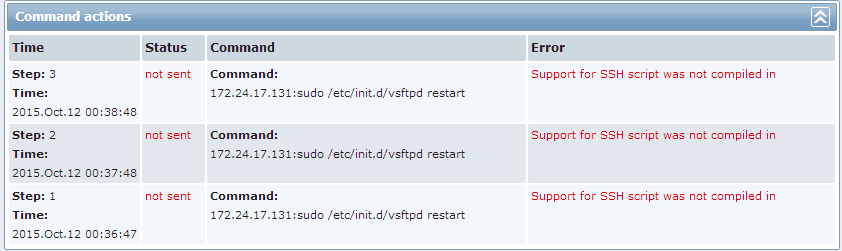
如果出现下面的问题,是编译时没有把SSH编译到zabbix里面

Zabbix的配置文件记录在数据库中;
[[email protected] ~]# mysql -uroot -predhat
mysql> use zabbix
mysql> show tables;
mysql> select name from actions;
+------------------------------------------+
| name                                     |
+------------------------------------------+
| Auto discovery. Linux servers.           |
| Report problems to Zabbix administrators |
| Report Network Traffic to zabbix admin   |
| Report ftp Server status                 |
+------------------------------------------+
4 rows in set (0.00 sec)
mysql>

转载于:https://blog.51cto.com/yfshare/1769101