Sendmail之安全
一、配置STARTTLS
1.产生颁发机构
[[email protected] ~]# cd /etc/pki/
[[email protected] pki]# vim tls/openssl.cnf

[[email protected] CA]# pwd
/etc/pki/CA
[[email protected] CA]# mkdir crl certs newcerts
[[email protected] CA]# touch index.txt serial
[[email protected] CA]# echo "01" >serial
[[email protected] CA]# openssl genrsa 1024 >private/cakey.pem
Generating RSA private key, 1024 bit long modulus
......................................++++++
.........................................................++++++
e is 65537 (0x10001)
[[email protected] CA]# chmod 600 private/*
[[email protected] CA]#
[[email protected] CA]# pwd
/etc/pki/CA
[[email protected] CA]# openssl req -new -x509 -key private/cakey.pem -out cacert.pem -days 3650

2.为Sendmail颁发证书
[[email protected] mail]# pwd
/etc/mail
[[email protected] mail]# mkdir certs
[[email protected] mail]# cd certs
[[email protected] certs]# openssl genrsa 1024 >Sendmail.key
Generating RSA private key, 1024 bit long modulus
....................++++++
........++++++
e is 65537 (0x10001)
[[email protected] certs]# openssl req -new -key Sendmail.key -out Sendmail.csr

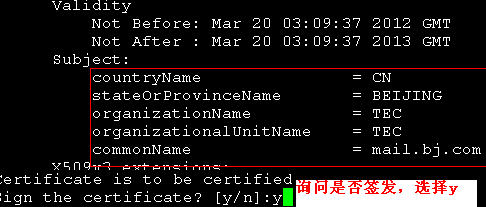
[[email protected] certs]# openssl ca -in Sendmail.csr -out Sendmail.cert
[[email protected] certs]# pwd
/etc/mail/certs
[[email protected] certs]# cp /etc/pki/CA/cacert.pem ./
[[email protected] certs]# chmod 600 *
[[email protected] certs]# cd ..
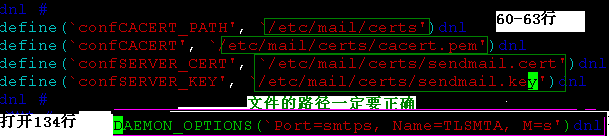
[[email protected] mail]# vim Sendmail.mc
3.Sendmail测试
[[email protected] mail]# telnet 127.0.0.1 25
Trying 127.0.0.1...
Connected to mail.bj.com (127.0.0.1).
Escape character is '^]'.
220 mail.bj.com ESMTP Sendmail 8.13.8/8.13.8; Tue, 20 Mar 2012 11:30:14 +0800
EHLO 127.0.0.1
250-mail.bj.com Hello mail.bj.com [127.0.0.1], pleased to meet you
250-ENHANCEDSTATUSCODES
250-PIPELINING
250-8BITMIME
250-SIZE
250-DSN
250-ETRN
250-STARTTLS 证明已经开启
250-DELIVERBY
250 HELP
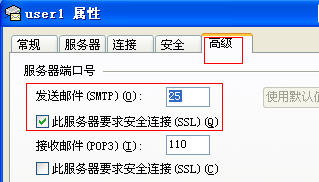
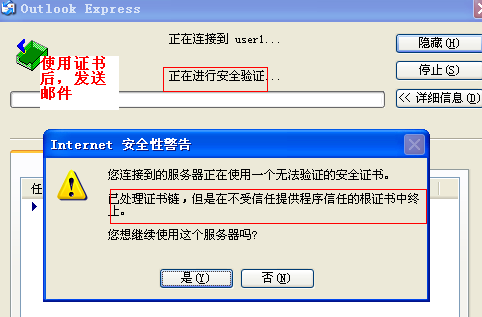
使用主机测试
4.为dovecot颁发证书
[[email protected] mail]# mkdir -pv /etc/dovecot/certs
mkdir: created directory `/etc/dovecot'
mkdir: created directory `/etc/dovecot/certs'
[[email protected] mail]# cd /etc/dovecot/certs/
[[email protected] certs]# openssl genrsa 1024 >dovecot.key
Generating RSA private key, 1024 bit long modulus
.......................................................................................++++++
........++++++
e is 65537 (0x10001)
[[email protected] certs]#
[[email protected] certs]# openssl req -new -key dovecot.key -out dovecot.csr
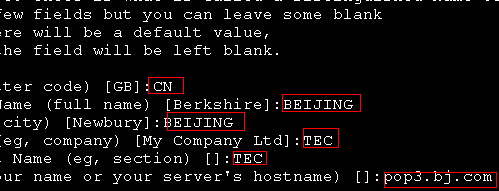
[[email protected] certs]# openssl ca -in dovecot.csr -out dovecot.cert

[[email protected] certs]# chmod 600 *
[[email protected] certs]# vim /etc/dovecot.conf
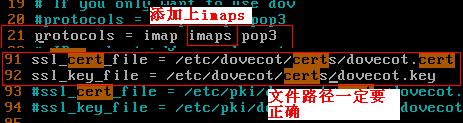
[[email protected] certs]# service dovecot restart
Stopping Dovecot Imap: [ OK ]
Starting Dovecot Imap: [ OK ]
[[email protected] certs]# netstat -tupln |grep dovecot
tcp 0 0 :::993 :::* LISTEN 3660/dovecot
tcp 0 0 :::110 :::* LISTEN 3660/dovecot
tcp 0 0 :::143 :::* LISTEN 3660/dovecot
[[email protected] certs]#
5.dovecot测试
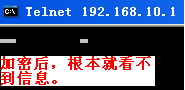
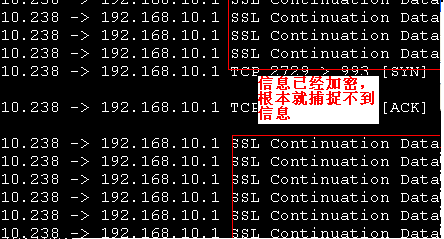
安装wireshark抓包工具
[[email protected] ~]# yum install wireshark.i386
[[email protected] ~]# tshark -ni eth0 -R "tcp.dstport eq 110"
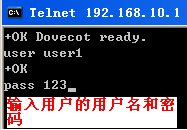
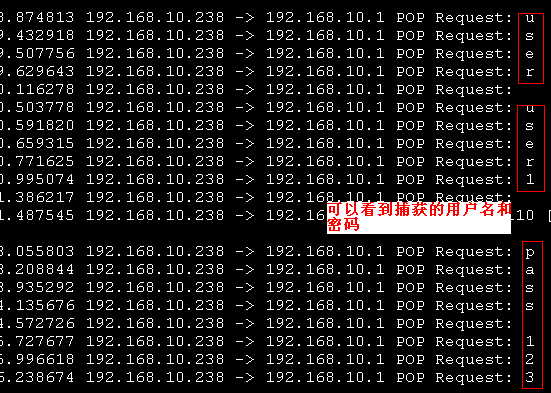
[[email protected] ~]# tshark -ni eth0 -R "tcp.dstport eq 993"
二、配置Sasl
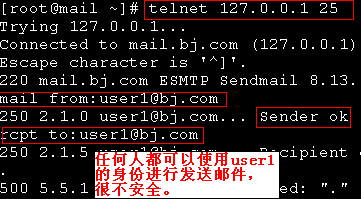
为了尽可能的提供更高的安全性,需要开启Sasl对用户进行验证。系统默认并不启用Sasl,这样就造成了任何人都可以以用户身份发送邮件。
1.查看安装Sasl相关组件
[[email protected] Server]# pwd
/mnt/cdrom/Server
[[email protected] Server]# rpm -qa|grep Sasl
cyrus-Sasl-lib-2.1.22-5.el5
cyrus-Sasl-2.1.22-5.el5
cyrus-Sasl-devel-2.1.22-5.el5
cyrus-Sasl-plain-2.1.22-5.el5
[[email protected] Server]#
[[email protected] ~]# service Saslauthd start
Starting Saslauthd: [ OK ]
[[email protected] ~]#
[[email protected] Server]# chkconfig --list|grep Sasl
Saslauthd 0:off 1:off 2:off 3:off 4:off 5:off 6:off
[[email protected] Server]# chkconfig Saslauthd on
[[email protected] Server]# chkconfig --list|grep Sasl
Saslauthd 0:off 1:off 2:on 3:on 4:on 5:on 6:off
[[email protected] Server]#
[[email protected] Server]# rpm -qc cyrus-Sasl
/etc/rc.d/init.d/Saslauthd
/etc/sysconfig/Saslauthd
[[email protected] Server]#
2.修改Sasl相关配置文件
[[email protected] ~]# cd /usr/lib/Sasl2/
[[email protected] Sasl2]# vim Sendmail.conf

[[email protected] Sasl2]# cd /etc/mail
[[email protected] mail]# pwd
/etc/mail
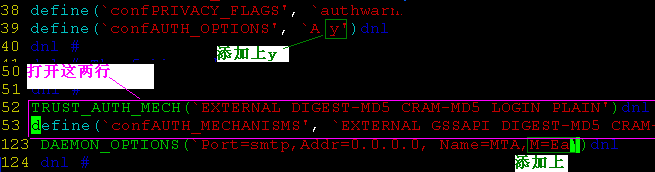
[[email protected] mail]# vim Sendmail.mc
[[email protected] mail]# service Sendmail restart
Shutting down sm-client: [ OK ]
Shutting down Sendmail: [ OK ]
Starting Sendmail: [ OK ]
Starting sm-client: [ OK ]
[[email protected] mail]#
3.帐号测试
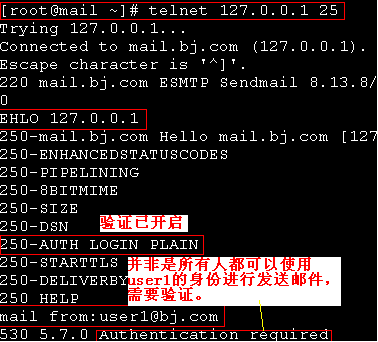
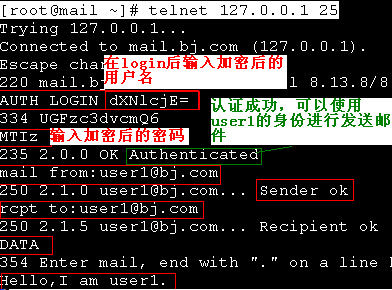
对用户的帐号进行编码
[[email protected] ~]# echo -n "user1"|openssl base64
dXNlcjE=
[[email protected] ~]# echo -n "123"|openssl base64
MTIz
[[email protected] ~]#
4.邮件测试
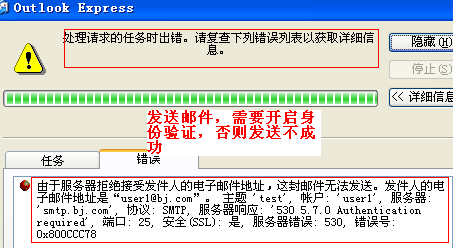
在不开启身份验证的情况下,发送邮件
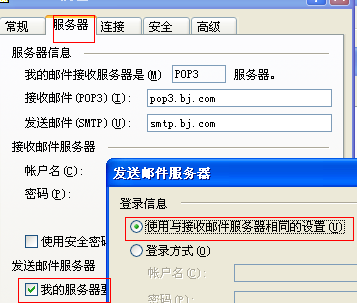
开启身份验证
转载于:https://blog.51cto.com/4476361/817589