cd /usr/share/ansible/plugins/callback
ansible1.7.2
ansible2 脚本完全不同,这个要注意
|
1
2
3
4
5
6
7
8
9
10
11
12
13
14
15
16
17
18
19
20
21
22
23
24
25
26
27
28
29
30
31
32
33
34
35
36
37
38
39
40
41
42
43
44
45
46
47
48
49
50
51
52
53
54
55
|
import os
import time
#import sqlite3#import redisimport json
dbname = '/tmp/setup.db'
TIME_FORMAT='%Y-%m-%d %H:%M:%S'
try:
con = sqlite3.connect(dbname)
cur = con.cursor()
except:
pass
def log(host, data):
pass
# if type(data) == dict:# invocation = data.pop('invocation', None)# if invocation.get('module_name', None) != 'setup':# return## facts = data.get('ansible_facts', None)## now = time.strftime(TIME_FORMAT, time.localtime())## try:# # `host` is a unique index# cur.execute("REPLACE INTO inventory (now, host, arch, dist, distvers, sys,kernel) VALUES(?,?,?,?,?,?,?);",# (# now,# facts.get('ansible_hostname', None),# facts.get('ansible_architecture', None),# facts.get('ansible_distribution', None),# facts.get('ansible_distribution_version', None),# facts.get('ansible_system', None),# facts.get('ansible_kernel', None)# ))# con.commit()# except:# pass#class CallbackModule(object):
def runner_on_ok(self, host, res):
#host=host=res._host.get_name()
#r = redis.Redis(host='127.0.0.1', port=6379, db=0)
#r.set(host,str(res))
f = open('/tmp/11','a')
f.write(str(host))
f.write(str(res))
f.close()
log(host, res)
def runner_on_failed(self, host, res, ignore_errors=False):
log(host, res)
|
或者换种方式 放入mongodb
http://ju.outofmemory.cn/entry/95213
|
1
|
mongodb 创建用户 |
http://www.cnblogs.com/valor-xh/p/6369432.html
http://www.blogjava.net/liufuxi/archive/2016/12/20/432147.html
|
1
|
感觉就是一个库,一个用户。然后如果你是root,那么什么都可以看,不是,就只能看这个库。合理。 |
|
1
|
mongodb-linux-x86_64-3.2.10.tgz setuptools-33.1.1.zip
|
然后ansible就出故障了
|
1
2
3
4
5
|
File "/usr/lib64/python2.6/site-packages/Crypto/Util/number.py", line 56, in <module>
if _fastmath is not None and not _fastmath.HAVE_DECL_MPZ_POWM_SEC:
AttributeError: 'module' object has no attribute 'HAVE_DECL_MPZ_POWM_SEC'
找到他,注释掉 |
|
1
|
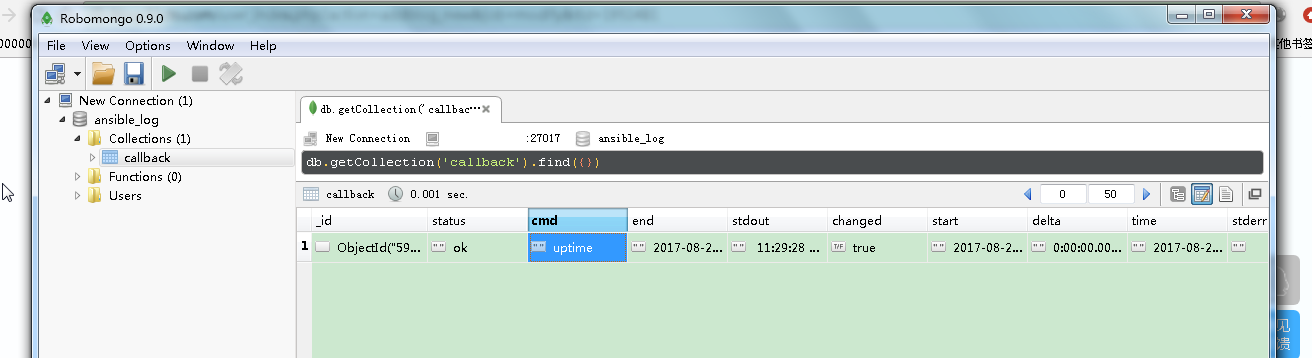
mongo客户端 robomongo-0.9.0-windows-x86_64-0786489
|
|
1
2
3
4
5
6
7
8
9
10
11
12
13
14
15
16
17
18
19
20
21
22
23
24
25
26
27
28
29
30
31
32
33
34
35
36
37
38
39
40
41
42
43
44
45
46
47
|
import os
import time
import json
import datetime
from pymongo import MongoClient
mongoinfo = {"host":"127.0.0.1","port":"27408","user":"root","password":"root","dbname":"ansible_log"}
dbname = '/tmp/setup.db'
TIME_FORMAT='%Y-%m-%d %H:%M:%S'
try:
con = sqlite3.connect(dbname)
cur = con.cursor()
except:
pass
def InsertDB(values):
global mongoinfo
dbhost = mongoinfo['host']
dbport = mongoinfo['port']
dbuser = mongoinfo['user']
dbpwd = mongoinfo['password']
dbname = mongoinfo['dbname']
client = MongoClient(uri)
db = client.ansible_log
db.callback.insert(values)
def log(host, data):
pass
class CallbackModule(object):
def runner_on_ok(self, host, res):
now = datetime.datetime.now()
result = res
result['time'] = now.strftime(TIME_FORMAT)
result['status'] = 'ok'
InsertDB(result)
def runner_on_failed(self, host, res, ignore_errors=False):
f = open('/tmp/12','a')
f.write(str(host))
f.write(str(res))
f.close()
log(host, res)
|
有两个问题
-
你指定 "port":"27408",没用
File "/usr/lib64/python2.6/site-packages/pymongo-3.5.0-py2.6-linux-x86_64.egg/pymongo/topology.py", line 189, in select_servers
self._error_message(selector))
ServerSelectionTimeoutError: 127.0.0.1:27017: [Errno 111] Connection refused
2.
/usr/share/ansible/plugins/callback/log_plays.py:33: DeprecationWarning: insert is deprecated. Use insert_one or insert_many instead.
db.callback.insert(values)
时间太久了,好多东西都变了
3.截个图
本文转自 liqius 51CTO博客,原文链接:http://blog.51cto.com/szgb17/1951481,如需转载请自行联系原作者