http://2678482.blog.51cto.com/2668482/1616826
Windows 7, X64 平台
比较烦琐的方式是,运行Qt*.exe 程序,提示缺少 *.dll, 将缺少的*.dll拷贝到目录中,感觉比较麻烦还容易出错!网上大半都是这样文档,想想 QT 应该有解决这此笨办法的工具(windeployqt),
-
Qt 5程序在Windows上的发布 将所有依赖的库整理好,放在目录中运行,打包! (缺点:存在多余的库)
-
使用 Process Explore / depends22_x64 等工具 获取所有的依赖库 (缺点:太麻烦了)
-
windeployqt 找出依赖,并自动拷贝到当前目录
通过 Qt "D:\Qt\Qt5.4.0\5.4\msvc2013_64\bin\windeployqt.exe" 命令找出依赖的库
windeployqt QtWebApp.exe
|
1
2
3
4
5
6
7
8
9
10
11
12
13
14
15
16
17
18
19
20
21
22
|
D:\qtcode\build-QtWebApp-Desktop_Qt_5_4_0_MSVC2013_64bit-Release\tmp\QtWebApp.exe 64 bit, release executableDirect dependencies: Qt5Core Qt5Network Qt5SqlAll dependencies : Qt5Core Qt5Network Qt5SqlTo be deployed : Qt5Core Qt5Network Qt5SqlWarning: Cannot find Visual Studio installation directory, VCINSTALLDIR is not s
et.Updating icuin53.dll.Updating icuuc53.dll.Updating icudt53.dll.Updating Qt5Core.dll.Updating Qt5Network.dll.Updating Qt5Sql.dll.Creating directory bearer.Updating qgenericbearer.dll.Updating qnativewifibearer.dll.Creating directory sqldrivers.Updating qsqlite.dll.Updating qsqlmysql.dll.Updating qsqloci.dll.Updating qsqlodbc.dll.Updating qsqlpsql.dll. |
所依赖的 Qt 库都会自动拷贝到当录下!
注意:
Warning: Cannot find Visual Studio installation directory, VCINSTALLDIR is not s
et
直接用 "VS2013 开发人员命令提示" 命令行去,执行刚才的 windeployqt QtWebApp.exe,会将 "vcredist_x64.exe"(vc x64 运行最少环境)程序放入当前目录。
建议:将所用到的库与开发环境的路径都放入 PATH 环境变量中设置好,这样使用 windeployqt 都能找到对应的 dll.当然使用对应的 工具的 "命令行工具" 也是可以的!
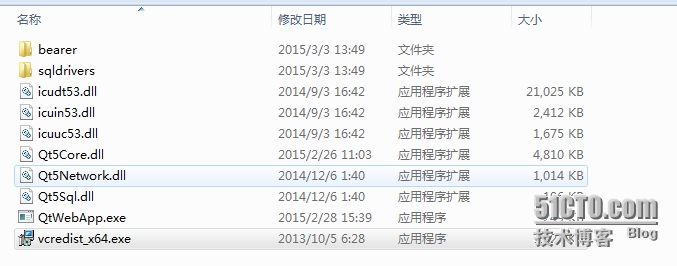
Qt绿色版的程序就这样生成完成!
软件打包(NSIS)
NSIS菜单 -- 编译器 -- VNISEdit(编译器环境)
图片如下


文件-- 新建脚本-向导 -- 下一步 -- 下一步到

授权文件就不折腾了!
下一步

选项中 "c:\path\to\file\AppMainExe.exe", c:\path\to\file\Example.file 都删除
接来下,点击上方的 "树型" 按钮

将“绿色版”的目录填入"选择的目录", 选中"包含子目录","单独添加每个文件" -- 确定 -- 下一步


完成,NSIS 自动编译,生成打包后的文件!
输出的信息:
|
1
2
3
4
5
6
7
8
9
10
11
12
13
14
15
16
17
|
已处理 1 个文件, 写入输出:添加插件初始化函数... 完成!处理页面... 完成!移除未用的资源... 完成!生成语言表...完成!生成卸载程序...完成!输出: "F:\Program Files\NSIS\xxxx\Setup.exe"
安装程序:4 个页面 (256 字节), 3 个区段 (需要 2) (3144 字节), 325 条指令 (9100 字节), 176 个字串 (2509 字节), 1 个语言表 (282 字节).卸载程序: 2 个页面 (128 字节), 1 个区段 (1048 字节), 69 条指令 (1932 字节), 93 个字串 (1561 字节), 1 个语言表 (226 字节).数据模块优化器储存了 14592 字节 (~0.0%).使用 lzma 压缩.EXE 头部大小: 46592 / 34816 字节安装代码: 2852 / 15667 字节安装数据: 15898195 / 40645353 字节卸载代码 + 数据: 9689 / 15249 字节CRC (0xD8BCB363): 4 / 4 字节总计大小: 15957332 / 40711089 字节 (39.1%) |