应该做点变化了,决定使用Maven来管理工程,并且在Java Web开发中使用Jetty来作为测试容器。
1.JavaWeb工程配置jetty-maven-plugin插件
|
1
2
3
4
5
6
7
8
|
<plugin>
<groupId>org.eclipse.jetty</groupId>
<artifactId>jetty-maven-plugin</artifactId>
<version>9.2.6.v20141205</version>
<configuration>
<scanIntervalSeconds>10</scanIntervalSeconds>
</configuration>
</plugin>
|
jetty的Maven插件由org.mortbay.jetty转到了org.eclipse.jetty。在使用最新的jetty-mavevn-plugin需要JRE1.7+,因此在使用的时候需要格外注意执行Maven命令所依赖的JRE版本。
执行mvn -version,就可以看到具体执行Maven命令时的JRE版本。
|
1
2
3
4
5
6
|
Apache Maven 3.1.0 (893ca28a1da9d5f51ac03827af98bb730128f9f2; 2013-06-28 10:15:32+0800)Maven home: D:\__dev\apache-maven-3.1.0Java version: 1.6.0_30, vendor: Sun Microsystems Inc.Java home: D:\__dev\Java\jdk1.6.0_30\jreDefault locale: zh_CN, platform encoding: GBKOS name: "windows 7", version: "6.1", arch: "x86", family: "windows" |
在如上的环境下执行mvn jetty:run命令时就会发现如下错误:
|
1
|
[ERROR] Failed to execute goal org.eclipse.jetty:jetty-maven-plugin:9.2.6.v20141205:run (default-cli) on project tiles: Execution default-cli of goal org.eclipse.jetty:jetty-maven-plugin:9.2.6.v20141205:run failed: Unable to load the mojo 'run' in the plugin 'org.eclipse.jetty:jetty-maven-plugin:9.2.6.v20141205' due to an API incompatibility: org.codehaus.plexus.component.repository.exception.ComponentLookupException: org/eclipse/jetty/maven/plugin/JettyRunMojo : Unsupported major.minor version 51.0 |
这个问题的产生就是我们执行mvn -version命令后看到的Java version并不是1.7+,这里可以在不改变系统的JAVA_HOME设置做个临时性的变动。在命令窗执行:set JAVA_HOME=java_jdk_1.7_的目录。
具体操作如下图所示(本机没有现成的JDK7这里使用了JDK8):

重新设置完成之后,执行jetty:run命令:

从上图标注可以看到Jetty Server启动成功。
这一段内容主要说明在使用jetty-maven-plugin是注意的执行Maven命令的JRE环境。
另外较低版本的jetty-maven-plugin有:
|
1
2
3
4
5
6
7
8
9
10
11
12
|
<plugin>
<groupId>org.mortbay.jetty</groupId>
<artifactId>jetty-maven-plugin</artifactId>
<version>7.1.6.v20100715</version>
<configuration>
<scanIntervalSeconds>1</scanIntervalSeconds>
<reload>automatic</reload>
<webAppConfig>
<contextPath>/tiles</contextPath>
</webAppConfig>
</configuration>
</plugin>
|
相关文档:
[org.eclipse.jetty].[jetty-maven-plugin].[9.x]:http://www.eclipse.org/jetty/documentation/current/jetty-maven-plugin.html
[org.mortbay.jetty].[jetty-maven-plugin].[old_version]:http://docs.codehaus.org/display/JETTY/Maven+Jetty+Plugin
建议使用最近发布的版本,关注jetty从http://eclipse.org/jetty/documentation开始。
2.基于Jetty可编程开发web应用
2.0. 添加依赖
|
1
2
3
4
5
6
7
8
9
10
11
|
<dependency>
<groupId>javax.servlet</groupId>
<artifactId>javax.servlet-api</artifactId>
<version>3.1.0</version>
<scope>provided</scope>
</dependency>
<dependency>
<groupId>org.eclipse.jetty.aggregate</groupId>
<artifactId>jetty-all</artifactId>
<version>7.6.9.v20130131</version>
</dependency>
|
如果在应用中使用到jsp的话需要添加jetty-jsp依赖,在jetty-all中并未聚合jetty-jsp模块。
2.1创建服务
|
1
2
3
4
5
6
7
8
9
10
11
12
13
14
15
16
17
18
19
20
21
22
23
24
25
26
27
28
29
30
31
32
33
34
35
36
37
38
39
40
41
42
43
44
45
46
47
48
49
50
51
52
53
54
55
56
57
58
59
60
61
|
package secondriver.embedded.jetty.app;
import org.eclipse.jetty.server.Handler;
import org.eclipse.jetty.server.Server;
import org.eclipse.jetty.server.handler.ContextHandler;
import org.eclipse.jetty.server.handler.ContextHandlerCollection;
import org.eclipse.jetty.server.handler.DefaultHandler;
import org.eclipse.jetty.server.handler.HandlerCollection;
import org.eclipse.jetty.server.nio.SelectChannelConnector;
import org.eclipse.jetty.util.thread.QueuedThreadPool;
import secondriver.embedded.jetty.app.servlet.DispatchHandler;
public class ProgrammableServer {
public static void main(String[] args) throws Exception {
// 创建Server
Server server = new Server();
// 添加ThreadPool
QueuedThreadPool queuedThreadPool = new QueuedThreadPool();
queuedThreadPool.setName("queuedTreadPool");
queuedThreadPool.setMinThreads(10);
queuedThreadPool.setMaxThreads(200);
server.setThreadPool(queuedThreadPool);
// 添加Connector
SelectChannelConnector connector = new SelectChannelConnector();
connector.setPort(8888);
connector.setAcceptors(4);
connector.setMaxBuffers(2048);
connector.setMaxIdleTime(10000);
server.addConnector(connector);
// 添加Handler
ContextHandlerCollection context = new ContextHandlerCollection();
ContextHandler contextHandler = context.addContext("/", "/");
contextHandler.setHandler(new DispatchHandler());
Handler defaults = new DefaultHandler();
HandlerCollection collection = new HandlerCollection();
collection.setHandlers(new Handler[] { context, defaults });
server.setHandler(collection);
// 启动服务
server.start();
while (server.isStarted()) {
System.out.println("server starting...");
break;
}
System.out.println("server stared...");
System.out.println("ContextHandlerCollectio.getServer() = "
+ context.getServer().hashCode());
System.out.println("Server:" + server.hashCode());
server.join();
}
} |
2.2.编写分发处理类DispatchHandler
|
1
2
3
4
5
6
7
8
9
10
11
12
13
14
15
16
17
18
19
20
21
22
23
24
25
26
27
|
package secondriver.embedded.jetty.app.servlet;
import java.io.IOException;
import javax.servlet.ServletException;
import javax.servlet.http.HttpServletRequest;
import javax.servlet.http.HttpServletResponse;
import org.eclipse.jetty.server.Request;
import org.eclipse.jetty.server.handler.AbstractHandler;
public class DispatchHandler extends AbstractHandler {
public void handle(String target, Request baseRequest,
HttpServletRequest request, HttpServletResponse response)
throws IOException, ServletException {
/**
* 这里将是根据不同的请求来分发给不同的Handler来处理
*/
if (target.equals("/index")) {
new IndexHandler().handle(target, baseRequest, request, response);
} else {
new HelloHandler().handle(target, baseRequest, request, response);
}
}
} |
2.3.编写相应的Handler(IndexHandler和HelloHandler)
|
1
2
3
4
5
6
7
8
9
10
11
12
13
14
15
16
17
|
public class IndexHandler extends AbstractHandler {
@Override
public void handle(String target, Request baseRequest,
HttpServletRequest request, HttpServletResponse response)
throws IOException, ServletException {
response.setCharacterEncoding("UTF-8");
response.setContentType("text/html;charset=UTF-8");
PrintWriter out = response.getWriter();
out.write("<h3>Hello World Jetty!</h3>");
out.write(Calendar.getInstance().getTime().toString());
out.flush();
out.close();
}
} |
|
1
2
3
4
5
6
7
8
9
10
11
12
13
|
public class HelloHandler extends AbstractHandler {
public void handle(String target, Request baseRequest,
HttpServletRequest request, HttpServletResponse response)
throws IOException, ServletException {
response.setContentType("text/html;charset=UTF-8");
PrintWriter out = response.getWriter();
out.write("<h3>This is a HelloHandler and contextPath is '/hello'.</h3>");
out.flush();
out.close();
}
} |
2.4.启动服务,通过浏览器访问:http://localhost:8888/index 和 http://localhost:8888/hello
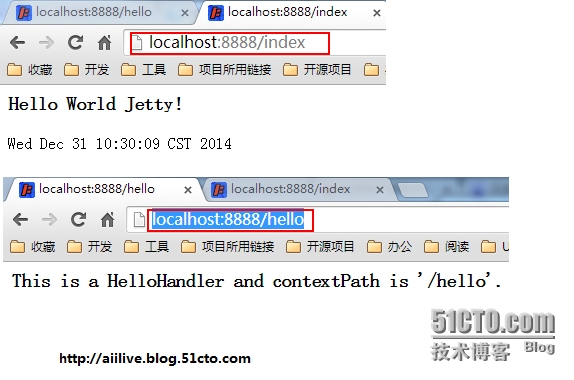
从通过可以看到访问响应的结果更加请求不同而被分发给不同的Handler来处理了。很多时候可不不这么使用,而是将Jetty作为嵌入式容器集成在应用中。
3.jetty作为嵌入式容器集成在应用中
本文转自 secondriver 51CTO博客,原文链接:http://blog.51cto.com/aiilive/1598025,如需转载请自行联系原作者