1. 概述
FAT32是Windows系统硬盘分区格式的一种,最大单文件大小为4GB。
FAT32由下面3个部分组成:
-
MBR: Master Boot Record, 512KB, 硬盘的物理0地址,以0x55aa结束分区;
-
FAT: File Allocation Table, 512*2KB, 32位的文件分配表,最大单文件大小为4GB,以0x55aa结束分区;
-
File and Directory Data:数据与目录区域。
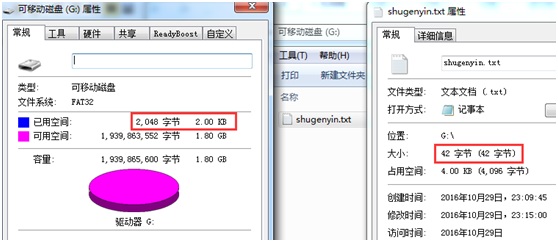
比如,一个42B的文件会占用2K=4个sector(512KB)。
2. FATFS源码介绍
FATFS是免费开源的FAT文件系统,特别适合小型嵌入式设备使用,FATFS支持FAT12/FAT16/FAT32。
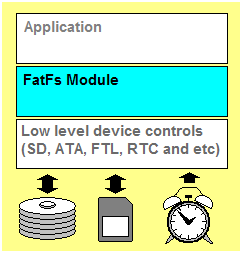
FATFS文件系统结构:
FATFS源码文件如下表:
|
文件名 |
功能 |
说明 |
|
ffconf.h |
FATFS模块配置文件 |
需要根据需求配置参数 |
|
ff.h |
FATFS和应用模块公用的头文件 |
不修改 |
|
ff.c |
FATFS模块源码 |
不修改 |
|
diskio.h |
FATFS和disk I/O模块公用的头文件 |
不修改 |
|
diskio.c |
FATFS和disk I/O模块接口层文件 |
与平台相关的代码,需要根据介质编写函数 |
|
integer.h |
数据类型定义 |
与编译器相关 |
|
option文件夹 |
可选的外部功能 |
比如要支持汉字需要修改 |
3. FATFS源码移植
FATFS移植的三个步骤
-
数据类型:在integer.h里面去定义好数据的类型
-
配置:通过ffconf.h配置FATFS的相关功能
-
函数编写:在diskio.c中进行底层驱动编写,一般需要编写5个函数disk_status, disk_initialize
disk_read, disk_write, disk_ioctl, get_fattime
在ffconf.h中,主要修改支持的函数齐全程度,支持的字体格式等。
|
1
2
3
4
5
6
7
8
9
10
11
12
13
14
15
16
17
18
19
20
21
22
23
|
#define _FS_MINIMIZE 0/* This option defines minimization level to remove some basic API functions.// 0: All basic functions are enabled./ 1: f_stat(), f_getfree(), f_unlink(), f_mkdir(), f_truncate() and f_rename()/ are removed./ 2: f_opendir(), f_readdir() and f_closedir() are removed in addition to 1./ 3: f_lseek() function is removed in addition to 2. */#define _CODE_PAGE 1/* This option specifies the OEM code page to be used on the target system./ Incorrect setting of the code page can cause a file open failure.// 1 - ASCII (No extended character. Non-LFN cfg. only)/ 437 - U.S./ 936 - Simplified Chinese (DBCS)*/#define _USE_LFN 0#define _MAX_LFN 255#define _LFN_UNICODE 0/* This option switches character encoding on the API. (0:ANSI/OEM or 1:UTF-16)/ To use Unicode string for the path name, enable LFN and set _LFN_UNICODE = 1./ This option also affects behavior of string I/O functions. */ |
在diskio.c中,修改对应的驱动程序(SPI底层驱动查看博文"NIOS2随笔——SD卡之SPI操作
"),修改好的代码如下:
|
1
2
3
4
5
6
7
8
9
10
11
12
13
14
15
16
17
18
19
20
21
22
23
24
25
26
27
28
29
30
31
32
33
34
35
36
37
38
39
40
41
42
43
44
45
46
47
48
49
50
51
52
53
54
55
56
57
58
59
60
61
62
63
64
65
66
67
68
69
70
71
72
73
74
75
76
77
78
79
80
81
82
83
84
85
86
87
88
89
90
91
92
93
94
95
96
97
98
99
100
101
102
103
104
105
106
107
108
109
110
|
//filename: diskio.c//author: shugen.yin//date: 2016.12.22//function: FATFS Lower layer API#include "diskio.h" /* FatFs lower layer API */#include "sd_spi.h" //初始化磁盘DSTATUS disk_initialize ( BYTE pdrv
){ u8 res=0;
res = SD_Initialize();//SD_Initialize()
if(res)return STA_NOINIT;
else return 0; //初始化成功
} //获得磁盘状态DSTATUS disk_status ( BYTE pdrv /* Physical drive nmuber (0..) */
){ return 0;
} DRESULT disk_read ( BYTE pdrv, /* Physical drive nmuber (0..) */
BYTE *buff, /* Data buffer to store read data */
DWORD sector, /* Sector address (LBA) */
UINT count /* Number of sectors to read (1..128) */
){ u8 res=0;
if (!count)return RES_PARERR;//count不能等于0,否则返回参数错误
res=SD_ReadDisk(buff,sector,count);
//处理返回值,将SPI_SD_driver.c的返回值转成ff.c的返回值
if(res==0x00)return RES_OK;
else return RES_ERROR;
}#if _USE_WRITEDRESULT disk_write ( BYTE pdrv, /* Physical drive nmuber (0..) */
const BYTE *buff, /* Data to be written */
DWORD sector, /* Sector address (LBA) */
UINT count /* Number of sectors to write (1..128) */
){ u8 res=0;
if (!count)return RES_PARERR;//count不能等于0,否则返回参数错误
res=SD_WriteDisk((u8*)buff,sector,count);
//处理返回值,将SPI_SD_driver.c的返回值转成ff.c的返回值
if(res == 0x00)return RES_OK;
else return RES_ERROR;
}#endif#if _USE_IOCTLDRESULT disk_ioctl ( BYTE pdrv, /* Physical drive nmuber (0..) */
BYTE cmd, /* Control code */
void *buff /* Buffer to send/receive control data */
){ DRESULT res;
switch(cmd)
{
case CTRL_SYNC:
SD_CS_SET;
if(SD_WaitReady()==0)res = RES_OK;
else res = RES_ERROR;
SD_CS_CLR;
break;
case GET_SECTOR_SIZE:
*(WORD*)buff = 512;
res = RES_OK;
break;
case GET_BLOCK_SIZE:
*(WORD*)buff = 8;
res = RES_OK;
break;
case GET_SECTOR_COUNT:
*(DWORD*)buff = SD_GetSectorCount();
res = RES_OK;
break;
default:
res = RES_PARERR;
break;
}
return res;
}#endifDWORD get_fattime (void)
{ return 0;
} //动态分配内存void *ff_memalloc (UINT size)
{ return (void*)size;
}//释放内存void ff_memfree (void* mf)
{} |
4. 搭建软硬件环境
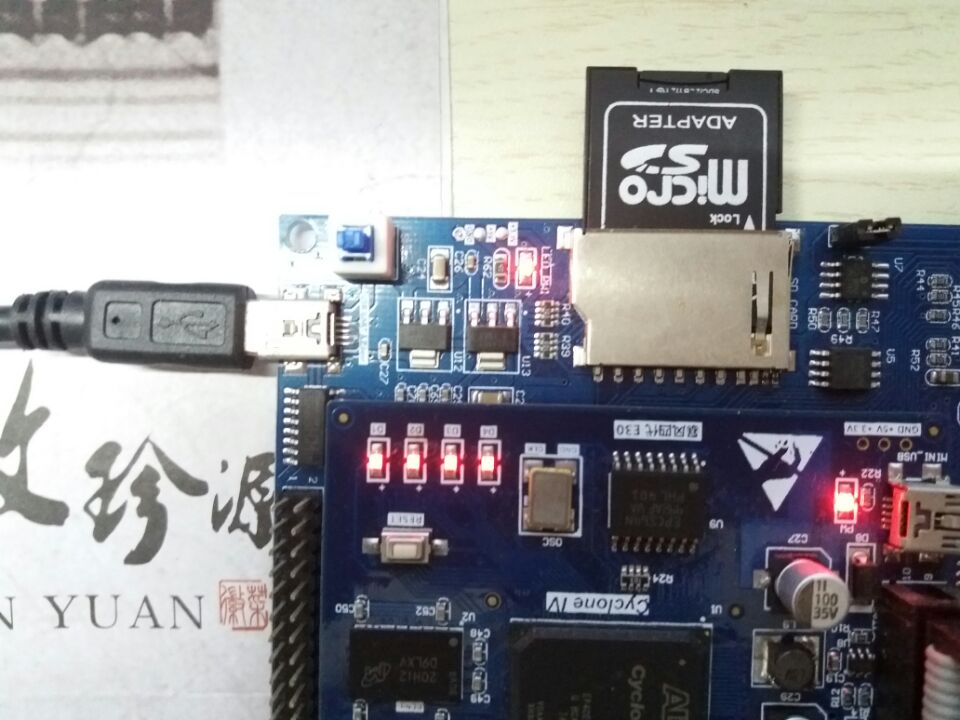
这里沿用博文"NIOS2随笔——SD卡之SPI操作"中的工程,将TF卡(2GB)借SD卡套插入SD卡卡座,如下图所示:
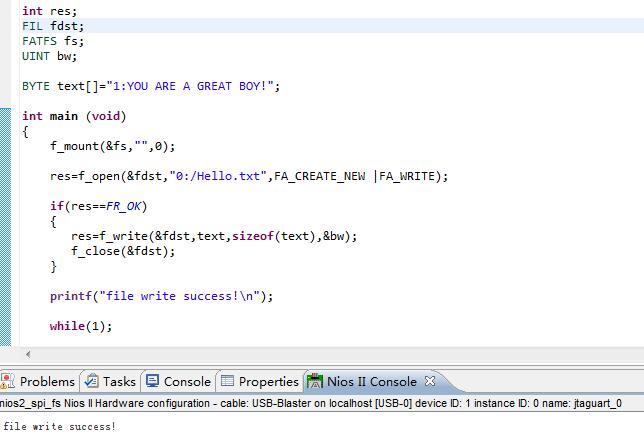
编写main函数,最终编译运行:终端显示file write成功
本文转自 shugenyin 51CTO博客,原文链接:http://blog.51cto.com/shugenyin/1885326