构建测试环境
Part1:创建测试数据库
|
1
2
3
4
5
6
7
8
9
10
11
12
13
14
15
16
17
18
19
20
21
22
23
24
25
26
27
28
29
30
31
32
33
34
35
36
37
38
39
40
|
[[email protected] ~]# mysql -uroot -pEnter password:
Welcome to the MySQL monitor. Commands end with ; or \g.
Your MySQL connection id is 5
Server version: 5.7.15-log MySQL Community Server (GPL)Copyright (c) 2000, 2016, Oracle and/or its affiliates. All rights reserved.
Oracle is a registered trademark of Oracle Corporation and/or its
affiliates. Other names may be trademarks of their respective
owners.Type 'help;' or '\h' for help. Type '\c' to clear the current input statement.
mysql> select version();
+------------+
| version() |+------------+
| 5.7.15-log |+------------+
1 row in set (0.00 sec)
Welcome to the MariaDB monitor. Commands end with ; or \g.
Your MariaDB connection id is 3
Server version: 10.1.16-MariaDB MariaDB ServerCopyright (c) 2000, 2016, Oracle, MariaDB Corporation Ab and others.
Type 'help;' or '\h' for help. Type '\c' to clear the current input statement.
MariaDB [helei]> select version();
+-----------------+
| version() |+-----------------+
| 10.1.16-MariaDB |+-----------------+
1 row in set (0.00 sec)
|
如何构建MySQL5.7测试环境和MariaDB10.1测试环境本文不做赘述,如有需要可移步:
一分钟完成MySQL5.7安装
http://suifu.blog.51cto.com/9167728/1855415
MariaDB10.1自动化部署
http://suifu.blog.51cto.com/9167728/1830575
Part2:构建测试表
|
1
2
3
4
5
6
7
8
9
10
11
|
CREATE TABLE helei (
id INT (10) UNSIGNED NOT NULL AUTO_INCREMENT,
c1 INT (10) NOT NULL DEFAULT '0',
c2 INT (10) UNSIGNED DEFAULT NULL,
c5 INT (10) UNSIGNED NOT NULL DEFAULT '0',
c3 TIMESTAMP NOT NULL DEFAULT CURRENT_TIMESTAMP ON UPDATE CURRENT_TIMESTAMP,
c4 VARCHAR (200) NOT NULL DEFAULT '',
PRIMARY KEY (id),
KEY idx_c1 (c1),
KEY idx_c2 (c2)
) ENGINE = INNODB; |
对比测试结果
Part1:MyriaDB10.1.16
|
1
2
3
4
5
6
7
|
MariaDB [helei]> explain select * from helei where (id,c1) in ((100,2684),(101,3566));
+------+-------------+-------+------+---------------+------+---------+------+------+-------------+
| id | select_type | table | type | possible_keys | key | key_len | ref | rows | Extra |
+------+-------------+-------+------+---------------+------+---------+------+------+-------------+
| 1 | SIMPLE | helei | ALL | NULL | NULL | NULL | NULL | 5198 | Using where |
+------+-------------+-------+------+---------------+------+---------+------+------+-------------+
1 row in set (0.00 sec)
|
可以看到,MariaDB对这条SQL总共扫描了5198行,且没有用到任何的索引。
Part2:MySQL5.7.15
|
1
2
3
4
5
6
7
|
mysql> explain select * from helei where (id,c1) in ((100,2684),(101,3566));
+----+-------------+-------+------------+-------+----------------+---------+---------+------+------+----------+-------------+
| id | select_type | table | partitions | type | possible_keys | key | key_len | ref | rows | filtered | Extra |
+----+-------------+-------+------------+-------+----------------+---------+---------+------+------+----------+-------------+
| 1 | SIMPLE | helei | NULL | range | PRIMARY,idx_c1 | PRIMARY | 4 | NULL | 2 | 20.00 | Using where |
+----+-------------+-------+------------+-------+----------------+---------+---------+------+------+----------+-------------+
1 row in set, 1 warning (0.29 sec)
|
可以看到,MySQL5.7版本已经用到了索引,一共扫描条数为2行。这是因为该语句已经被MySQL5.7的内部优化器改写为如下图所示:
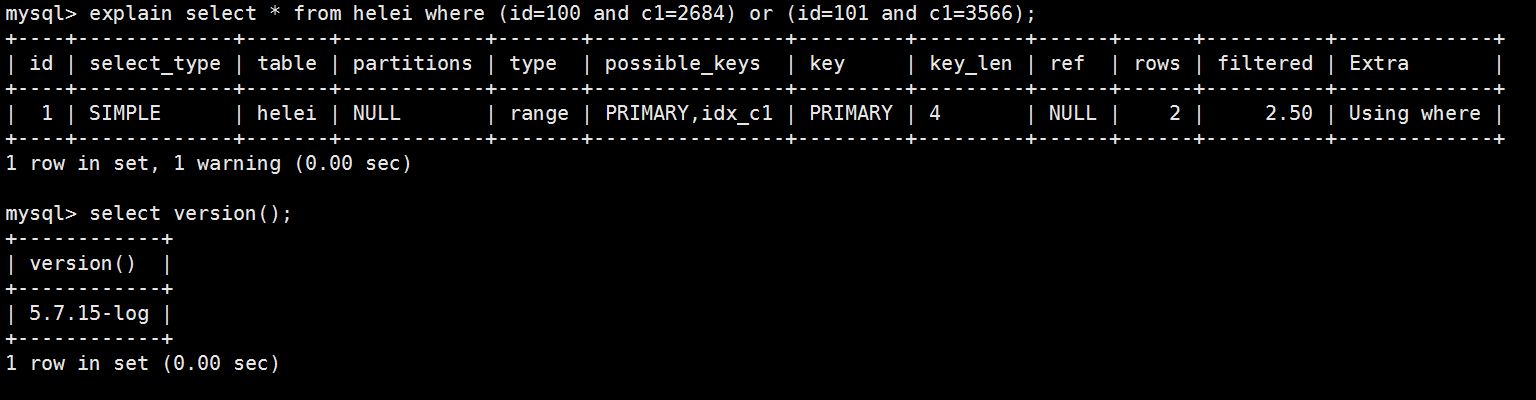
——总结——
可以看出,MariaDB版本内部优化器无法改写,因此对于这类查询只能全表扫描。经测试,MySQL5.6和MariaDB10.0/10.1都无法改写。由于笔者的水平有限,编写时间也很仓促,文中难免会出现一些错误或者不准确的地方,不妥之处恳请读者批评指正。
本文转自 dbapower 51CTO博客,原文链接:http://blog.51cto.com/suifu/1860216
,如需转载请自行联系原作者