前几天给大家介绍了docker的集群存储软件etcd的安装(地址http://dl528888.blog.51cto.com/2382721/1623746),今天就再给大家介绍集群的控制软件fleet安装。
fleet的介绍,info里复制的
|
1
|
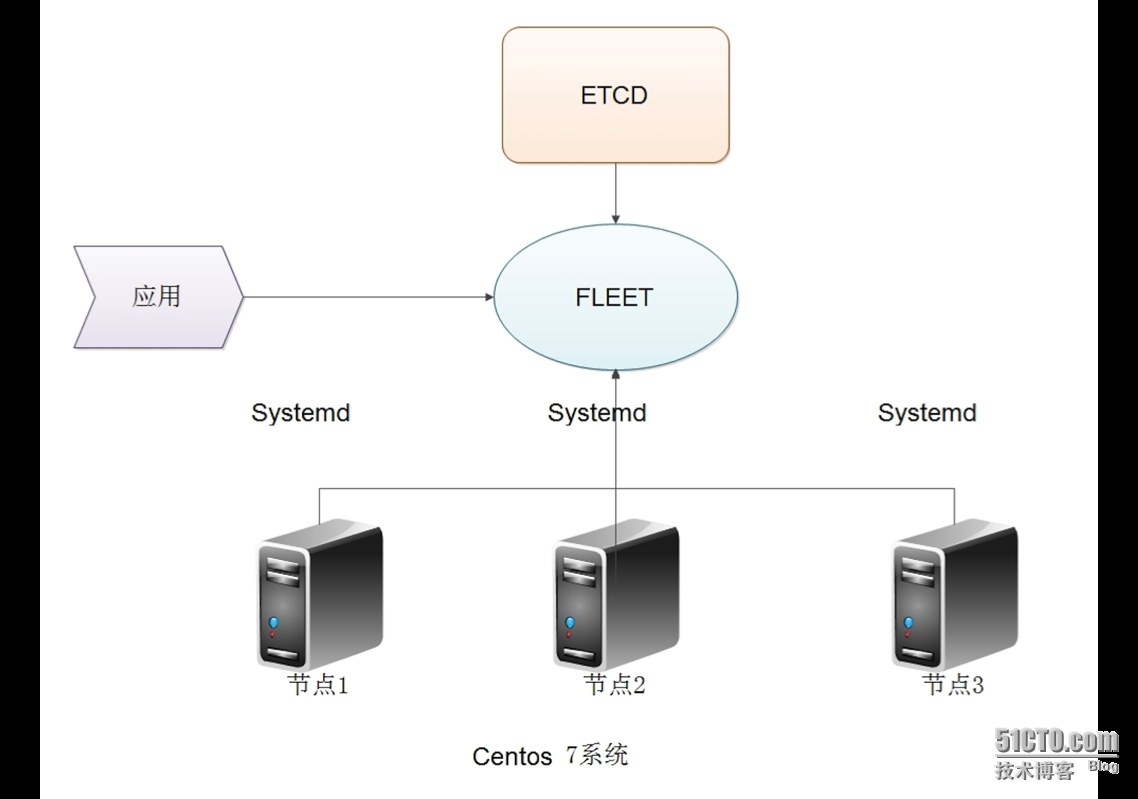
fleet 是一个通过 Systemd对CoreOS 集群中进行控制和管理的工具。fleet 与 Systemd 之间通过 D-Bus API 进行交互,每个 fleet agent 之间通过 etcd 服务来注册和同步数据。fleet 提供的功能非常丰富,包括查看集群中服务器的状态、启动或终止 Docker container、读取日志内容等。 |
简单来说,我搭建docker集群,使用etcd作为信息存储,fleet连接与控制所有节点服务器的systemd,然后通过想用的命令创建或者消灭节点里docker容器。
下面是我自己画的一个fleet的架构图
下面是安装
1、安装go
|
1
|
yum install go -y
|
2、下载fleet
|
1
2
|
cd /tmp/
git clone https://github.com/coreos/fleet.git
|
3、安装fleet
|
1
2
|
cd fleet
./build
|
4、负责可执行程序
|
1
2
|
cp bin/fleetd /usr/local/bin/
cp bin/fleetctl /usr/local/bin/
|
5、配置fleet
在某一个节点里编辑与配置/etc/fleet/fleet.conf
|
1
2
3
4
5
6
7
8
9
10
11
12
13
14
15
16
17
18
19
20
21
22
23
24
25
26
27
28
29
30
31
32
33
34
35
|
09:15:02 # cat /etc/fleet/fleet.conf
# This config file is INI-formatted# Lower the logging threshold. Acceptable values are 0, 1, and 2. A higher# value corresponds to a lower logging threshold.# verbosity=0# Provide a custom set of etcd endpoints. The default value is determined# by the underlying go-etcd library.#etcd_servers=["http://192.168.65.2:4001"]# Amount of time in seconds to allow a single etcd request before considering it failed.# etcd_request_timeout=1.0# Provide TLS configuration when SSL certificate authentication is enabled in etcd endpoints# etcd_cafile=/path/to/CAfile# etcd_keyfile=/path/to/keyfile# etcd_certfile=/path/to/certfile# IP address that should be published with any socket information. By default,# no IP address is published.public_ip="10.10.27.221"
# Comma-delimited key/value pairs that are published to the fleet registry.# This data can be referenced in unit files to affect scheduling descisions.# An example could look like: metadata="region=us-west,az=us-west-1"metadata="region=cn-core-02"
# An Agent will be considered dead if it exceeds this amount of time to# communicate with the Registry. The agent will attempt a heartbeat at half# of this value.# agent_ttl="30s"# Interval at which the engine should reconcile the cluster schedule in etcd.# engine_reconcile_interval=2 |
基本只需要修改public_ip与metadata
6、配置启动脚本
|
1
2
3
4
5
6
7
8
9
10
11
12
13
14
|
09:16:14 # cat /usr/lib/systemd/system/fleet.service;
[Unit]Description=FleetDocumentation=https://github.com/coreos/fleet
[Service]Type=simpleEnvironmentFile=-/etc/fleet/fleet.conf
ExecStart=/usr/local/bin/fleetd -config /etc/fleet/fleet.conf
ExecStop=/usr/bin/killall -9 fleetd
Restart=on-failureRestartSec=5s[Install]WantedBy=multi-user.target |
7、启动fleet
|
1
|
systemctl start fleet |
8、查看集群状态
我目前已经创建好了集群,并且有了4个节点
|
1
2
3
4
5
6
|
09:15:06 # fleetctl list-machines -l
MACHINE IP METADATA1a1b60030aaef2f1d8d0468f0000002d 10.10.21.199 region=cn-core-016d832c54a40fe752dba35d0b00000024 10.10.27.221 region=cn-core-02893b160e363b4ec7834719a7f06e67cf 10.10.17.3 region=cn-core-04cce83e1dd55b46f6a543b49a6b59586a 10.10.17.3 region=cn-core-03 |
其中machine是一个主机唯一的标示,ip是之前配置fleet.conf里的public_ip项,metadata是fleet.conf里metadata的。
目前已经建立好集群,请直接安装fleet前一定要先在每个节点安装etcd,否则fleet无法工作的,之后给大家整体介绍一个docker集群的真实案例。
本文转自 reinxu 51CTO博客,原文链接:http://blog.51cto.com/dl528888/1624481,如需转载请自行联系原作者