|
1
2
3
4
5
6
7
8
9
10
11
12
13
14
15
16
17
18
19
20
21
22
23
24
25
26
27
28
29
30
31
32
33
34
35
36
37
38
39
40
41
42
43
44
45
46
47
48
|
<!DOCTYPE HTML><html><head> <meta charset="UTF-8">
<link rel="stylesheet" href="dijit/themes/soria/soria.css">
<style type="text/css">
html,body{
height: 100%;
margin: 0;
overflow: hidden;
padding: 0;
}
#appLayout{
height: 100%;
}
#leftCol{
width: 120px;
}
.claro .demoLayout .edgePanel{
background-color: #d0e9fc;
}
</style>
<script type="text/javascript" src="dojo/dojo.js" djConfig="parseOnLoad:true"></script>
<script type="text/javascript">
</script>
<title>GridContainer学习</title>
</head><body class="soria">
<div class="demoLayout" style="height: 300px; width: 300px" data-dojo-type="dijit.layout.BorderContainer" data-dojo-props="design: 'headline'">
<div class="demoLayout" style="height: 50%" data-dojo-type="dijit.layout.BorderContainer" data-dojo-props="region: 'top', splitter: true, design: 'headline'">
<div class="centerPanel" data-dojo-type="dijit.layout.ContentPane" data-dojo-props="region: 'center'">center</div>
<div class="edgePanel" data-dojo-type="dijit.layout.ContentPane" data-dojo-props="region: 'bottom'">bottom</div>
</div>
<div class="centerPanel" data-dojo-type="dijit.layout.ContentPane" data-dojo-props="region: 'center'">center</div>
<div class="edgePanel" data-dojo-type="dijit.layout.ContentPane" data-dojo-props="splitter: true, region: 'left'">left</div>
<div class="demoLayout" style="width: 50%" data-dojo-type="dijit.layout.BorderContainer" data-dojo-props="region: 'right', design: 'headline'">
<div class="centerPanel" data-dojo-type="dijit.layout.ContentPane" data-dojo-props="region: 'center'">center</div>
<div class="edgePanel" data-dojo-type="dijit.layout.ContentPane" data-dojo-props="region: 'left'">left</div>
</div>
<div class="edgePanel" data-dojo-type="dijit.layout.ContentPane" data-dojo-props="splitter: true, region: 'bottom'">bottom</div>
</div><!-- load dojo and provide config via data attribute --><script src="dojo/dojo.js" data-dojo-config="async:true, parseOnLoad:true"></script>
<script> require(["dijit/layout/BorderContainer", "dijit/layout/ContentPane", "dojo/parser"]);
</script></body></html> |
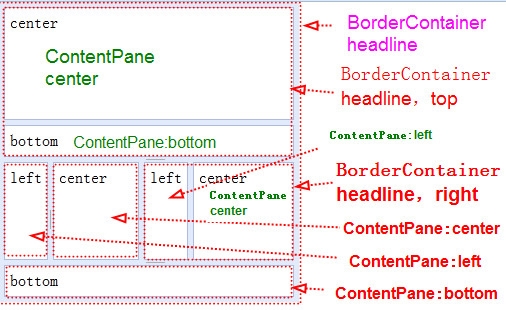
输出:
本文转自stock0991 51CTO博客,原文链接:http://blog.51cto.com/qing0991/1565113,如需转载请自行联系原作者