一、简述HA高可用集群
高可用集群就是当集群中的一个节点发生各种软硬件及人为故障时,集群中的其他节点能够自动接管故障节点的资源并向外提供服务。以实现减少业务中断时间,为用户提供更可靠,更高效的服务。
二、基于nfs实现mysql的高可用集群配置
环境准备接上文 heartbeat-gui部署
实验环境:
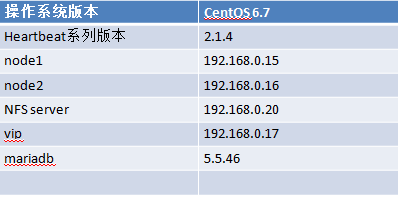
nfs server准备
|
1
2
3
4
5
6
7
8
9
10
11
12
13
14
15
16
17
18
19
20
21
22
23
24
25
26
27
28
29
30
31
32
33
34
35
36
37
38
39
40
41
42
43
44
45
46
47
48
49
50
51
52
53
54
55
56
57
58
59
60
61
62
63
64
65
66
67
68
69
70
71
72
73
74
75
76
77
78
79
80
81
82
83
84
85
86
87
88
89
90
91
92
93
94
|
1、在nfs server准备LVM存储空间[[email protected] ~]# fdisk /dev/sdb
Device contains neither a valid DOS partition table, nor Sun, SGI or OSF disklabelBuilding a new DOS disklabel with disk identifier 0x61284c6a.Changes will remain in memory only, until you decide to write them.
After that, of course, the previous content won't be recoverable.Warning: invalid flag 0x0000 of partition table 4 will be corrected by w(rite)WARNING: DOS-compatible mode is deprecated. It's strongly recommended to switch off the mode (command 'c') and change display units to
sectors (command 'u').
Command (m for help): n
Command action e extended
p primary partition (1-4)
pPartition number (1-4): 3First cylinder (1-1305, default 1): Using default value 1Last cylinder, +cylinders or +size{K,M,G} (1-1305, default 1305): +10GValue out of range.Last cylinder, +cylinders or +size{K,M,G} (1-1305, default 1305): +5G Command (m for help): t
Selected partition 3Hex code (type L to list codes): 8e
Changed system type of partition 3 to 8e (Linux LVM)
Command (m for help): w
The partition table has been altered!Calling ioctl() to re-read partition table.
Syncing disks.[[email protected] ~]# partx -a /dev/sdb
[[email protected] ~]# pvcreate /dev/sdb3
Physical volume "/dev/sdb3" successfully created
[[email protected] ~]# vgcreate myvg /dev/sdb3
Volume group "myvg" successfully created
[[email protected] ~]# lvcreate -L 5G -n mydata myvg
Logical volume "mydata" created.
[[email protected] ~]# mke2fs -t ext4 /dev/myvg/mydata
mke2fs 1.41.12 (17-May-2010)Filesystem label=OS type: Linux
Block size=4096 (log=2)Fragment size=4096 (log=2)Stride=0 blocks, Stripe width=0 blocks327680 inodes, 1310720 blocks65536 blocks (5.00%) reserved for the super user
First data block=0Maximum filesystem blocks=134217728040 block groups
32768 blocks per group, 32768 fragments per group8192 inodes per groupSuperblock backups stored on blocks: 32768, 98304, 163840, 229376, 294912, 819200, 884736
Writing inode tables: done Creating journal (32768 blocks): done
Writing superblocks and filesystem accounting information: done
This filesystem will be automatically checked every 36 mounts or180 days, whichever comes first. Use tune2fs -c or -i to override.2、开机自动挂载,并nfs导出[[email protected] ~]# mkdir /mydata
[[email protected] ~]# vim /etc/fstab
/dev/myvg/mydata /mydata ext4 defaults 0 0
[[email protected] ~]# mount -a
[[email protected] ~]# mount | grep /mydata
/dev/mapper/myvg-mydata on /mydata type ext4 (rw)
[[email protected] ~]# vim /etc/exports
/mydata 192.168.0.0/24(rw,no_root_squash)
#共享给192.168.0.0/24网段,可读可写,允许root用户登录便于初始化,配置结束可取消root用户登录3、导出nfs共享目录#创建mysql用户,指明uid,gid。各节点的mysql用户uid,gid一致。[[email protected] ~]# groupadd -r -g 306 mysql
[[email protected] ~]# useradd -r -g 306 -u 306 mysql
#创建共享目录,并修改属主属组。[[email protected] ~]# mkdir /mydata/data
[[email protected] ~]# chown -R mysql.mysql /mydata/data
#导出nfs共享目录[[email protected] ~]# exportfs -arv
exporting 192.168.0.0/24:/mydata
|
各节点准备mysql,并测试nfs。以下步骤,各节点一致。
node1配置
|
1
2
3
4
5
6
7
8
9
10
11
12
13
14
15
16
17
18
19
20
21
22
23
24
25
26
27
28
29
30
31
32
33
34
35
36
37
38
39
40
41
42
43
44
45
46
47
48
49
50
51
52
53
54
55
56
57
58
59
60
61
62
63
64
65
66
67
68
69
70
71
72
73
74
75
76
77
78
79
80
81
82
83
84
85
86
87
88
89
|
[[email protected] ~]# mkdir /mydata
[[email protected] ~]# showmount -e 192.168.0.20
Export list for 192.168.0.20:
/mydata 192.168.0.0/24
[[email protected] ~]# mount -t nfs 192.168.0.20:/mydata /mydata
[[email protected] ~]# mount | grep /mydata
192.168.0.20:/mydata on /mydata type nfs (rw,vers=4,addr=192.168.0.20,clientaddr=192.168.0.15)
[[email protected] ~]# groupadd -r -g 306 mysql
[[email protected] ~]# useradd -r -g 306 -u 306 mysql
#验证mysql用户是否拥有共享目录权限[[email protected] ~]# su - mysql
su: warning: cannot change directory to /home/mysql: No such file or directory
-bash-4.1$
-bash-4.1$
-bash-4.1$ cd /mydata/data
-bash-4.1$ touch node1.txt
-bash-4.1$ ls
node1.txt-bash-4.1$ rm node1.txt
-bash-4.1$ exit
logout#在nfs server端验证[[email protected] ~]# cd /mydata/data
[[email protected] data]# ll
total 0-rw-rw-r--. 1 mysql mysql 0 Nov 19 19:59 node2.txt#验证root用户对目录是否有权限[[email protected] ~]# touch /mydata/data/node.txt
[[email protected] ~]# ll /mydata/data
total 0-rw-r--r--. 1 root root 0 Nov 19 20:02 node.txt#安装mariadb[[email protected] ~]# tar xf mariadb-5.5.46-linux-x86_64.tar.gz -C /usr/local
[[email protected] ~]# cd /usr/local
`mysql' -> `mariadb-5.5.46-linux-x86_64'
[[email protected] mysql]# chown -R root.mysql ./*
#初始化mysql至nfs,此步骤只需一个节点操作即可,本文node1执行,那么node2就不需要执行#初始化操作后,可以将nfs server的共享选项中的no_root_squash移除了[[email protected] mysql]# ./scripts/mysql_install_db --datadir=/mydata/data/ --user=mysql
#nfs server验证[[email protected] data]# ls
aria_log.00000001 aria_log_control mysql performance_schema test
#为mysql节点准备配置文件[[email protected] mysql]# mkdir /etc/mysql
[[email protected] mysql]# cp support-files/my-large.cnf /etc/mysql/my.cnf
#编辑配置文件,加入以下三行[[email protected] mysql]# vim /etc/mysql/my.cnf
datadir = /mydata/data
innodb_file_per_table = onskip_name_resolve = on#为mysql节点准备服务脚本,并禁止mysqld开机自启[[email protected] mysql]# cp support-files/mysql.server /etc/rc.d/init.d/mysqld
[[email protected] mysql]# chkconfig --add mysqld
[[email protected] mysql]# chkconfig mysqld off
#启动mysql,创建mydb数据库[[email protected] mysql]# service mysqld start
[[email protected] mysql]# /usr/local/mysql/bin/mysql
Welcome to the MariaDB monitor. Commands end with ; or \g.Your MariaDB connection id is 3
Server version: 5.5.46-MariaDB-log MariaDB ServerCopyright (c) 2000, 2015, Oracle, MariaDB Corporation Ab and others.Type 'help;' or '\h' for help. Type '\c' to clear the current input statement.
MariaDB [(none)]> CREATE DATABASE mydb;Query OK, 1 row affected (0.03 sec)MariaDB [(none)]> exit
Bye[[email protected] mysql]# service mysqld stop
|
node2配置
|
1
2
3
4
5
6
7
8
9
10
11
12
13
14
15
16
17
18
19
20
21
22
23
24
25
26
27
28
29
30
31
32
33
34
35
36
37
38
39
40
41
42
43
44
45
46
47
48
49
50
51
52
53
54
55
56
57
|
[[email protected] ~]# tar xf mariadb-5.5.46-linux-x86_64.tar.gz -C /usr/local
[[email protected] ~]# cd /usr/local/
`mysql' -> `mariadb-5.5.46-linux-x86_64'
[[email protected] mysql]# chown root.mysql ./*
#将node1的mysql配置文件复制给node2[[email protected] mysql]# scp /etc/mysql/my.cnf node2:/etc/mysql/
#准备服务脚本,并禁止开机自启[[email protected] mysql]# cp support-files/mysql.server /etc/rc.d/init.d/mysqld
[[email protected] mysql]# chkconfig --add mysqld
[[email protected] mysql]# chkconfig mysqld off
#启动服务并查看共享数据库[[email protected] mysql]# service mysqld start
[[email protected] mysql]# /usr/local/mysql/bin/mysql
Welcome to the MariaDB monitor. Commands end with ; or \g.Your MariaDB connection id is 2
Server version: 5.5.46-MariaDB-log MariaDB ServerCopyright (c) 2000, 2015, Oracle, MariaDB Corporation Ab and others.Type 'help;' or '\h' for help. Type '\c' to clear the current input statement.
MariaDB [(none)]> SHOW DATABASES;+--------------------+| Database |+--------------------+| information_schema || mydb || mysql || performance_schema || test |
+--------------------+5 rows in set (0.02 sec)
MariaDB [(none)]> EXITBye#授权root用户远程访问mysql[[email protected] ~]# /usr/local/mysql/bin/mysql
Welcome to the MariaDB monitor. Commands end with ; or \g.Your MariaDB connection id is 3
Server version: 5.5.46-MariaDB-log MariaDB ServerCopyright (c) 2000, 2015, Oracle, MariaDB Corporation Ab and others.Type 'help;' or '\h' for help. Type '\c' to clear the current input statement.
MariaDB [(none)]> grant all on *.* to 'root'@'192.168.%.%' identified by '123456';
Query OK, 0 rows affected (0.06 sec)MariaDB [(none)]> flush privileges;Query OK, 0 rows affected (0.01 sec)[[email protected] mysql]# service mysqld stop
|
在node1和node2卸载共享目录
|
1
|
[[email protected] mysql]# umount /mydata
|
三、在heartbeat-gui界面配置
1、添加组资源,以及ip资源
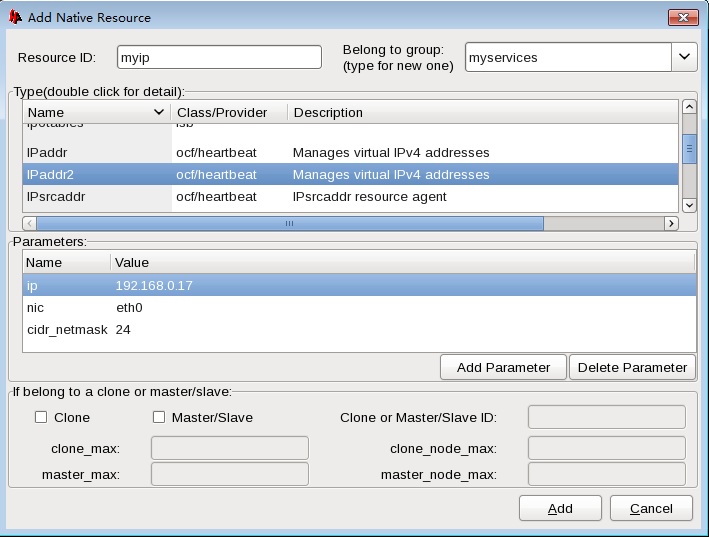
2、添加共享文件系统资源

3、添加mysql-server资源
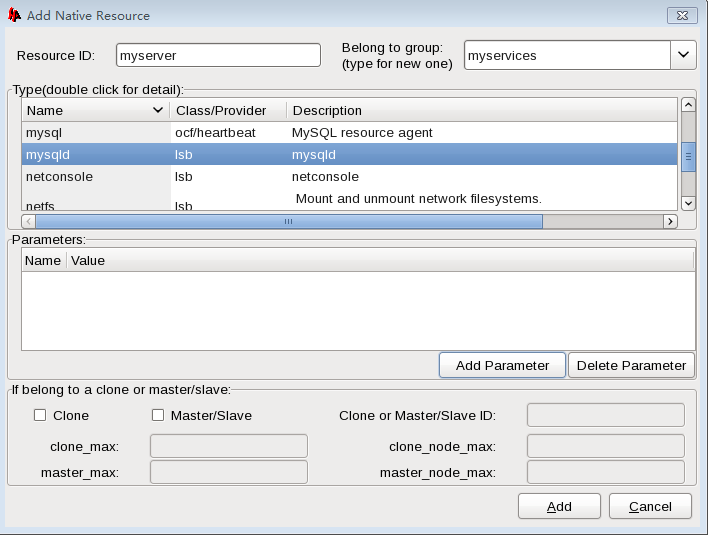
注意:定义的次序就是启动的次序。
本文转自 元婴期 51CTO博客,原文链接:http://blog.51cto.com/jiayimeng/1874668