sudo apt-get update
apt install postgresql
Do you want to continue? [Y/n] --填Y等待运行完成
vi /etc/postgresql/10/main/postgresql.conf (10.查看你postgresql下相应得文件夹)
修改 #listen_addresses=‘localhost’ 为 listen_addresses=’*’
修改 #password_encryption=on 为 password_encryption=on
修改端口号,避免和本地的pgsql的端口号冲突
vi /etc/postgresql/10/main/pg_hba.conf
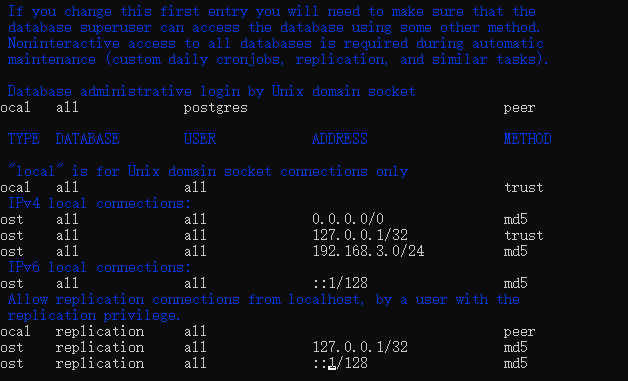
之后修改你的
ALTER USER postgres WITH PASSWORD ‘postgres’; 修改密码
启动pgsql
service postgresql start