Tengine部分特性
-
nginx -m 查看所有已经加载的模块,static说明已经安装的,shared说明是动态安装的;
-
nginx架构是模块化的,除了主模块,其他模块都需在安装时进行编译安装,也可在安装后进行编译安装;
-
tengine完全兼容nginx的配置;
-
tengine实现动态加载模块,不需重新编译,就可以实现安装新的模块。动态模块功能会被默认安装。而nginx不支持模块动态加载,需要编译重启;
-
首先下载tengine-2.2.0.tar.gz;下载链接:http://pan.baidu.com/s/1jI7cycm 密码:ig6x
-
#安装编译所需环境:
|
1
|
yum groupinstall "development Tools" "Server Platform Development" -y
|
-
#安装编译所需的扩展模块:
|
1
|
yum -y install zlib-devel pcre-devel openssl-devel
|
#注释
zlib-devel扩展模块:支持压缩
pcre-devel扩展模块:支持url重写,pool扩展
openssl-devel扩展模块:支持https协议
-
#查看编译所支持的模块(个别常用的):
|
1
2
3
4
5
6
7
8
9
10
11
|
[[email protected] tengine-2.2.0]# ./configure --help | less
--prefix=PATH set installation prefix #指定安装路径
--sbin-path=PATH set nginx binary pathname #nginx二进制启动脚本路径
--conf-path=PATH set nginx.conf pathname #conf配置文件路径
--error-log-path=PATH set error log pathname #错误日志路径
--pid-path=PATH set nginx.pid pathname #pid存放路径
--lock-path=PATH set nginx.lock pathname #锁文件存放路径
--without-http disable HTTP server #提供http服务,默认开启
--without-http-cache disable HTTP cache #提供http缓存服务,默认开启
--without-http_stub_status_module disable ngx_http_stub_status_module #ngixn自带的状态页面,默认关闭
--with-http_gzip_static_module enable ngx_http_gzip_static_module #压缩木块
|
-
编译安装tengine:
|
1
|
[[email protected] tengine-2.2.0]# ./configure --prefix=/usr/local/nginx --sbin-path=/usr/local/nginx/sbin/nginx --conf-path=/usr/local/nginx/conf/nginx.conf --error-log-path=/usr/local/nginx/log/error.log --http-log-path=/usr/local/nginx/log/access.log --pid-path=/usr/local/nginx/nginx.pid --lock-path=/usr/local/nginx/lock/nginx.lock --user=nginx --group=nginx --with-http_ssl_module --with-http_flv_module --with-http_stub_status_module --with-http_gzip_static_module
|
-
#开启4个进程编译安装:
|
1
|
[[email protected] tengine-2.2.0]# make -j 4 && make install
|
配置文件部分:
-
#修改nginx.conf文件中的http模块的配置,原有的文件可以mv做个备份。
|
1
2
3
4
5
6
7
8
9
10
11
12
13
14
15
16
17
18
19
20
21
22
23
24
25
26
27
28
|
vim nginx.confuser root;worker_processes 4;error_log /usr/local/nginx/log/error.log;
pid /usr/local/nginx/log/nginx.pid;
events { worker_connections 10240;
use epoll;
}http { include mime.types;
default_type application/octet-stream;
log_format main '$remote_addr - $remote_user [$time_local] $server_name "$request"'
'$status $body_bytes_sent "$http_referer" '
'"$http_user_agent" "$http_x_forwarded_for" "time:$request_time"';
access_log /usr/local/nginx/log/access.log main;
client_max_body_size 500m;
sendfile on;keepalive_timeout 300;gzip on;
gzip_disable "msie6";
gzip_proxied any;gzip_min_length 2048;gzip_comp_level 4;gzip_types text/plain application/x-javascript application/javascript text/javascript text/css application/xml application/json image/jpeg image/gif image/png;
include /usr/local/nginx/conf/conf.d/*.conf;
include conf.d/*.conf; #当然也可以改为相对路径
} |
-
#nginx启动脚本,拷贝nginx的或者网上复制一份启动脚本,自己修改下。如下
|
1
2
3
4
5
6
7
8
9
10
11
12
13
14
15
16
17
18
19
20
21
22
23
24
25
26
27
28
29
30
31
32
33
34
35
36
37
38
39
40
41
42
43
44
45
46
47
48
49
50
51
52
53
54
55
56
57
58
59
60
61
62
63
64
65
66
67
68
69
70
71
72
73
74
75
76
77
78
79
80
81
82
83
84
85
86
87
88
89
90
91
92
93
94
95
96
97
|
[[email protected] ~]# cat /etc/init.d/nginx
#!/bin/bash## nginx - this script starts and stops the nginx daemon## chkconfig: - 85 15# description: Nginx is an HTTP(S) server, HTTP(S) reverse# proxy and IMAP/POP3 proxy server# processname: nginx# config: /etc/nginx/nginx.conf# config: /etc/sysconfig/nginx# pidfile: /var/run/nginx.pid# Source function library.. /etc/rc.d/init.d/functions
# Source networking configuration.. /etc/sysconfig/network
# Check that networking is up.[ "$NETWORKING" = "no" ] && exit 0
TENGINE_HOME="/usr/local/nginx/"
nginx=$TENGINE_HOME"sbin/nginx"
prog=$(basename $nginx)
NGINX_CONF_FILE=$TENGINE_HOME"conf/nginx.conf"
[ -f /etc/sysconfig/nginx ] && /etc/sysconfig/nginx
lockfile=/usr/local/nginx/lock/nginx.lock
start() { [ -x $nginx ] || exit 5
[ -f $NGINX_CONF_FILE ] || exit 6
echo -n $"Starting $prog: "
daemon $nginx -c $NGINX_CONF_FILE
retval=$?
echo
[ $retval -eq 0 ] && touch $lockfile
return $retval
}stop() { echo -n $"Stopping $prog: "
killproc $prog -QUIT
retval=$?
echo
[ $retval -eq 0 ] && rm -f $lockfile
return $retval
killall -9 nginx
}restart() { configtest || return $?
stop
sleep 1
start
}reload() { configtest || return $?
echo -n $"Reloading $prog: "
killproc $nginx -HUP
RETVAL=$?
echo
}force_reload() { restart
}configtest() { $nginx -t -c $NGINX_CONF_FILE
}rh_status() { status $prog
}rh_status_q() { rh_status >/dev/null 2>&1
}case "$1" in
start) rh_status_q && exit 0
$1
;;stop) rh_status_q || exit 0
$1
;;restart|configtest) $1
;;reload) rh_status_q || exit 7
$1;;force-reload) force_reload
;;status) rh_status
;;condrestart|try-restart) rh_status_q || exit 0
;;*)echo $"Usage: $0 {start|stop|status|restart|condrestart|try-restart|reload|force-reload|configtest}"
exit 2
esac |
-
#提示锁目录文件不存在
|
1
2
3
|
[[email protected] ~]# service nginx start
正在启动 nginx: [确定]touch: 无法创建"/usr/local/nginx/lock/nginx.lock": 没有那个文件或目录
|
-
#创建锁目录,重新启动nginx
|
1
2
3
4
5
6
|
[[email protected] ~]# mkdir /usr/local/nginx/lock/
[[email protected] ~]# service nginx restart
nginx: the configuration file /usr/local/nginx/conf/nginx.conf syntax is ok
nginx: configuration file /usr/local/nginx/conf/nginx.conf test is successful
停止 nginx: [确定]正在启动 nginx: [确定] |
-
#创建一个静态web服务器:
|
1
2
3
4
5
6
7
8
9
10
11
12
13
14
15
16
17
18
19
20
21
22
23
24
25
|
[[email protected] conf.d]# cat static.conf
server { listen 80 default_server;
server_name _;
location /{
root /data/company/;
index index.html index.htm;
}
}server { listen 81 default_server;
server_name _;
location /{
root /data/www/;
index index.html index.htm;
}
}server { listen 82 default_server;
server_name _;
location /{
root /data/meng/;
index index.html index.htm;
}
} |
-
#创建静态资源目录:
|
1
|
mkdir /data/meng
|
-
#创建一个index.html页面。
|
1
2
|
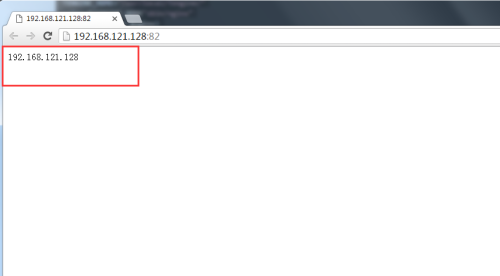
[[email protected] meng]# cat index.html
192.168.121.128 |
-
#通过浏览器访问:
本文转自青衫解衣 51CTO博客,原文链接:http://blog.51cto.com/215687833/1900510